Benjamin Vera Cruz

Flat vector illustration showing a business owner reviewing IT systems as costs decline, with warning indicators on screens and reduced resources, illustrating how problems emerge when an IT budget is too low and critical systems begin to feel pressure.

How to Know If Your IT Budget Is Too Low — and Where Underfunding Hurts First

Most leaders do not begin their day concerned that their IT budgets are too low.

At first glance, all appears to be in order: systems remain operational, support tickets are resolved, and there have not been any significant incidents prompting difficult discussions. When observed from a distance, it may seem that technology is effectively managed.

But under the surface, subtle cracks often start to form — and they almost always show up in the same places first.

Teams spend more time firefighting than improving. Security alerts linger longer than they should. Projects stall because no one has the time, tools, or breathing room to move them forward.

When that pattern emerges, it’s rarely about effort or competence. It’s a sign the IT budget is too low for the level of risk, complexity, and expectations the organization is carrying.

The challenge is that IT underfunding doesn’t announce itself clearly. It doesn’t show up as a single broken system or a line item that’s obviously wrong. It shows up operationally first — long before leadership labels it a budgeting problem.

Research shows that many organizations struggle to link IT spend directly to business outcomes and operational performance, meaning issues from inadequate budgeting often surface first in day-to-day operations rather than as a clear “budget problem.”

For example, only a small minority of businesses believe their IT budgets are fully optimized — with 95 % saying they are not fully optimized and many actively reviewing or cutting IT spending even as overall spend grows — suggesting that underfunding pressures are widespread and not immediately obvious until operational strains appear.

This article walks through how to recognize those early signals, where underfunding tends to hurt first, and how to prioritize fixes without turning IT budgeting into guesswork.

Why IT Underfunding Rarely Looks Like a Budget Problem

Most IT budgets are built backward.

They’re based on last year’s spend, last year’s incidents, and last year’s sense of urgency. If nothing catastrophic happened, the assumption is often that the budget was “about right.”

But the environment rarely stays still.

  • Security requirements increase quietly
  • Infrastructure ages
  • Compliance expectations expand
  • Workflows become more dependent on systems
  • Teams expect faster turnaround with fewer disruptions

When budgets stay flat while complexity grows, the gap doesn’t show up immediately. It shows up as friction.

Things still work — just not smoothly.
Issues get resolved — just not quickly.
Projects move forward — just not on schedule.

From a leadership perspective, that friction often gets misdiagnosed as execution problems, staffing issues, or growing pains. In reality, it’s frequently the first sign that the organization has outgrown its current IT funding level.

When budgets stay flat while complexity grows, the gap doesn’t show up immediately. It shows up as friction.

The First Places an IT Budget Falls Short

When an IT budget is too low, it doesn’t fail everywhere at once.

It fails where capacity and visibility matter most — the areas that quietly hold the entire operation together. These tend to fall into five categories:

  1. Operations
  2. Security
  3. Delivery and innovation
  4. End-user productivity
  5. Architecture and long-term health

The early symptoms are easy to normalize. Leaders adapt. Teams work around issues. Temporary fixes become permanent habits.

That’s why having a clear diagnostic lens matters.

Quick Diagnostic Checklist: Early Warning Signs

If several of these sound familiar, it’s a strong indicator that underfunding is already affecting operations.

Frequent outages or long time to repair

When systems fail more often — or take longer to recover — it usually signals underinvestment in infrastructure, monitoring, redundancy, or vendor support. The cost isn’t just downtime. It’s lost confidence and accumulated disruption.

Rising number of unresolved security alerts

Alerts that stay open, patches that slip, and security tasks that get deprioritized are classic signs of an underfunded security operation. This isn’t about negligence. It’s about insufficient tooling, staffing, or time.

Growing project backlog

When new initiatives keep getting pushed “to next quarter,” it often points to a capacity gap. Teams are fully consumed keeping things running, leaving no room for improvement, automation, or innovation.

Rising technical debt

Deferred upgrades and postponed maintenance feel harmless in the moment. Over time, they increase complexity, raise future costs, and make every change harder than it should be.

Individually, these issues seem manageable. Together, they paint a clear picture of an IT budget that’s stretched too thin.
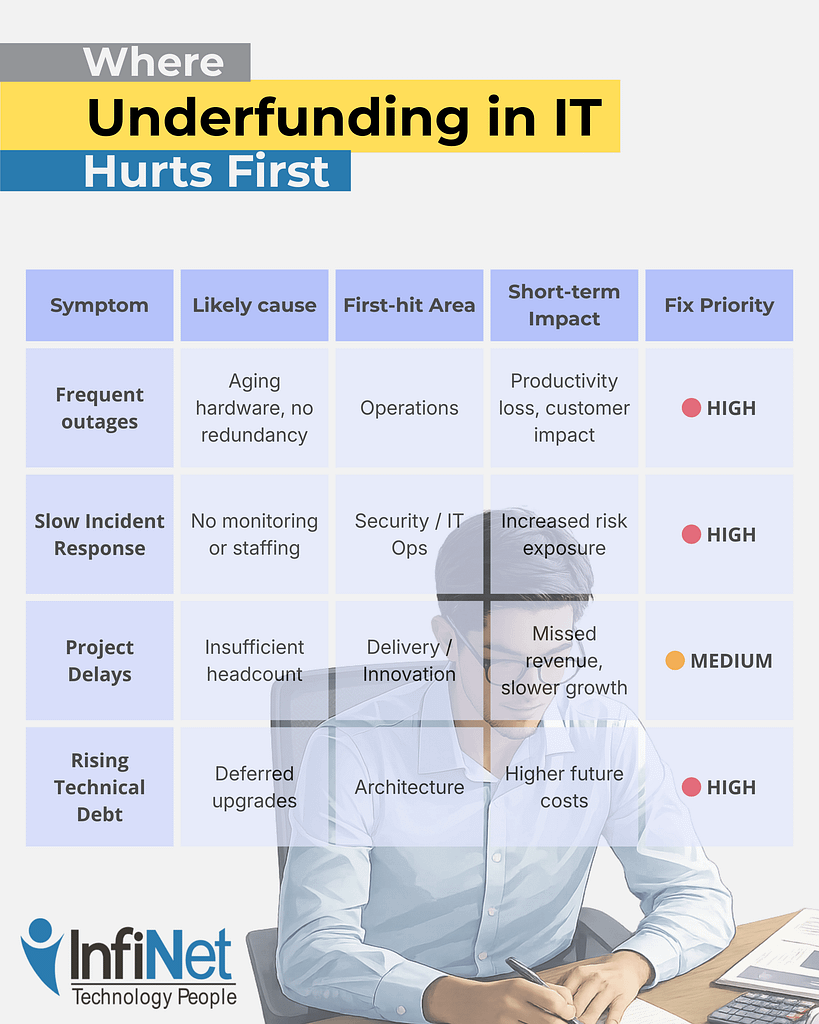
“Infographic showing where underfunding in IT hurts first, explaining common symptoms like outages, slow incident response, project delays, and rising technical debt, helping business leaders understand when an IT budget is too low and which areas are impacted first.”

Underfunding tends to hit the same areas first because they absorb risk on behalf of the rest of the business.

As you can see, patterns are important here.

Security and availability are usually affected first — not because they’re unimportant, but because they require continuous investment to remain invisible. When funding slips, these areas quietly absorb the damage until something breaks.

By the time leadership feels urgency, the organization is often already operating in a riskier, more fragile state than it realizes.

How to Measure Whether Your IT Budget Is Too Low

Good IT budgeting isn’t about comparing spend to industry averages. It’s about understanding whether the budget supports the organization’s actual operating reality.

A few practical signals help make that visible.

Track operational KPIs

Metrics like uptime, mean time to repair (MTTR), incident volume, backlog age, and patch timelines reveal capacity gaps long before costs explode. When these trend in the wrong direction, budget pressure is usually involved.

Monitor security signals

Pay attention to how many alerts remain open, how long remediation takes, and what percentage of systems fall behind on updates. Rising numbers indicate an underfunded security posture — even if no breach has occurred.

Survey stakeholders regularly

Quarterly check-ins with leadership and staff can surface productivity drag that metrics miss. Developer velocity, business satisfaction, and helpdesk NPS often decline before formal incidents rise.

Together, these signals provide a much clearer picture than budget totals alone.

Decision Guide: What to Fix First

When underfunding becomes visible, the instinct is often to spread money thinly across everything. That usually makes the problem worse.

A more effective approach is triage.

1. Stabilize security and availability

Gaps here create the largest short-term risk. Address monitoring, patching, alert ownership, and system resilience first.

2. Restore visibility

Without clear insight into what’s happening, teams operate reactively. Investing in observability and ownership often delivers outsized returns.

3. Add intentional capacity

This doesn’t always mean hiring. It can mean automation, better tooling, or clearly defined external ownership that creates breathing room.

4. Delay non-essential initiatives

Not every project deserves immediate funding. Stabilizing foundations should come before expansion.

The goal isn’t to spend more everywhere — it’s to spend intentionally where risk and friction are already accumulating.

The Trade-Offs Leaders Often Miss

Underfunding IT can feel like a conservative financial choice. In reality, it often increases long-term costs.

Illustration comparing a stable office workstation with a cluttered one, showing how hidden IT costs accumulate over time when budgets are underfunded.

Deferred maintenance becomes technical debt. Delayed security work increases exposure. Overloaded teams burn out, raising turnover risk. Incidents become more expensive the longer they’re ignored.

Short-term savings are real — but so are the downstream consequences. The most costly IT problems are rarely sudden. They’re usually the result of small compromises compounded over time.

Underfunding IT can feel like a conservative financial choice. In reality, it often increases long-term costs.

Frequently Asked Questions

1. How much should a company spend on IT?

There’s no universal number. The right spend depends on risk tolerance, regulatory exposure, system complexity, and growth goals — not just company size.

2. Is outsourcing cheaper than hiring internal IT staff?

Sometimes. Outsourcing can provide access to expertise and scale without full-time costs, but it still requires appropriate funding to be effective.

3. What’s the biggest risk of delaying IT investment?

Accumulated technical debt and reduced resilience. Problems become harder and more expensive to fix the longer they’re deferred.

4. How often should IT budgets be reviewed?

At least annually, with quarterly check-ins tied to operational and security metrics — not just spend tracking.

5. How do I justify IT spend to non-technical leadership?

Frame it around risk reduction, operational stability, and capacity — not tools or features.

A Clear Next Step

If you’re unsure whether your current IT budget is truly supporting the business — or quietly holding it back — clarity usually comes from examining how well operations, security, and delivery are actually holding up.

Understanding where friction lives today is often more valuable than debating numbers in isolation.

Flat-style digital illustration of an IT professional using a tablet in a calm, modern office. In the background, multiple workstations display structured system dashboards. Text reads: “Get in touch with our team.” InfiNet logo shown.

How to Know If Your IT Budget Is Too Low — and Where Underfunding Hurts First Read More »
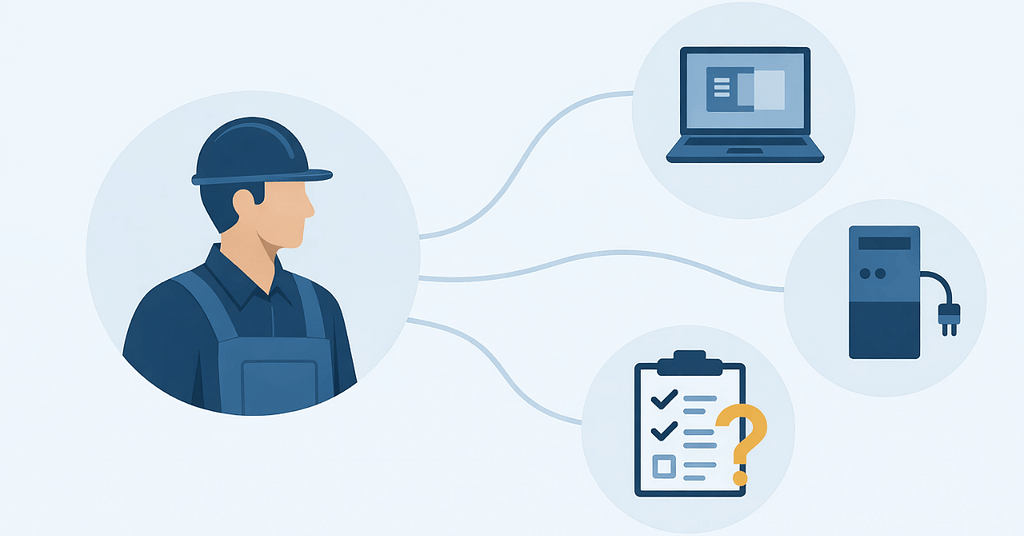
Semi-flat illustration of a skilled trades professional linked to computers, equipment, and checklists, highlighting IT challenges in skilled work related to system coordination and stability.

IT Challenges in Skilled Trades: Stability Isn’t Simple

Let’s face it — most field service days don’t start at a desk.

They start with trucks pulling out early, crews checking schedules on their phones, dispatch juggling updates, and someone in the office trusting that everything will stay in sync.

And most days, it does… until it doesn’t.

…a work order doesn’t update.

…a tablet won’t connect.

…photos don’t upload until the end of the day.

…someone calls in because “the system’s acting weird again.”

None of this feels catastrophic. It just feels — familiar.

That’s the reality behind many IT challenges in skilled trades. The systems aren’t completely broken — they’re just held together by workarounds, manual checks, and crossed fingers.

Stability in this kind of environment doesn’t happen by accident. It takes more work because the technology has to support people who are constantly moving, adapting, and working outside a controlled office setting.

Recent workforce research highlights that frontline and mobile teams are more productive and less stressed when they have reliable technology and training — underscoring the importance of stable systems that work how these crews need them to.

Why Field Service IT Breaks Differently Than Office-Based IT

At first glance, IT problems in skilled trade companies look like everyday tech issues. Devices glitch. Apps lag. Connections drop.

But the underlying issue is structural.

Most IT environments are designed around assumptions:

  • People work from fixed locations
  • Devices stay on desks
  • Connectivity is consistent
  • Users follow predictable routines

Field service work breaks every one of those assumptions.

Your teams move constantly. They rely on mobile devices. They work in places with uneven connectivity. And when something doesn’t work, there’s no IT desk down the hall.

That’s where IT challenges for mobile field teams start to compound — not because the technology is bad, but because it’s mismatched to the way the business operates.

The Hidden Cost of “It Usually Works”

Most field service leaders don’t wake up worried about IT.

What they worry about is:

  • Jobs taking longer than expected
  • Crews calling back to the office for help
  • Information not lining up between field and dispatch
  • Admin staff filling gaps manually

Here’s what often gets missed: those small issues aren’t isolated. They stack.

Every workaround becomes part of the workflow. Research shows that frequent technology disruptions — even those that don’t look like full outages — can translate into millions of dollars in lost productivity for mid- to large-sized organizations each year.

Every manual fix adds friction. And over time, your team stops expecting systems to work reliably — they just expect to compensate.

If your team needs workarounds to get through the day, IT isn’t stable — it’s tolerated.

This is one of the most underestimated IT challenges in skilled trades: the slow normalization of inefficiency.

Why Most IT Support Models Fall Short for Skilled Trade Teams

On paper, many skilled trade companies already have IT support.

They can call when something breaks. They can submit tickets. Someone eventually helps.

But reactive support alone doesn’t create stability — especially for mobile operations.

A calm, tech‑forward illustration representing IT challenges in skilled trades, showing a mobile field technician struggling with unreliable connectivity, a central operations dashboard highlighting gaps in stability, and a support desk handling reactive tickets. Supplemental system icons depict inconsistent device standards, unrealistic connectivity assumptions, misaligned workflows, and the lack of predictable, preventative IT processes.

Traditional support models tend to focus on:

  • Fixing individual issues
  • Closing tickets
  • Restoring service

What they don’t always address is:

  • Whether devices are standardized
  • Whether connectivity assumptions are realistic
  • Whether systems are aligned with real workflows
  • Whether problems are predictable — and preventable

That’s why skilled trade IT support often feels responsive but not reassuring.

Support that only reacts can’t create consistency for crews in skilled trades.

Where Instability Actually Shows Up Day to Day

In skilled trades, IT instability rarely announces itself as a crisis.

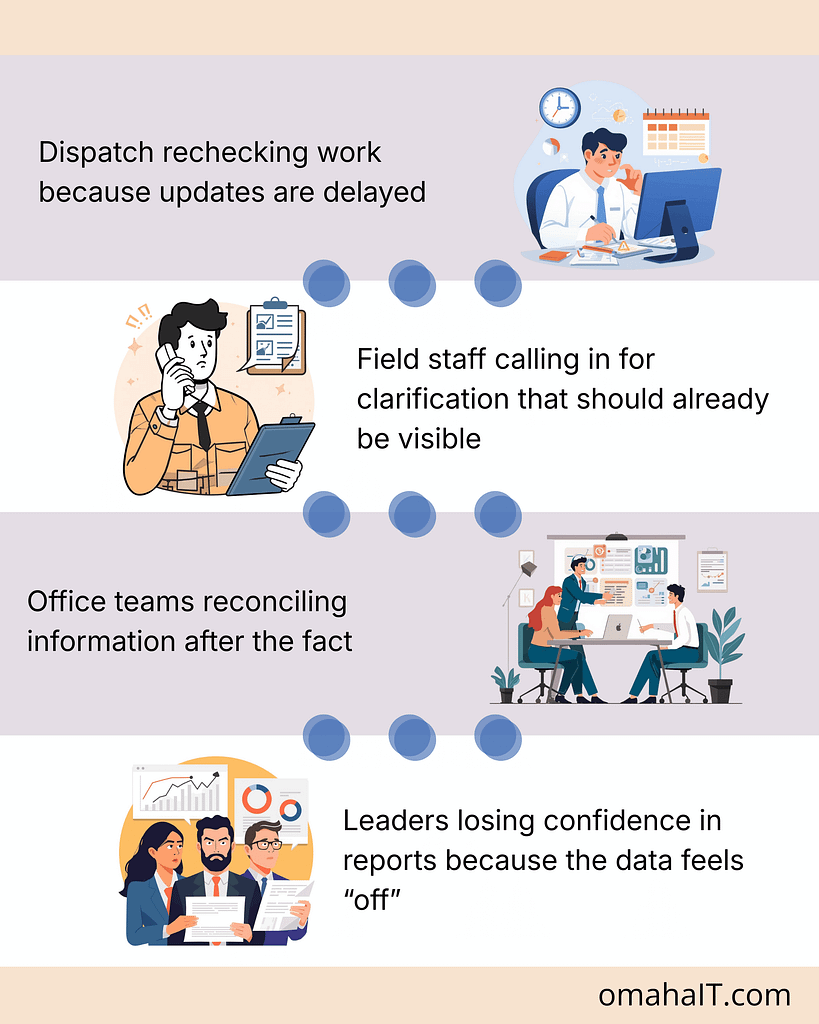
It shows up in smaller, operational ways:

Illustration showing day-to-day IT challenges in skilled trades, including delayed dispatch updates, field staff calling for clarification, office teams reconciling information after the fact, and leaders questioning data accuracy.

None of these are dramatic. But together, they erode trust in systems — and eventually, in decisions made from them.

What Stable IT Actually Looks Like in a Skilled Trade Business

This is where the conversation usually shifts.

Stable IT isn’t about having the newest tools or the most software. It’s about predictability.

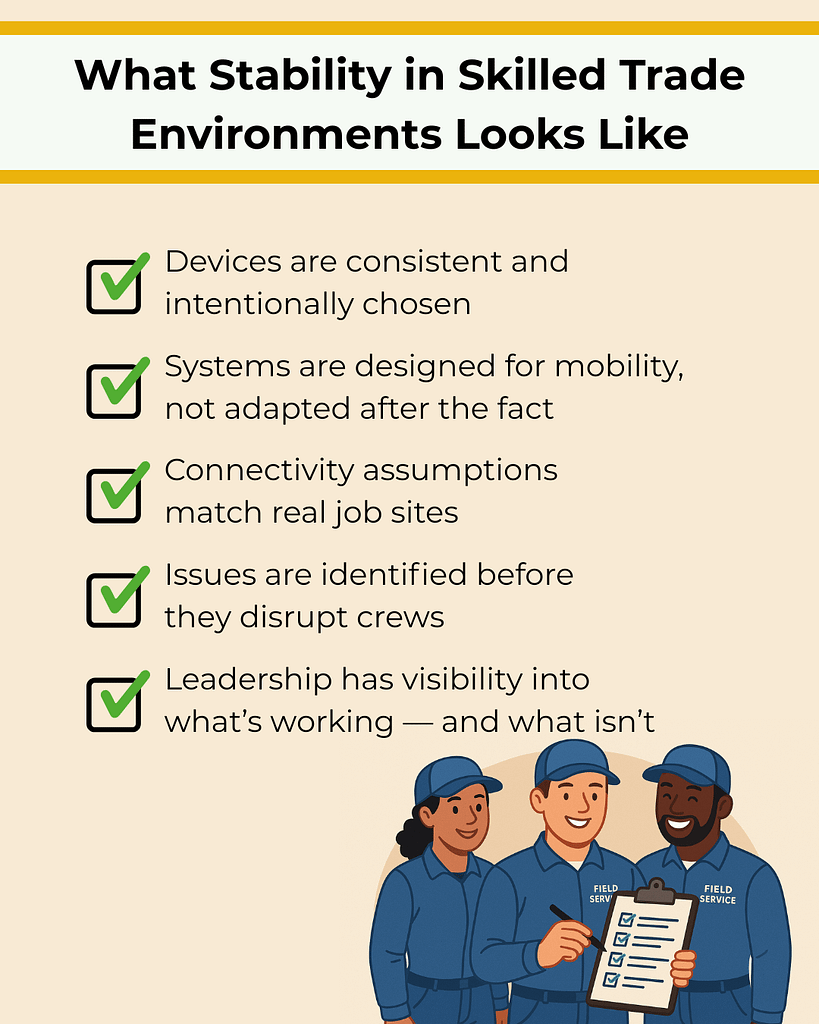
In a stable skilled trade environment:

Illustration showing a stable, well-managed work environment addressing IT challenges in skilled trades, with consistent devices, mobile-ready systems, reliable connectivity, proactive issue detection, and clear leadership visibility supporting field service crews.

Stability shows up as fewer interruptions, clearer handoffs, and teams spending less time compensating for technology.

Stable IT doesn’t draw attention to itself. It just lets work move.

Stability Is a Leadership Decision, Not a Technology Upgrade

One of the biggest misconceptions is that IT stability comes from adding or replacing tools.

In reality, it comes from:

  • Planning instead of reacting
  • Understanding how work actually flows
  • Making intentional decisions about systems and standards
  • Treating IT as operational infrastructure, not just support

This is where leadership involvement matters. Not to choose software — but to define what reliability should look like for the business.

How to Reduce IT Friction Without Disrupting Operations

Improving stability doesn’t require ripping everything out or slowing teams down.

It starts with clarity:

  • Where does instability show up most often?
  • Which systems crews rely on daily?
  • Where are people compensating manually?
  • What assumptions no longer match reality?

From there, progress becomes intentional rather than reactive.

This approach is how skilled trade organizations move from constant fixing to quiet reliability — without adding chaos in the process.

Start With Clarity, Not Another Tool

If IT feels unreliable, the first step isn’t adding more technology.

It’s understanding where instability actually lives — and why.

A clear view of your systems, workflows, and assumptions makes it easier to decide what to fix, what to standardize, and what to leave alone.

That’s how stability starts.

Flat-style illustration of a seated male professional using a digital tablet in an IT operations center. The background shows multiple system monitors and other staff at work. Branding includes the message “Get in touch with our team” and the InfiNet logo.

Frequently Asked Questions

1. What are the most common IT challenges in skilled trades?

The most common issues involve device reliability, inconsistent connectivity, data syncing between field and office, and systems that weren’t designed for mobile workflows.

2. Why does IT feel less reliable for mobile crews?

Because many IT environments are built around office-based assumptions. When teams work across trucks, job sites, and remote locations, those assumptions break down.

3. How is skilled trade IT support different from office IT?

Skilled trade IT support must account for mobility, inconsistent environments, and workflow timing — not just devices and software.

4. What causes mobile workforce IT issues to persist?

Lack of standardization, reactive support models, and limited visibility into how systems perform in real-world conditions.

5. How can skilled trade companies improve IT stability?

By aligning IT decisions with actual workflows, standardizing devices and systems, and focusing on prevention and visibility rather than just response.

IT Challenges in Skilled Trades: Stability Isn’t Simple Read More »

Flat illustration of a modern office workspace representing a healthy IT environment, with organized desks, calm system screens glowing softly green, and a quiet, structured setting that suggests stable, well-functioning technology.

What a Healthy IT Environment Looks Like for SMBs

Most businesses assume their IT is “fine” because nothing is broken.

People can log in. Files open. Work gets done.

But if you paused and asked, “How confident are we that our systems would hold up if something changed tomorrow?”—a security incident, a failed update, a sudden outage—the answer usually isn’t as clear.

That gap between working and healthy is where most IT problems live. Quietly. Until they don’t.

A healthy IT environment isn’t about perfection. It’s about knowing where you stand, what risks you’re carrying, and whether your systems are actually supporting how your business operates today.

What “Healthy IT” Feels Like Day to Day

When your IT environment is healthy, you don’t spend much time thinking about it.

Systems behave the way you expect them to.
Issues are caught early—or avoided altogether.
There’s less scrambling, fewer surprises, and more confidence in decisions.

That doesn’t happen by accident.

Healthy IT is usually the result of reliable infrastructure, proactive security, and repeatable operations working together—without unnecessary complexity.

Start With the Questions That Shape Everything

Before tools, vendors, or upgrades, IT health starts with clarity.

You should be able to answer questions like:

  • How many users and devices are we actually supporting?
  • Do we handle sensitive or regulated data?
  • How much downtime can we realistically tolerate?
  • If data was lost, how quickly would we need it back?
  • Are we relying on in-house knowledge—or outside help?

If these answers feel fuzzy, you’re not alone. Most environments grow reactively, shaped by immediate needs instead of long-term intent.

Healthy IT begins when those assumptions are made visible.

The Core Building Blocks of a Healthy IT Environment

Your Network: The Quiet Foundation

If your network is unstable, everything else feels fragile.

In healthy environments, networks are business-grade, segmented, and designed to limit the blast radius when something goes wrong. Guest Wi-Fi is separate. Critical systems aren’t exposed unnecessarily. As the business grows, redundancy becomes a priority—not an afterthought.

If outages or slowdowns regularly surprise you, your foundation likely needs attention.

Security That Goes Beyond “We Have Antivirus”

If security is only something you think about after an alert or scare, it’s probably too reactive.

Healthy environments layer protections: firewalls, endpoint security, multi-factor authentication, and regular updates. More importantly, they make security visible, so risks aren’t hidden behind assumptions like “we’ve never had an issue.”

Security health isn’t about fear—it’s about awareness.

Backups You Don’t Have to Hope Will Work

If you’ve never tested restoring your data, you don’t actually know how protected you are.

Healthy IT environments rely on automated backups that are checked, tested, and aligned with real recovery expectations. You know how much data you could lose—and how long recovery would take—before an incident forces the question.

Backups are only healthy when recovery is predictable.

Devices That Stay Updated Without Chasing Them

Manually updating systems works—until it doesn’t.

As businesses grow, healthy environments shift toward automated patching and centralized device management. Updates happen consistently. Gaps are visible. Exceptions are intentional, not accidental.

If updates feel random or last-minute, risk is quietly accumulating.

Monitoring That Spots Problems Before People Do

If your team is usually the first to notice something’s wrong, your systems are already behind.

Healthy IT environments rely on monitoring and alerts that surface issues early—performance drops, failed backups, security events—before they disrupt work.

Visibility is what turns IT from reactive support into a stable operational function.

How a Healthy IT Environment Grows with Your Business

As your business grows, the way you rely on technology changes.

Early on, short interruptions may be inconvenient but manageable. Over time, even a brief outage can slow work, frustrate customers, or delay billing and communication.

A healthier setup plans for those moments.

That often means:

  • Having a way for your team to stay online if your main internet goes down
  • Being able to notice unusual activity before it turns into an emergency
  • Managing updates and company devices from one place instead of chasing them individually
  • Knowing ahead of time who steps in and what happens when something stops working

None of this is about adding complexity. It’s about reducing surprises.

As operations become more dependent on technology, healthy IT makes sure small issues stay small—and don’t interrupt how your business runs.

The Operational Side Most Businesses Overlook

Tools don’t create health. Operations do.

Healthy IT environments have:

  • Clear inventories of systems and devices
  • Documented processes for changes and maintenance
  • Defined escalation paths when alerts occur
  • Fewer “tribal knowledge” dependencies

This is where IT stops being a collection of fixes and starts behaving like a system.

People, Policies, and Preparedness

Even the best systems depend on people.

Healthy environments include clear expectations for:

  • Acceptable use
  • Remote access
  • Security awareness
  • Incident response

Teams don’t need to be technical—they just need to know what to do when something doesn’t feel right.

Preparedness reduces panic. Clarity reduces mistakes.

The Trade-Offs That Matter

Every IT decision carries trade-offs.

Cutting corners on backups might save money—until it doesn’t.
Relying on one vendor simplifies management—but increases dependency.
Skipping monitoring feels fine—until issues go unnoticed too long.

Healthy IT doesn’t eliminate trade-offs. It makes them intentional and visible, so decisions aren’t rushed under pressure.

What It All Comes Down To

A healthy IT environment is one you can rely on.

You know what systems you have.
You know where the real risks are.
And you know what would happen if something went wrong.

If you have that level of clarity, your IT is doing its job.

If you don’t—and you’re relying on assumptions or hoping nothing breaks—that’s usually the first sign something needs attention.

Often, a short conversation is enough to confirm what’s working, identify gaps, and decide whether any changes actually make sense for your business.

Flat-style digital illustration of an IT professional using a tablet in a calm, modern office. In the background, multiple workstations display structured system dashboards. Text reads: “Get in touch with our team.” InfiNet logo shown.

Frequently Asked Questions

1. What is a healthy IT environment for a small business?
It’s an environment where systems are reliable, secure, backed up, and monitored—so IT supports operations without constant disruption.

2. How can I tell if my IT environment is unhealthy?
Frequent surprises, unclear backup status, reactive security, or reliance on users to spot issues are common warning signs.

3. Do small businesses need enterprise IT tools?
Not usually. Most benefit more from clarity, consistency, and visibility than from complex tools.

4. How often should backups be tested?
At least quarterly, or anytime systems or data change significantly.

5. Is managed IT required for a healthy environment?
Not always—but many businesses use managed services to gain visibility, security, and consistency they can’t support internally.

What a Healthy IT Environment Looks Like for SMBs Read More »

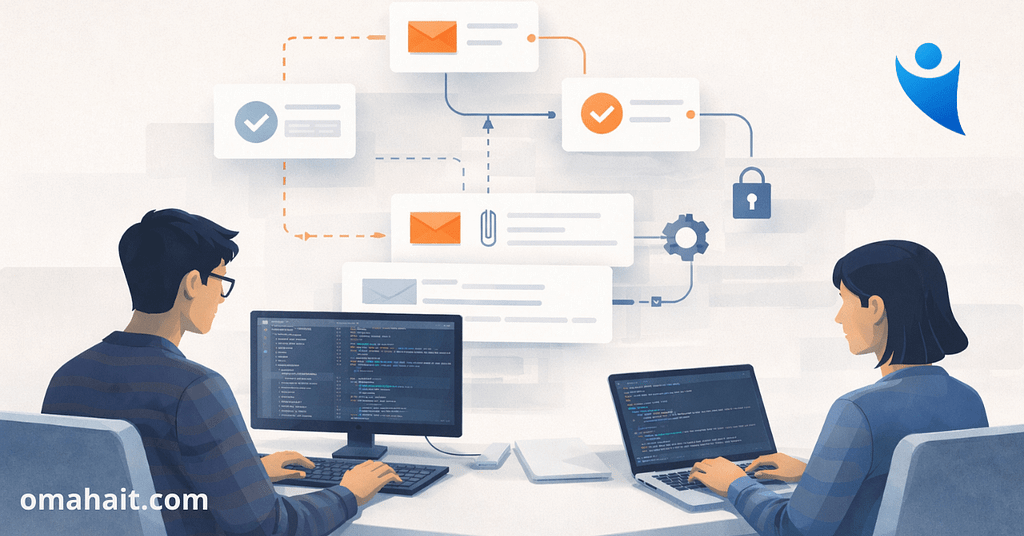
Illustration of two professionals working at computers with visual email workflows, security checks, and automation icons, representing how teams prevent email fraud in professional services.

Email Fraud in Professional Services: What Firms Miss

Email is where professional firms make real decisions.

Payments are approved. Client instructions are confirmed. Vendors are paid. Sensitive documents move forward.

Most of this happens quickly, informally, and without much friction — because that’s how professional services stay efficient and responsive.

That same efficiency is what makes email fraud in professional services so effective.

Not because firms are careless.
But because their workflows depend on trust, familiarity, and momentum.

Why email fraud works so well in professional firms

Professional services firms share operational traits that attackers deliberately look for.

Email drives authority, not just communication

In many firms, email isn’t a notification layer — it is the approval layer.

A short message from the right person can:

  • Trigger a wire transfer
  • Change payment details
  • Approve an invoice
  • Release confidential information

When email carries that level of authority, impersonation becomes powerful.

This is the foundation of business email compromise.

Trust is assumed — and rarely re-verified

Firms are built on long-standing internal and external relationships.

People recognize names, writing styles, and routines.
They’re used to requests that are brief, urgent, and informal.

Attackers don’t disrupt that pattern.
They imitate it.

That’s why fraudulent emails often feel normal — not suspicious.

Speed quietly overrides verification

Professional firms are under constant pressure to move quickly.

Clients expect responsiveness.
Leadership expects follow-through.
Staff are rewarded for keeping things moving.

Over time, verification steps get relaxed:

  • “I’ll confirm later.”
  • “This looks routine.”
  • “I don’t want to slow this down.”

Those small decisions accumulate into systemic exposure — a core issue in professional firm cybersecurity.

What business email compromise actually looks like

There’s no dramatic warning sign.

A message arrives that appears to come from a partner or executive.
The request fits the context of current work.
The language matches how that person usually communicates.

Nothing feels off enough to stop the process.

Funds move.
Details change.
And only afterward does the firm realize what happened.

This is why email fraud in professional services is so difficult to reverse — and so disruptive.

Why tools alone don’t solve the problem

Many firms assume that adding more security software equals better protection.

Technology matters — but it doesn’t define safety.

Email fraud succeeds because:

  • Authority isn’t clearly bounded
  • Exceptions aren’t formally governed
  • Verification depends on judgment, not structure

No tool can compensate for unclear decision ownership.

Protection requires intention, not accumulation.

The operational impact firms underestimate

Even near-misses leave a mark.

People hesitate before acting.
Leadership confidence erodes.
Processes become inconsistent.

The cost isn’t just financial — it’s operational trust.

That’s why email fraud in professional services should be addressed as a leadership and workflow issue, not a technical one.

What “protected” actually looks like in practice

Protected firms don’t rely on suspicion.
They rely on clarity.

Clear authority boundaries

Everyone knows:

  • Who can approve financial actions
  • Under what conditions
  • With what confirmation steps

No ambiguity. No guesswork. Simply aligning IT decisions with business operations.

Intentional verification, not friction

Verification steps are:

  • Standardized
  • Expected
  • Supported by leadership

They’re part of the workflow — not a disruption to it.

Visibility into real risk

Leadership understands:

  • Where high-risk email actions occur
  • How often exceptions are made
  • Which accounts carry the most exposure

Visibility turns assumptions into decisions.

Training that explains why

Staff aren’t trained to fear email — they’re trained to understand it.

They learn:

  • How fraud exploits routine
  • What decisions attackers target
  • Why certain steps exist

That understanding sustains good behavior over time.

Why leadership involvement changes everything

Email fraud doesn’t happen because someone made a bad call.
It happens because decision frameworks were unclear.

Leadership sets:

  • The tone for verification
  • The tolerance for exceptions
  • The balance between speed and protection

When leaders model clarity, the firm follows.

A better next step than adding another tool

If you’re unsure whether your firm is truly protected, start by gaining clarity.

Understand:

  • Where decisions live
  • How they’re verified
  • Where assumptions exist

That’s how firms reduce risk while maintaining confidence and momentum.

Flat-style illustration of a seated male professional using a digital tablet in an IT operations center. The background shows multiple system monitors and other staff at work. Branding includes the message “Get in touch with our team” and the InfiNet logo.

Frequently Asked Questions

1. What is email fraud in professional services?

Email fraud in professional services involves impersonation or manipulation through email to trigger unauthorized payments, data sharing, or workflow changes.

2. How is business email compromise different from phishing?

Business email compromise is targeted, contextual, and often uses real names and workflows. Phishing is typically broader and easier to spot.

3. Can email security tools prevent this?

They help, but they don’t address unclear authority or informal approval habits — where most risk lives.

4. Why are professional firms targeted so often?

Because email drives real decisions, trust is high, and speed is prioritized.

5. Is this an IT issue or a leadership issue?

Both — but leadership defines the decision framework that technology supports.

Email Fraud in Professional Services: What Firms Miss Read More »

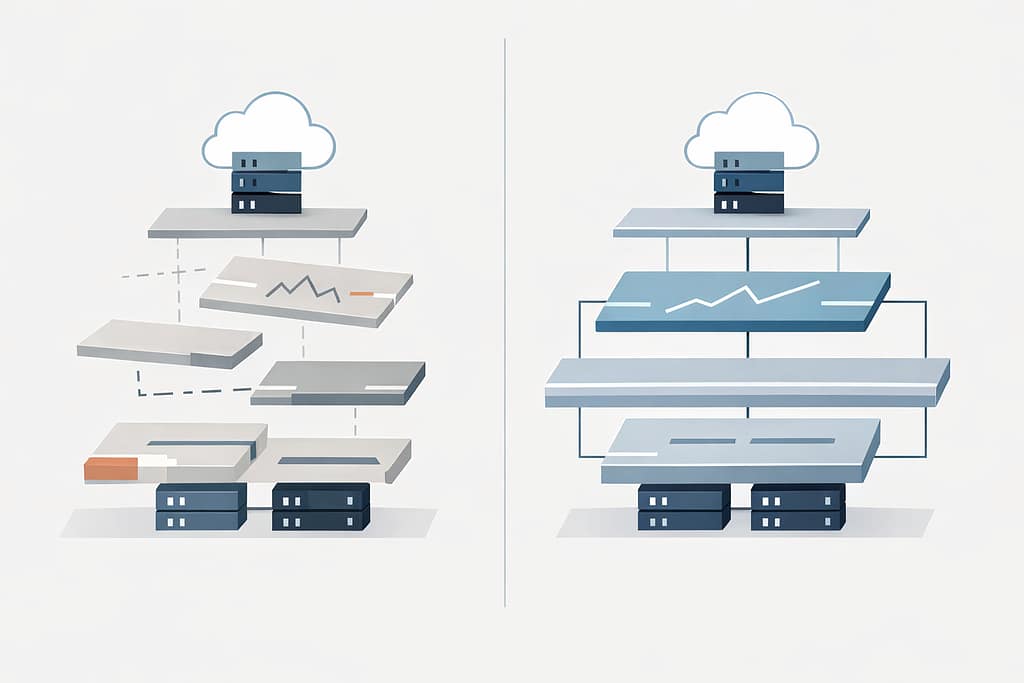
Diagram illustrating proactive IT vs reactive IT, contrasting an organized technology stack with a fragmented, reactive setup.

Proactive IT vs Reactive IT: The Costly Difference

Let’s face it—most business leaders don’t wake up thinking about IT models.

You notice IT when something breaks. When systems slow down. When staff can’t log in. When a small issue turns into a day-long disruption.

And when that happens, it often feels like IT is constantly in reaction mode—even if you’re paying for support.

That’s where the real question shows up, usually unspoken:

Are we operating with proactive IT—or are we still stuck in reactive IT support?

The difference between the two isn’t about tools, buzzwords, or pricing tiers. It shows up in how your business operates day to day, how predictable your systems feel, and how often leadership gets pulled into preventable problems.

This is what proactive IT vs reactive IT actually looks like in real life.

What “Reactive IT” Looks Like in Day-to-Day Operations

Reactive IT support is familiar because most businesses have lived with it.

Something goes wrong.
A ticket is opened.
A technician responds.
The immediate issue is fixed.

On the surface, it feels functional. Sometimes even fast.

But zoom out, and patterns start to appear.

  • The same types of issues resurface every few months
  • Updates happen after something breaks
  • Security changes are triggered by incidents, not planning
  • Leadership gets involved only when the situation escalates

Reactive IT focuses on restoring function, not improving the system.

And that’s the key distinction.

In a reactive model, IT is measured by response:

  • How fast was the issue resolved?
  • Was the system brought back online?
  • Did users get back to work?

What rarely gets addressed is why the issue happened in the first place—or what conditions allowed it to happen again.

Why Reactive IT Support Always Feels Urgent

Reactive IT isn’t ineffective because technicians aren’t capable.
It feels urgent because the model itself is built around urgency.

When support is triggered only by problems:

  • Every issue competes for attention
  • Prioritization is driven by pain, not risk
  • Small issues quietly stack until they become disruptive

This is where many leaders feel stuck.

From their perspective:

  • IT is “handled,” but never feels settled
  • Budgets fluctuate based on incidents
  • Planning conversations are replaced by emergency decisions

Over time, reactive IT creates a cycle where leadership is constantly responding instead of steering.

And the business adapts around that instability—often without realizing it.

What Proactive IT Services Change Behind the Scenes

Proactive IT services shift the focus from incidents to intentional system design.

The goal isn’t to eliminate every issue.
It’s to reduce uncertainty, surface risk early, and make technology predictable enough that leadership can plan around it.

Behind the scenes, proactive IT looks like:

  • Monitoring systems for trends, not just failures
  • Applying updates and maintenance on a schedule—not after disruption
  • Reviewing access, backups, and configurations before they’re tested by an incident
  • Aligning IT decisions with how the business actually operates

The most important difference?

Problems are addressed when they’re still small, quiet, and inexpensive.

That’s rarely visible to end users—but it’s deeply felt by leadership.

Proactive IT vs Reactive IT: The Difference Leaders Actually Feel

From a leadership perspective, the difference between proactive IT vs reactive IT isn’t technical. It’s operational.

With reactive IT:

  • IT conversations happen when something is already wrong
  • Decisions are rushed
  • Risk is discovered after impact
  • Technology feels unpredictable

With proactive IT:

  • IT discussions happen before disruption
  • Decisions are made with context
  • Risk is visible, not surprising
  • Technology becomes a stabilizing force instead of a variable

Leaders don’t suddenly “think about IT more.”
They think about it less—because it stops interrupting everything else.

Managed IT vs Break Fix: Where Most Businesses Get Stuck

Many businesses believe they’ve moved past break-fix simply because they pay a monthly fee.

But managed IT vs break fix isn’t just about billing structure—it’s about intent.

You can have a managed services contract and still operate reactively if:

  • Monitoring exists but insights aren’t acted on
  • Reports are delivered but not translated into decisions
  • Support is consistent, but planning is absent

True proactive IT requires more than tools and tickets.

It requires:

  • Regular review of systems and risks
  • Alignment between IT activity and business priorities
  • Someone accountable for seeing the whole picture—not just individual issues

Without that, “managed” IT becomes reactive IT with better packaging.

How to Tell Which IT Support Model You’re Really Using

If you’re unsure where your organization falls, ask yourself a few practical questions:

  • Do IT conversations mostly happen after problems occur?
  • Are system improvements driven by incidents rather than planning?
  • Does leadership get visibility into risk before it becomes disruption?
  • Is there a clear understanding of why certain IT decisions are made?

If the answers lean toward reaction, urgency, or uncertainty, the model is likely reactive—regardless of how it’s labeled.

Proactive IT support models feel quieter, calmer, and more deliberate.

Not because nothing ever goes wrong—but because fewer things catch you off guard.

Why This Difference Matters More as Businesses Grow

Smaller organizations can sometimes tolerate reactive IT longer than they should.

But as businesses grow:

  • Systems become more interconnected
  • Downtime affects more people
  • Security gaps carry larger consequences
  • IT decisions ripple across departments

What once felt manageable becomes expensive, risky, and distracting.

Proactive IT services help organizations scale without scaling chaos.

They introduce structure where growth naturally creates complexity.

What “Good” Proactive IT Actually Looks Like

At its best, proactive IT doesn’t feel like a service—it feels like clarity.

  • Leadership understands where risk lives
  • Systems are designed intentionally, not inherited accidentally
  • IT decisions support business goals instead of competing with them
  • Technology becomes predictable enough to trust

This level of maturity doesn’t come from stacking more tools or reacting faster.

It comes from stepping back and asking better questions:

  • What are we trying to protect?
  • What can fail quietly before it fails loudly?
  • What does stability actually require in our environment?

Frequently Asked Questions

1. What is the difference between proactive IT and reactive IT?

Reactive IT responds to issues after they occur. Proactive IT focuses on preventing issues, reducing risk, and designing systems intentionally so fewer disruptions happen in the first place.

2. Is proactive IT worth the cost?

For growing businesses, proactive IT often reduces long-term costs by preventing downtime, minimizing emergency fixes, and enabling better planning. The value is stability and predictability—not just faster fixes.

3. Can reactive IT ever be enough?

In very small or low-risk environments, reactive IT may be temporarily sufficient. As complexity, compliance, or reliance on technology increases, reactive models tend to create hidden risk and operational friction.

4. How do I know if my IT provider is proactive?

Proactive IT providers discuss risk, planning, and system improvements before incidents occur. If conversations only happen when something breaks, the model is likely reactive.

5. What does proactive IT look like in practice?

In practice, proactive IT includes scheduled maintenance, system monitoring, risk reviews, and ongoing alignment between technology decisions and business needs—without constant disruption.

A Better Starting Point: Clarity Before Change

Understanding proactive IT vs reactive IT isn’t about choosing a label.
It’s about understanding how technology actually behaves inside your business.

Before making changes, it helps to gain visibility:

  • Where risk lives today
  • Which issues are recurring—and why
  • What stability would look like if systems were designed intentionally

That clarity is often the first step toward quieter operations, fewer surprises, and technology that supports growth instead of interrupting it. If you’re ready to understand what’s really happening inside your environment, start there.

Flat-style digital illustration of an IT professional using a tablet in a calm, modern office. In the background, multiple workstations display structured system dashboards. Text reads: “Get in touch with our team.” InfiNet logo shown.

Proactive IT vs Reactive IT: The Costly Difference Read More »

Call Now Button