
Let’s face it: when spending conversations come up, most leaders do not feel their IT budget is too low.
On the surface, things appear to be working. Systems run. Tickets get closed. Nothing is breaking badly enough to force uncomfortable discussions. Technology seems under control.
But underneath that, small issues often begin to stack up in familiar ways.
Teams stay stuck in reactive mode instead of making improvements. Security alerts linger longer than they should. Projects slow down or stall altogether because there is no time, capacity, or margin to move them forward.
When that pattern appears, it’s rarely about effort or competence. It’s usually a sign the IT budget no longer matches the level of risk, complexity, and expectations the organization is carrying.
The challenge is that IT underfunding doesn’t announce itself clearly. It doesn’t show up as one broken system or an obviously wrong line item. It shows up operationally first – long before leadership even calls it a budgeting issue.
The First Places an IT Budget Falls Short
When an IT budget is too low, it doesn’t fail everywhere at once.
It fails where capacity and visibility matter most — the areas that quietly hold the entire operation together. These tend to fall into five categories:
- Operations
- Security
- Delivery and innovation
- End-user productivity
- Architecture and long-term health
The early symptoms are easy to normalize. Leaders adapt. Teams work around issues. Temporary fixes become permanent habits.
That’s why having a clear diagnostic lens matters.

Quick Diagnostic Checklist: Early Warning Signs
If several of these sound familiar, it’s a strong indicator that underfunding is already affecting operations.
Frequent outages or long time to repair
When systems fail more often — or take longer to recover — it usually signals underinvestment in infrastructure, monitoring, redundancy, or vendor support. The cost isn’t just downtime. It’s lost confidence and accumulated disruption.
Rising number of unresolved security alerts
Alerts that stay open, patches that slip, and security tasks that get deprioritized are classic signs of an underfunded security operation. This isn’t about negligence. It’s about insufficient tooling, staffing, or time.
Growing project backlog
When new initiatives keep getting pushed “to next quarter,” it often points to a capacity gap. Teams are fully consumed keeping things running, leaving no room for improvement, automation, or innovation.
Rising technical debt
Deferred upgrades and postponed maintenance feel harmless in the moment. Over time, they increase complexity, raise future costs, and make every change harder than it should be.
Individually, these issues seem manageable. Together, they paint a clear picture of an IT budget that’s stretched too thin.
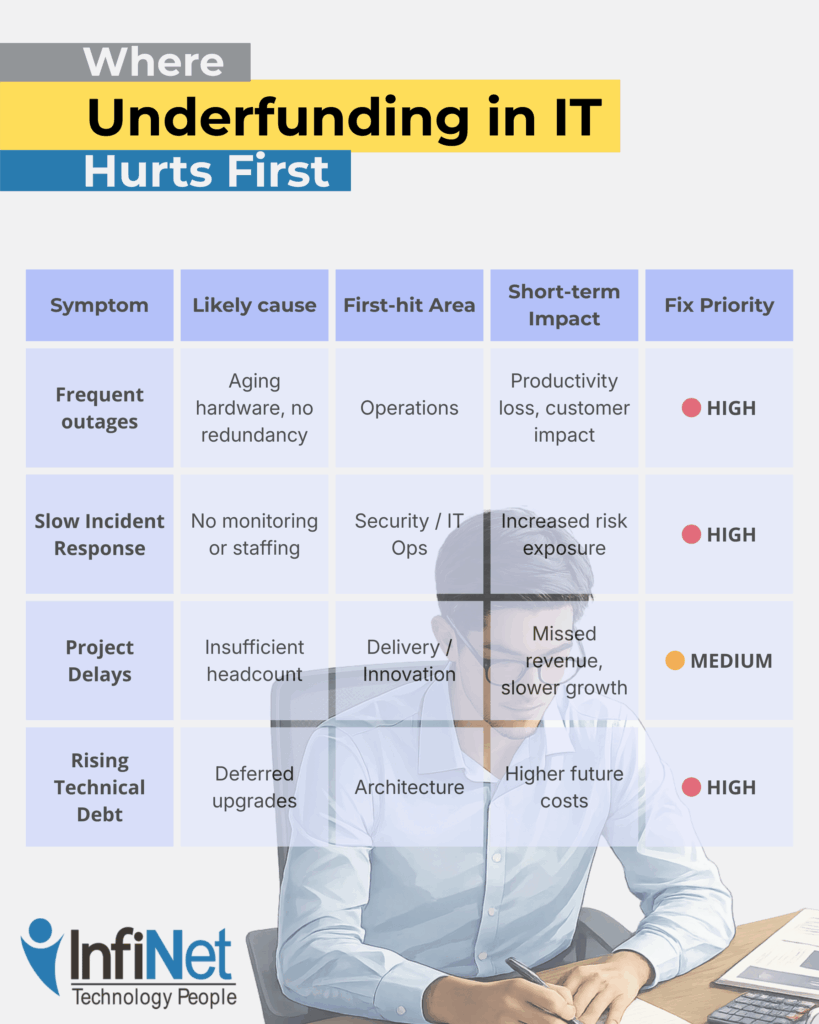
Underfunding tends to hit the same areas first because they absorb risk on behalf of the rest of the business.
As you can see, patterns are important here.
Security and availability are usually affected first — not because they’re unimportant, but because they require continuous investment to remain invisible. When funding slips, these areas quietly absorb the damage until something breaks.
By the time leadership feels urgency, the organization is often already operating in a riskier, more fragile state than it realizes.
Leadership Decision Guide: What to Fix First
When underfunding becomes visible, the instinct is often to spread money thinly across everything. That usually makes the problem worse.
A more effective approach is triage.
1. Stabilize security and availability
Gaps here create the largest short-term risk. Address monitoring, patching, alert ownership, and system resilience first.
2. Restore visibility
Without clear insight into what’s happening, teams operate reactively. Investing in observability and ownership often delivers outsized returns.
3. Add intentional capacity
This doesn’t always mean hiring. It can mean automation, better tooling, or clearly defined external ownership that creates breathing room.
4. Delay non-essential initiatives
Not every project deserves immediate funding. Stabilizing foundations should come before expansion.
The goal isn’t to spend more everywhere — it’s to spend intentionally where risk and friction are already accumulating.
Frequently Asked Questions
1. How much should a company spend on IT?
There’s no universal number. The right spend depends on risk tolerance, regulatory exposure, system complexity, and growth goals — not just company size.
2. Is outsourcing cheaper than hiring internal IT staff?
Sometimes. Outsourcing can provide access to expertise and scale without full-time costs, but it still requires appropriate funding to be effective.
3. What’s the biggest risk of delaying IT investment?
Accumulated technical debt and reduced resilience. Problems become harder and more expensive to fix the longer they’re deferred.
4. How often should IT budgets be reviewed?
At least annually, with quarterly check-ins tied to operational and security metrics — not just spend tracking.
5. How do I justify IT spend to non-technical leadership?
Frame it around risk reduction, operational stability, and capacity — not tools or features.
A Clear Next Step
If you’re unsure whether your current IT budget is truly supporting the business — or quietly holding it back — clarity usually comes from examining how well operations, security, and delivery are actually holding up, often with the perspective of a trusted managed IT service.
Understanding where friction lives today is often more valuable than debating numbers in isolation.