3-2-1 Backup Rule Explained for Businesses with Managed IT
Let’s start with something simple.
Your server goes down at 10:14 AM on a Tuesday.
Not dramatically. Not with sparks. Just… down.
Your team can’t access shared files. Accounting can’t pull invoices. Someone tries to open a folder and gets an error message that feels far too calm for what’s happening.
You call IT. They say, “We’ll restore from backup.”
And that’s the moment that matters.
Because what happens next depends entirely on whether your environment follows the 3-2-1 backup rule — or whether someone assumed one copy was enough.
Table of Contents
What the 3-2-1 Backup Rule Actually Means
The 3-2-1 backup rule requires:
- 3 copies of your data (production + two backups)
- 2 different types of storage media
- 1 copy stored offsite (cloud or physically separate location)
This structure is consistently defined by backup vendors like Acronis and reinforced by guidance from the Cybersecurity & Infrastructure Security Agency (CISA), which recommends the 3-2-1 model as a baseline for resilience against ransomware and system failure.
Why the consistency?
Because this framework solves multiple types of failure at once.
And most businesses underestimate how many failure types actually exist.
Why One Backup Is Not Enough (Even If It’s in the Cloud)
There’s a common assumption in small and mid-sized businesses:
“We’re in the cloud. We’re backed up.”
That’s not automatically true.
Cloud file sync tools replicate changes instantly — including deletions, corruption, and ransomware encryption. If a file is encrypted locally and sync is active, the encrypted version may overwrite the clean version everywhere.
CISA explicitly warns that a single backup copy is not sufficient and emphasizes maintaining offline or offsite backups to ensure recovery if primary systems are compromised.
If your backup is always connected…
It may not be a backup. It may just be a mirror.
That distinction matters.
The #1 Risk the 3-2-1 Rule Eliminates: Single Points of Failure
Most real-world IT failures aren’t dramatic cyberattacks.
They’re ordinary.
- A drive fails.
- A server OS corrupts.
- A staff member deletes the wrong folder.
- An update breaks a dependency.
- A power event damages a device.
The danger isn’t the event.
It’s having only one recovery path.
The 3-2-1 backup rule eliminates single points of failure by diversifying:
- Storage type
- Physical location
- Access pathways
If one layer fails, another survives.
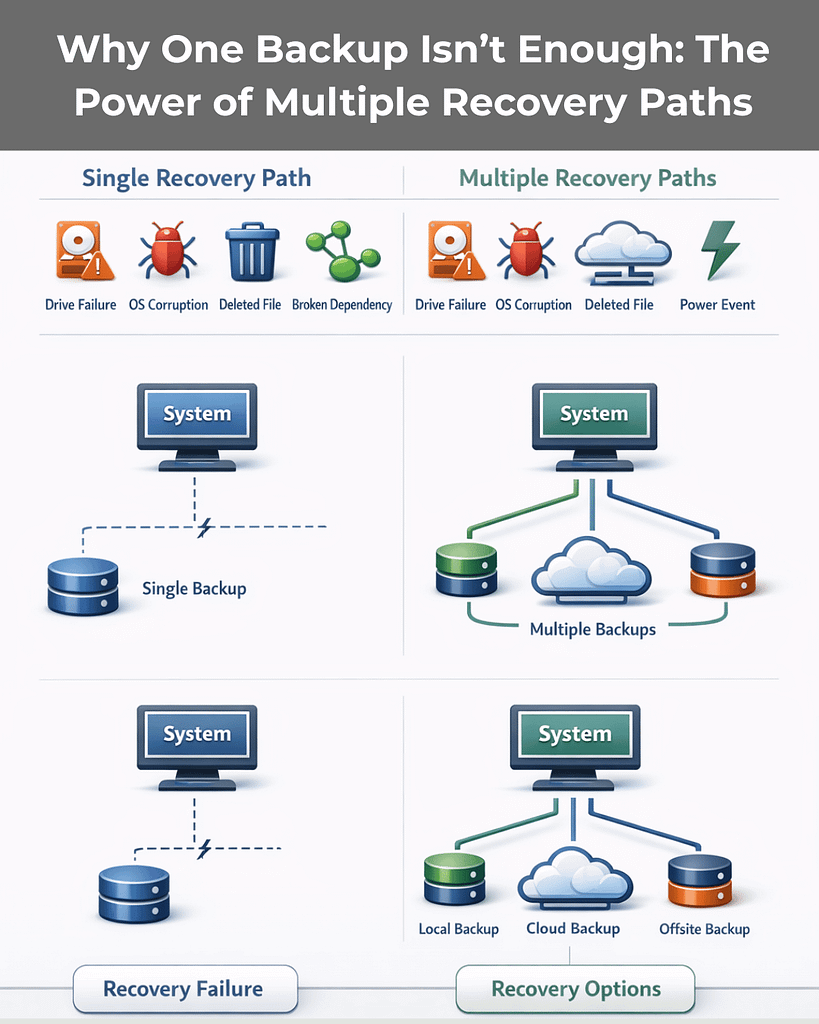
For businesses using managed IT services, this structure allows providers to design recovery across different failure categories — hardware, human error, corruption, or attack — instead of assuming one safety net will hold.
Why the 3-2-1 Backup Rule Is Critical for Ransomware Protection
Modern ransomware doesn’t just encrypt production data.
It looks for backups.
Attackers increasingly attempt to:
- Encrypt local NAS backups
- Delete connected backup repositories
- Compromise backup credentials
- Target cloud backup consoles
Security researchers and enterprise infrastructure providers have documented this shift, which is why newer models like 3-2-1-1 are emerging — adding:
- 1 immutable or offline copy (cannot be altered or deleted)
Immutability means once the backup is written, it cannot be modified — even by administrators — for a defined retention period.
For managed IT clients in 2026, ransomware backup protection isn’t optional.
It’s architectural.
If your backups can be deleted, they can be weaponized against you.
Business Continuity Isn’t About Backups. It’s About Time.
Here’s a more important question:
How long can your business operate without systems?
The 3-2-1 backup rule supports two types of recovery:
1. Local Restore (Speed)
A local backup — such as a NAS or backup appliance — allows fast recovery from:
- Accidental deletions
- File corruption
- Routine hardware failures
This protects operational continuity.
2. Offsite Restore (Survival)
An offsite copy — cloud or geographically separate — protects against:
- Fire
- Flood
- Theft
- Building outages
- Regional disasters
On-prem-only backups fail during physical disasters.
The 3-2-1 structure ensures you can survive large-scale events, not just everyday mistakes.
This is foundational to effective business continuity planning — something many organizations only evaluate after disruption occurs.
Compliance Isn’t Just About Retention — It’s About Design
If you operate in healthcare, finance, legal, or professional services, your data environment likely has regulatory requirements tied to:
- Encryption
- Retention duration
- Geographic storage
- Access controls
The 3-2-1 backup rule allows managed IT providers to balance:
- On-prem control (for sensitive workflows)
- Cloud-based resilience
- Encrypted offsite redundancy
CISA guidance and industry compliance frameworks consistently emphasize layered protection and separation of recovery systems from production systems.
Compliance rarely requires complexity.
It requires intentional architecture.
The Overlooked Risk: Human Error
Not every incident is malicious.
In fact, accidental deletion remains one of the most common causes of data loss.
Someone overwrites a shared spreadsheet.
A folder is cleaned up too aggressively.
An automated process syncs the wrong version.
Without multiple restore points across different storage systems, ordinary mistakes become operational crises.
The 3-2-1 backup rule ensures you have:
- Multiple restore points
- Multiple physical locations
- Multiple recovery pathways
That redundancy protects against both attack and accident.
What “Good” Looks Like for Managed IT Clients in 2026
Not all backup systems are equal — even if they use the term “3-2-1.”
Here’s what maturity looks like.
Baseline: True 3-2-1 Structure
A strong managed IT backup strategy typically includes:
- Production data on servers/workstations
- Local backup on a NAS or dedicated appliance
- Encrypted offsite backup in the cloud
Enterprise vendors like Acronis and federal guidance from CISA both emphasize this structure as foundational.
Healthy environments also include regular restore testing — because a backup that hasn’t been tested is a theory, not a recovery plan.
Better: Enhanced 3-2-1 with Modern Protections
Top-performing MSPs now add:
- Immutable storage (cannot be altered or deleted)
- Air-gapped or logically isolated copies
- Automated backup integrity checks
You may see this described as 3-2-1-1-0:
- 3 copies
- 2 media
- 1 offsite
- 1 immutable
- 0 errors (verified backups)
This evolution exists for one reason: attackers now target backup systems directly.
Your backup strategy must assume that.
Best: Fully Managed Backup Lifecycle
The strongest environments include more than infrastructure.
They include process.
- Continuous monitoring and alerting
- Automated verification
- Scheduled test restores
- Documented recovery plans
- Multi-tiered retention (daily, weekly, monthly)
- Coverage for remote worker devices and SaaS platforms
- Cloud geo-redundancy
At this level, backup is no longer a product.
It’s part of operational maturity.
And that’s where managed IT shifts from reactive support to leadership-level partnership.
The Real Question to Ask Your MSP
Not:
“Do we have backups?”
Ask instead:
- Do we follow the 3-2-1 backup rule exactly?
- Are our backups isolated from ransomware?
- Have we tested restores recently?
- How long would recovery realistically take?
- Is there an immutable or offline copy?
If those answers aren’t clear, your risk probably isn’t either.
Frequently Asked Questions
1. What is the 3-2-1 backup rule in simple terms?
The 3-2-1 backup rule means keeping three total copies of your data, stored on two different types of media, with one copy stored offsite. It is widely recommended by cybersecurity authorities like CISA as a baseline for resilience.
2. Is cloud storage the same as backup?
No. Cloud file sync services replicate changes — including deletions and ransomware encryption. A true backup maintains separate, restorable copies that are not instantly overwritten.
3. How does the 3-2-1 backup rule protect against ransomware?
It ensures at least one copy is stored offsite and ideally isolated or immutable, so attackers cannot encrypt or delete every recovery point.
4. Do small businesses really need this level of backup structure?
Yes. Single points of failure disproportionately impact SMBs because downtime affects revenue, operations, and reputation immediately. The 3-2-1 model is specifically designed to prevent total data loss.
5. What is 3-2-1-1-0?
An evolution of the 3-2-1 backup rule that adds one immutable/offline copy and zero unverified backups (meaning restore testing is performed regularly).
Final Thought
Backups are easy to assume.
Recovery is harder to design.
The 3-2-1 backup rule isn’t about technical best practice — it’s about removing uncertainty from moments that would otherwise disrupt your business.
If you’d like clarity on whether your current environment truly meets that standard — or just sounds like it does — that’s a conversation worth having.

3-2-1 Backup Rule Explained for Businesses with Managed IT Read More »