Infinet

ThinkstockPhotos 842804838

Why I No Longer Charge My Mobile Phone Overnight and Why You Shouldn’t Either

I just read this warning: “Don’t overcharge your mobile phone. Make sure you unplug it from the charger after it reaches 100%. Don’t leave it charging overnight.”

Why is this?

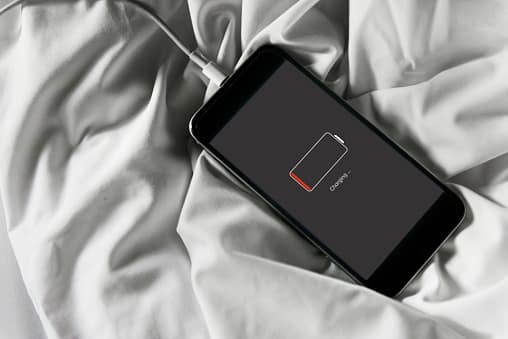
It’s because your mobile phone charger doesn’t stop charging after your phone reaches 100% capacity. It keeps topping off the charge during the night. This is called a “trickle charge.”

Charging Mobile Phones

While you’re sleeping, and the phone is plugged in, it works to keep fully charged by compensating for the small amount of charge it loses by just being turned on. This is bad because the trickle charge causes your mobile phone to retain a higher ambient temperature than it should. This ultimately reduces the battery’s capacity.

I wondered why I couldn’t seem to keep my phone charged all day. It’s barely three-years-old, and I’m already having battery issues! Now I know why. I’ve been damaging the battery all this time by charging it at night while I sleep. I wish I had known this before!

Mobile phones contain a rechargeable lithium-ion (or Li-ion) battery that charges faster than traditional rechargeable batteries. So, when we plug our iPhone or Android into a charger, it can get fully charged in just about two hours.

By keeping our phones charged overnight we’re increasing the amount of time it spends on the charger, thereby degrading its battery capacity that much sooner.

Hatem Zeine, the founder of Ossia, a developer of wireless charging technology, tells us: “If you think about it, charging your phone while you’re sleeping results in the phone being on the charger for 3-4 months a year. So even though the manufacturers try their best to cover this scenario, this process inevitably lowers the capacity of your phone’s battery.”

Batteries decay from the moment you start using your new phone. This means they gradually lose their ability to hold a charge. By charging your phone overnight, you’re increasing the amount of time it spends with the charger. As a result, it degrades the capacity much sooner.

If you’re like me, you’re always on your phone checking text messages, emails, calling people, listening to music, watching videos, surfing the Web and more. It’s no wonder the battery runs down so quickly. However, if we’re careful about the way we recharge our phones, we can get much more life from the battery.

The people at Cadex Electronics that make lithium phone batteries say:

“Go ahead and charge to 100%. There’s no need to worry about overcharging as modern devices will terminate the charge correctly at the appropriate voltage…Modern smartphones are smart, meaning that they have built-in protection chips that will safeguard the phone from taking in more charge than what it should. Good quality chargers also have protection chips that prevent the charger from releasing more power than what’s needed. For example, when the battery reaches 100%, the protection hardware inside the phone will stop current from coming in, and the charger will turn off.”

However, they go on to say:

Li-ion does not need to be fully charged as is the case with lead acid, nor is it desirable to do so. In fact, it is better not to fully charge because a high voltage stresses the battery.”

Don’t wait until your phone battery gets to 0% to charge it. A good time to charge it is when the battery reaches 35-45%. Doing this will help to preserve the battery life. If you do this religiously, then you should be able to keep your smartphone for longer than two years.

So essentially what I’ve learned is that rechargeable batteries are doomed to failure. They are constantly decaying from the moment you first turn on your brand-new phone and eventually lose their capacity to hold a charge. How depressing!

This is why my phone keeps losing its charge more quickly the longer I have it! I’ve owned my current iPhone 7 for over two years, and I’ve experienced a significant reduction in battery capacity.

Even worse, Apple tells us that constantly charging and recharging the iPhone battery isn’t good because the capacity of Li-ion batteries diminishes slightly with each charging cycle.

Most Android phones have a feature that allows for fast charging. They also have a chip with a Power Management IC (PMIC) that tells the charger when it’s receiving the higher-voltage fast charging to prevent it from overheating. Heat is a bad thing for all mobile phones. This is why you should never leave your phone in a hot car. The same goes for freezing temperatures.

So, what do the experts advise us to do? How should we charge our smartphones?

Here’s what the people at Cadex say to do:

“Don’t wait until your phone gets close to a 0% battery charge until you recharge it. Full discharges wear out the battery sooner than do partial discharges. Wait until your phone gets down to around a 35% or 40% charge and then plug it into a charger. That will help preserve the capacity of the battery. You should also keep your phone cool, as higher temperatures accelerate the loss of battery capacity.”

Another tip: Take off your phone’s case before you charge it so it won’t overheat.

Well, I guess this is the reason why I never seem to keep a phone longer than two years. This, coupled with the fact that Apple keeps coming out with cool new phones entices me to replace my old one. I know–This can be an expensive proposition. Maybe this is what the phone companies planned for all along–To keep us buying new phones! And with the pay-by-the-month plans that providers now offer, they make it even easier to swap out our not-so-old phones for a new one.

But for those of you who want to keep your phones for longer than two years, charge your phone during the day after it reaches 35 to 40 percent and unplug it when it reaches 100%. This might get you more longevity from your Li-ion battery so you can hang onto your phone for another year or so.

Why I No Longer Charge My Mobile Phone Overnight and Why You Shouldn’t Either Read More »
ThinkstockPhotos 840534924

New Threat Alert From The FBI – Password Spraying

You probably use a number of personal identification numbers (PINs), passwords, and passphrases to get money from ATMs, to use your debit card when shopping, or to log in to your personal or business email. Hackers represent a real threat to both your personal and business password security and confidential information. Now, these criminals are using a technique called Password Spraying to steal your information.

Password Spraying

According to information derived from FBI investigations, malicious cyber actors are increasingly using password spraying against organizations in the United States and abroad. In February 2018, the Department of Justice in the Southern District of New York indicted nine Iranian nationals, who were associated with the Mabna Institute, for computer intrusion offenses. However, password spraying isn’t limited to this group. Other hackers are using it to gain access to both personal and business confidential information.

Manhattan U.S. Attorney Geoffrey S. Berman said: “Today, in one of the largest state-sponsored hacking campaigns ever prosecuted by the Department of Justice, we have unmasked criminals who normally hide behind the ones and zeros of computer code. As alleged, this massive and brazen cyber-assault on the computer systems of hundreds of universities in 22 countries, including the United States, and dozens of private sector companies and governmental organizations was conducted on behalf of Iran’s Islamic Revolutionary Guard. The hackers targeted innovations and intellectual property from our country’s greatest minds. These defendants are now fugitives from American justice, no longer free to travel outside Iran without risk of arrest. The only way they will see the outside world is through their computer screens, but stripped of their greatest asset – anonymity.”

How Does Password Spraying Work?

Password spraying is a type of brute force attack where hackers use a username with multiple passwords to gain access to your IT system. With traditional brute force attacks, the criminal uses one username with multiple passwords. Employing a lockout functionality, which locks the criminal out after a set number of login attempts, is an effective means of dealing with traditional brute force attacks.

However, with a password-spray attack (also known as the “low-and-slow” method), the malicious cyber actors use a single password against many accounts before moving on to another password. They continue this process until they find one that works. This strategy works for them because they can avoid account lockouts. It circumvents lockout functionality by using the most common passwords against multiple user accounts until they find one that works.

Password spraying targets single sign-on (SSO) and cloud-based applications using federated authentication. A federated authentication identity provides single access to multiple systems across different enterprises. Criminals target federated authentication protocols because it disguises their activities and ensures their anonymity.

Attackers use password spraying in environments that don’t use multi-factor authentication (MFA), rely on easy-to-guess passwords, or use SSO with a federated authentication method.

Your Email Is Also At Risk

Hackers also prey on email accounts that use inbox synchronization (which pulls emails from the Cloud to inboxes on remote devices). Malicious actors use inbox synchronization to obtain unauthorized access to your organization’s email directly from the Cloud. Then they download email to locally stored files, identify your company’s email address list, and secretly apply inbox rules to forward your sent and received messages to them.

The United States Computer Emergency Readiness Team (US-CERT) details how hackers use password spraying, what you should watch out for, who is at risk, and the impact this type of attack can have on your organization.

Your Technology Service Provider can explain this to you and your employees in plain language, and help you protect your organization against password spraying and other attacks.

 Traditional Tactics Techniques & Procedures

  • Using social engineering tactics to perform online research (i.e., Google search, LinkedIn, etc.) to identify target organizations and specific user accounts for initial password spray
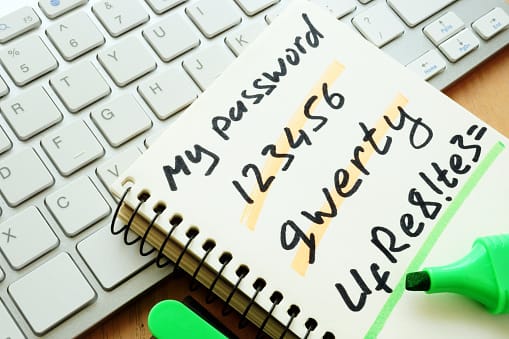
  • Using easy-to-guess passwords (e.g., “Winter2018”, “Password123!”) and publicly available tools, execute a password spray attack against targeted accounts by utilizing the identified SSO or web-based application and federated authentication method
  • Leveraging the initial group of compromised accounts, downloading the Global Address List (GAL) from a target’s email client, and performing a larger password spray against legitimate accounts
  • Using the compromised access, attempting to expand laterally (e.g., via Remote Desktop Protocol) within the network, and performing mass data exfiltration using File Transfer Protocol tools such as FileZilla

Indicators That You’ve Been Attacked

  • A massive spike in attempted logins against the enterprise SSO portal or web-based application;
  • Using automated tools, malicious actors attempt thousands of logons, in rapid succession, against multiple user accounts at a victim enterprise, originating from a single IP address and computer (e.g., a common User Agent String).
  • Attacks have been seen to run for over two hours.
  • Employee logins from IP addresses resolving to locations inconsistent with their normal locations.

Typical Victim Environment

The vast majority of known password spray victims share some of the following characteristics:

  • Use SSO or web-based applications with the federated authentication method
  • Lack multifactor authentication (MFA)
  • Allow easy-to-guess passwords (e.g., “Winter2018”, “Password123!”)
  • Use inbox synchronization, allowing email to be pulled from cloud environments to remote devices
  • Allow email forwarding to be set up at the user level
  • Limited logging setup creating difficulty during post-event investigations

The Impact

A successful network intrusion can have severe impacts, particularly if the compromise becomes public and sensitive information is exposed. Possible impacts include:

  • Temporary or permanent loss of sensitive or proprietary information;
  • Disruption of regular operations;
  • Financial losses incurred to restore systems and files; and
  • Potential harm to an organization’s reputation.

7 Steps You Can Take To Mitigate Password Spraying Attacks

  1. Enable MFA and review MFA settings to ensure coverage overall active, internet facing protocols.
  2. Review password policies to ensure they align with the latest NIST guidelines and deter the use of easy-to-guess passwords.
  3. Review IT helpdesk password management related to initial passwords, password resets for user lockouts, and shared accounts. IT helpdesk password procedures may not align with company policy, creating an exploitable security gap.
  4. Many companies offer additional assistance and tools that can help detect and prevent password spray attacks, such as the
  5. Make sure your employees change their corporate passwords every 60 days.
  6. Establish a password policy that prohibits easy-to-guess passwords. Enable multi-factor authentication (MFA) for all web-based applications. If MFA practice is already in place, review current protocols thoroughly to ensure it is maintained well
  7. Ask your Technology Solutions Provider to conduct Security Awareness Training for your employees at all levels.

The FBI Reporting Notice

The FBI would like you to report any suspicious or criminal activity to your FBI field office or the FBI’s 24/7 Cyber Watch (CyWatch). Field office contacts can be identified at www.fbi.gov/contact-us/field. CyWatch can be contacted by phone at (855) 292-3937 or by e-mail at [email protected].

Your report should include:

  • The date,
  • Time,
  • Location,
  • Type of activity,
  • Number of people affected,
  • Type of equipment used for the activity,
  • The name of your company or organization, and
  • A designated point of contact.

New Threat Alert From The FBI – Password Spraying Read More »

ThinkstockPhotos 827896866

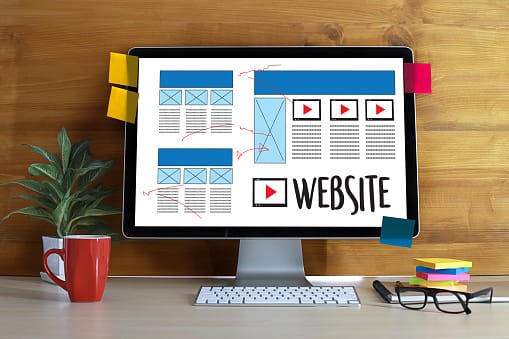
Getting the Most Out of Your Business Website

Today’s internet has literally changed the way businesses function. It has redrawn the boundaries and changed the rules of competition in today’s business climate. The Internet has allowed business owners to create much closer relationships with their customers. In addition, it has given consumers more power through access to unlimited information.

Business Website

Regardless of the size of your business, you probably have a website and a pretty decent one at that. In fact, websites are not as costly as they once were to build and manage. Thanks to the increase in the number of web developers and online sites that host websites, almost anyone can have a website if they want it.

For savvy business owners, their website is the key to greater sales and stronger relationships with customers. A successful website is constantly adding new content that offers value to consumers. They update the site regularly with the latest security and technology. A company with an amazing website almost always excels in the marketplace over competitors who don’t. Why? Because they understand that their business website is the voice of their company online.

Websites have become a valuable commodity to business owners. They are the first stop of prospective clients who want to find more information about your business. Current clients also rely on websites to find product information and updates. Your website is the place where all the action takes place each day. Your website can make or break your business. Knowing how important websites are, most business owners are interested in learning how they can get the most out of their site.

Allow your website to communicate your story to clients

With the understanding that websites do speak to your customers, you should ask yourself the question, “What do you want your website to say to customers?”

Each day, you must make sure that the information you provide is important to your customers and that it’s accurate. Does it resonate well with them? Will it make them want to purchase your products or services? Image is everything in a business. Since your website represents the first image that people have concerning your business, it’s important to make a good first impression. As it is commonly said, first impressions matter. What story do you want the website to tell?

The best websites always tell a compelling story. Sometimes your story is all about why you started your business and sometimes it’s more about your roots, your background. Great businesses have a unique reason for their existence. Bill Gates got the idea for Microsoft when a friend, Paul Allen, showed him the 1975 issue of Popular Electronics. This issue featured a story on the Altair 8800, one of the first microcomputers. Both Gates and Allen saw the potential for developing a programming language for the computer. The rest is history.

In putting together the story behind your business, it may be necessary to hire a good writer to help craft the message. This expense is well worth it. Once you create a great story that customers can relate to, your next job is to write professional content for your site. Though your budget may initially be small, you can go back and redo this once you have the time and money to do so. Usually, your website is a work in progress anyway. It is constantly evolving and changing as your business grows.

Good content will make customers feel that they need your goods and services to meet a need in their lives. You should include information about how these goods or services are better than those offered by others in the same industry. Many of today’s most successful brands have become indispensable to their customers. Think about how Prada and Louis Vuitton have changed the handbag industry. Their customers feel a strong urge to own one of these exclusive handbags and many are priced in the thousands of dollars.

Provide contact information

Imagine locating a website online, and the information given therein is attractive. You read through their homepage and look at what they offer. In your mind, you are convinced that this is it. They are exactly what you need. You pick up your phone while scrolling down, looking for the contacts page and you find nothing. No phone number, no email address, no physical address, nothing. This can be frustrating, right? In fact, most people will get disheartened immediately. They will look elsewhere for other products. Consumers feel that if there’s no contact information, then the business must be shady. So it’s important to include your physical location, email address and phone number. This degree of transparency tells consumers that you have nothing to hide.

Collect lead information

If you have been in business long enough, you know that some clients will visit your website more than once before they decide to make a purchase. Do not despair, this does not mean that your website is not fulfilling its mandate. It simply means that many customers enjoy doing lots of shopping before they make a purchase. In the meantime, you can collect lead information using a lead capture form. This will give you the opportunity to send them regular email updates about specials you might have. Often, if a prospective customer gets an email telling them they can get a discount by making a purchase right away, they will do so. Everyone loves to get a great deal.

User friendly navigation

The whole science behind user experience has grown tremendously in the past ten years. A site must be intuitive, responsive and user friendly. You cannot afford to hide things or make it hard for customers to get information. Websites that are difficult to understand end up chasing customers away. Try to get regular feedback from users. Find out what people are saying about your site. Correct any issues you may have right away.

Final thoughts

All in all, if you maximize each component of your website, you will discover the magic that a great site can offer. Customers will visit often. They will tell their friends about your site. An amazing website truly is priceless.

Getting the Most Out of Your Business Website Read More »

ThinkstockPhotos 532253660 2

FBI Issues Cyber Security Warning

Russian Hackers Target Routers in 50 Countries Worldwide

FBI Cyber Security Warning

In a day and time when everyone is being super careful not to click on suspicious links, there’s a new threat lurking. Just about every home and office has a router. It’s an inconspicuous piece of equipment that most of us rarely think about. And now, a new alert issued by the FBI says that Russian hackers have targeted routers in 50 countries around the world.

Just last week, the FBI issued a warning stating that a malware botnet known as VPNFilter was responsible for taking over millions of routers worldwide. The affected routers are thought to be primarily consumer-grade routers purchased at Best Buy and other retail and online electronic stores. The authorities also believe that routers provided by internet service providers such as Frontier Communications, Spectrum, and Charter have been affected. Commercial grade routers found in many businesses are also at risk.

Why the router?

Routers are rarely updated. Unlike the operating system on a smartphone or computer, most router manufacturers do not send out regular updates for their products. Last January, a complaint was filed against router manufacturer, D-Link. In the complaint, the FTC said that the manufacturer was leaving their users at risk by not installing adequate security measure. Their failure to do so had left many consumers open to attacks from hackers.

Experts are now saying that there’s no incentive for router manufacturers to release regular updates to their products that could stave off attacks. Up to now, these manufacturers have not been held liable and when there’s no liability, manufacturers will often take cost-saving shortcuts.

How hackers are getting in

Using malware to target the VPNFilter, cybercriminals are able to collect user data. Once the hacker has control of the router, they can use it to eaves drop on consumers. This weakness also allows hackers a doorway to all home computers, TVs, smartphones, or anything connected via the router.

The FBI recently discovered one website that hackers had set up to use in their attack. This website was designed to give instructions to the routers that had been taken over. Though shutting this site down did cut off one avenue of attack, the FBI warned that millions of routers were still infected. This leaves millions of consumers around the world vulnerable and most users will not even realize they’ve been hacked.

Who is responsible for the hacks?

The Justice Department said the hacking group referred to itself as “Sofacy” and that they answered to the Russian government. The hacking group also goes by the names Fancy Bear and APT28 and they have been involved in some very high-profile targets over the last few years. This group was blamed for the hacks carried out during the 2016 presidential campaign that targeted the Democratic National Convention.

Cisco Systems Inc. performed its own investigation and found that the targeted routers include Netgear, Belkin’s Linksys, QNAP, Mikro Tik, and TP-Link. There may be others involved as well and most were purchased by consumers at local electronic stores and online. Cisco shared the results of their investigation with the Ukrainian government and the U.S. The FBI said that they believe some of the affected routers were also provided by internet service companies.

What routers have been infected?

Authorities have put together a list of the known affected routers, but recommend that everyone take the precaution of rebooting the router and changing the password as soon as possible. The known affected routers include:

  • Linksys (Models E1200, E2500 & WRVS4400N)
  • Netgear (Models DGN2200, R6400, R7000, R8000, WNR1000 & WNR2000)
  • Mikrotik Cloud Core Routers (versions 1016, 1036 & 1072)
  • TP-Link R600VPN
  • QNAP NAS devices running QTS software
  • QNAP (Models TS251 & TS439 Pro)

New types of warfare between Russia and the Ukraine

Russia has long been involved in attacks against the Ukraine and Ukrainian companies due to ongoing hostilities between the two countries. In the past, these attacks have cost millions of dollars and exposed the personal, confidential information of both businesses and individuals. At least one attack was responsible for an electricity blackout in the Ukraine.

The Ukrainian government recently stated that the Russian government was planning a cyber-attack against some privately held companies, along with Ukrainian state bodies. They believe these attacks were meant to disrupt the Champions League soccer finals which were being held in Kyiv.

What to do next

Experts are recommending that everyone using a router shut it down and reboot it. They also recommend disabling remote manager settings. If at all possible, upgrade the router to the latest firmware and change your password.

Managed IT providers are recommending many commercial grade firewalls and routers for business owners who have quite a bit more to lose than the average consumer. They have stated that commercial grade firewalls and routers offer powerful firewall technologies and some offer wireless access point that offers stronger protection for the home or office.

Consumer-grade routers used by the average individual are most at risk. Businesses who have remote employees working from home often forget that these workers present a weak area that hackers can take advantage of. Most individuals have never upgraded their router’s firmware or changed the original password that came with the router. IT experts believe that hackers will eventually exploit all weaknesses like this.

An ongoing risk

The FBI warned, “The size and scope of the infrastructure by VPNFilter malware is significant.”

Their experts said that hackers could render the routers affected completely inoperable if they wanted to, but that wasn’t their primary goal. Instead, they were planning to steal data off the computers, phones, and other connected devices by taking over the routers that controlled internet access. The FBI stated that the malware would be very hard to detect even by professionals because of encryption and other tactics used by the hacking group.

In addition to rebooting routers and changing passwords experts recommend contacting your internet service provider for possible firmware updates or other guidance.

FBI Issues Cyber Security Warning Read More »

ThinkstockPhotos 872308748

How Managed Networks Can Deliver Better Wi-Fi Service

It’s one thing for a business to have installed Wi-Fi networks, but it’s another thing to ensure that the equipment is and will continue to work properly. This means the network should be able to continue supporting the growing demands of a business. It should be able to upgrade automatically whenever necessary to provide the latest and most convenient improvements available. This may sound simple and manageable by the IT staff, but it can be challenging.

Managed Networks

Having in-house IT staff means that you have to get in line with other departments and wait your turn before you get help. They already have enough work each day so your Help Desk request may get pushed to the back. This is just one reason why it can be beneficial to have a trusted partner manage your Networks and computers.

The Right Fit

So many managed IT providers say that they’ll be there when you need them. How can you find the right fit for your business? It can be challenging in this day and time, simply because of all the many great choices. But, it can be helpful to sit down with your supervisors and talk to them about the ideal IT provider – someone who will take the time to listen to you, show concern about getting it right for you, someone who really will become a trusted partner.

A good IT partner will stay on top of daily maintenance for your hardware and software. They’ll keep the Wi-Fi equipment running smoothly. They will make recommendations about new products your company could benefit from. If you could find an IT service provider who stands by their promises, imagine how much easier your life would be. Your company would stop demanding so much of your time. You might actually get a vacation this year.

How to find your IT Managed Services Provider

Talk to other businesses owners in your area. Ask them to recommend someone. Check all names, credentials, and reputations online. You can find out quickly whether someone has a good strong reputation in the business world. Visit the company and meet some of their staff members. Do they seem capable, knowledgeable and skilled? If you walk in and find a young receptionist on the phone with her boyfriend and two of the techs in the back flirting, then get out of there quickly! That’s not the right place for you.

You’re serious about your business. You want it to succeed for yourself and especially for your family. So don’t settle for lame vendors that never show up and don’t do good work when they do meander by your place. Take as much time as you need finding a professional team of IT techs who know their jobs exceptionally well and love to come to work each day. These guys will know what’s going on when you get the Blue Screen of Death. They can fix it remotely in just a few minutes and you’re back to work.

Communicate your needs

When you find the right IT managed support team, sit them down at your office and make it clear that you want the very best they can give. You’re in this to win it and if they want to go along for the ride, they’re welcome. But they will have to pull their weight.

When you set down some guidelines right at the beginning of any relationship, you’ll find that the relationship is much more rewarding for both people. Of course, there will be contracts to sign that will state and include everything you talk about. A good contract is clear about what your responsibilities are and what the IT provider will provide. The cost should be included and can be a monthly charge or a fixed price you pay several times a year. Most vendors will work with you because they want your business.

Below, are just a few of the more important IT and networking services/products that your business needs:

  • Cloud storage and backup
  • Remote monitoring/management of servers, desktops, mobile devices
  • Business continuity plan in case of disaster
  • Cybersecurity for all computers and devices
  • Regular preventative maintenance
  • Scalability
  • 24/7 tech support

There are many other services you could opt for and you should discuss this with your IT professional.

The best managed wireless is all about handling many different services well. Every phone and computer should be secure even those of remote workers. Communications should be up and running 99 percent of the time. If you run a hospital or medical office, then you understand the importance of a good communication system. Most providers will suggest VoIP. It’s cloud-based and dependable, plus it can fit nicely in any budget.

With managed services, an organization should not have to worry about maintaining their Wi-Fi networks. Work with someone you have confidence in; someone who will exceed your expectations. You need a good, trusted IT service provider who is willing to get to know your business and work right alongside you to see it grow. Don’t settle for less than the best!

How Managed Networks Can Deliver Better Wi-Fi Service Read More »

Talk to our Team