It’s a typical day at the office, and workflows are already in motion.
A client reaches out with a straightforward request. It’s familiar—you’ve handled it before. Still, you take a moment to check an email thread, log into a carrier portal, and reference your internal system to make sure everything lines up. That’s simply how brokerage workflows tend to operate.
Nothing is broken. The process works. The request gets resolved.
But even simple tasks require a few extra steps. Information lives in different places. Context has to be reassembled. What should feel routine takes more effort than expected.
Over time, those small moments add up. Not because the work itself is complex—but because brokerage workflows aren’t always as connected as they could be.
That’s when everyday work starts to feel more complicated than it needs to be.
Where the complexity actually comes from
Most insurance brokerages don’t struggle because the work itself is overcomplicated. One of the challenges is how that work actually comes together.
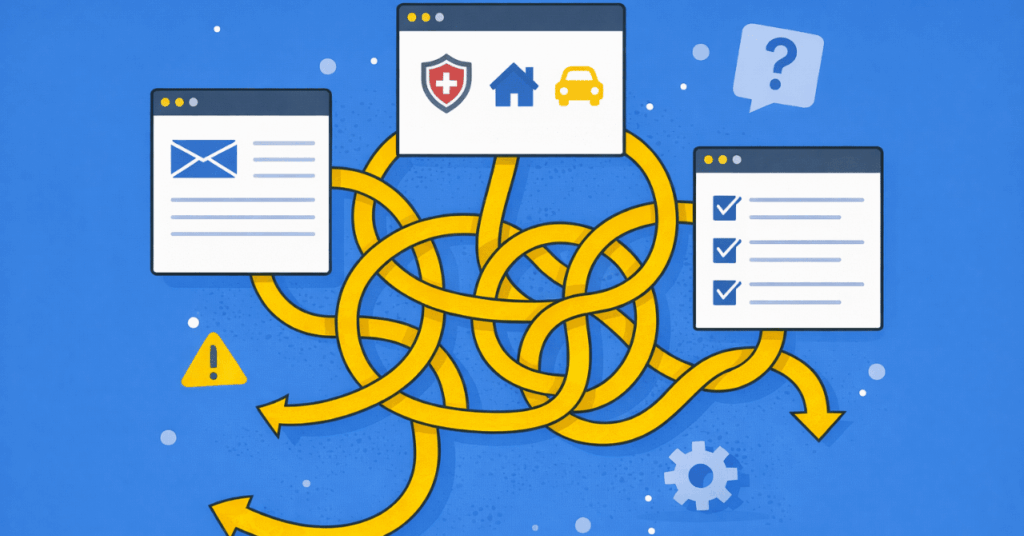
You’re operating across multiple touchpoints:
Clients reaching out with questions or changes
Carriers providing updates through separate portals
Internal systems tracking policies and communication
Each piece works on its own. But together, they don’t always move in a clean, connected way.
3 Areas Workflows Break Down
1. Information is spread across systems
Part of the picture lives in email. Another part sits in a carrier portal. The rest is stored internally.
You’re not missing information—you’re spending time pulling it together before you can act on it.
2. Processes rely on memory
Who followed up, what was promised, what still needs attention—these details often live in someone’s head.
It works, but it’s not always visible. And when things get busy, consistency starts to slip.
3. Systems don’t match how work actually flows
Switching between tools becomes part of the job. Small workarounds fill the gaps.
The process adapts, but the systems stay the same—creating extra steps along the way.
What this means for your team
The impact isn’t always obvious. There’s no major outage or single point of failure.
But over time, it shows up as:
Slower response times
More back-and-forth between team members
Increased mental load just to keep things moving
The work still gets done—but it takes more effort than it should. And that is not a place where you want to be, especially for businesses whose goal is to scale up as soon as possible.
What aligned workflows actually look like
When workflows are set up intentionally, the difference is almost immediately noticeable.
– Information is easier to access. – Tasks move in a more predictable way. – Follow-ups don’t depend on memory alone.
It’s not about adding more tools. It’s about making sure your existing systems support how your team actually works.
Where to start
If you’re trying to pinpoint where things feel harder than they should, start simple:
– Where does your team spend time tracking things down?
– Where do steps depend on who remembers what?
– Where does work slow down between systems?
Those are usually the areas worth paying attention to first, and where a managed IT service can work with you best.
For insurance brokerages in Omaha, this often comes down to how well systems, processes, and day-to-day work are aligned.
If you’re starting to notice where things feel more complicated than they should, that’s usually the right place to begin.
Most leaders don’t think about data loss until something feels off — a missing folder, a locked system, a vendor calling about a breach, or finance asking why invoices were redirected.
But in 2026, data loss rarely looks like a dramatic server crash.
It looks like recoverability failing.
Not just “Did something break?” But:
Can you restore the right data
To the right place
Within the right timeframe
Even if credentials are compromised?
That’s the real conversation now.
The most common causes of data loss aren’t random disasters. They follow patterns. And those patterns show up repeatedly in industry reporting from sources like Verizon’s DBIR, NIST guidance, and CISA backup recommendations.
Here’s what they look like in the real world — and how intentional businesses prevent them.
1. Human Error Still Leads the List
It’s rarely malicious.
Someone deletes the wrong SharePoint folder. A spreadsheet is overwritten. A departing employee “cleans up” files. Data is synced into the wrong tenant.
The human element continues to show up consistently in breach and incident reporting across industries. Even when attacks aren’t happening, mistakes are.
What Leadership Often Underestimates
Platform recycle bins and version history feel like safety nets.
They’re not strategy.
Microsoft documents versioning, restore windows, and recycle capabilities in M365 — but those are service features, not full recovery architecture.
What Mature Prevention Looks Like
Least privilege access (not everyone can delete everything)
Retention policies and legal holds where appropriate
Controlled external sharing defaults
Backup systems separate from production access
Good environments assume mistakes will happen — and design recoverability accordingly.
Sometimes there’s no encryption at all — just data theft and extortion.
Industry reporting continues to show ransomware present in a significant share of breaches. And attackers increasingly target identity first — because if they control credentials, they can delete backups.
What Breaks Down
“We have backups” becomes meaningless if:
Backup credentials use the same identity system
Deletion isn’t protected
Backups aren’t immutable
No restore testing has been done
What Intentional Design Looks Like
MFA everywhere (especially admin roles)
Segmented backup infrastructure
3-2-1 backup rule extended with immutable/offline copies
Backup admin credentials separate from production identity
Quarterly restore testing
CISA explicitly recommends layered backups and 3-2-1 principles to improve recoverability odds. NIST guidance emphasizes conducting and testing backups — not just configuring them.
The modern mindset:
Attackers don’t just go after your data. They go after your ability to recover.
Mailbox takeover → forwarding rules created → invoices redirected
Cloud account compromise → mass file deletion via sync
OAuth app abuse → persistence without passwords
Credential abuse continues to rank as a leading initial access vector in breach reporting. The FBI’s IC3 data shows the scale of phishing and cyber-enabled fraud complaints — especially business email compromise.
What Leadership Often Misses
Identity compromise isn’t always loud.
Sometimes the only signal is:
A new mailbox rule
An OAuth consent grant
“Impossible travel” login
And by the time it’s discovered, data may already be gone.
Prevention That Reduces Blast Radius
Phishing-resistant MFA for admins
Conditional access (device compliance, geo rules)
Removal of standing admin rights (JIT / PIM)
Continuous monitoring for anomalies
Immutable backups protected from deletion
Recovery design must assume admin credentials can be compromised.
Because eventually, one will be.
4. Unpatched Vulnerabilities & Exposed Services
This one feels avoidable — because it is.
A forgotten VPN appliance. An exposed RDP port. An internet-facing web app left “temporarily” open.
Vulnerability exploitation continues to rise as an initial access vector. Delays in remediation are a consistent theme in breach reporting.
NIST categorizes hardware failure alongside ransomware and intentional destruction as catastrophic drivers — and stresses planning and testing backups accordingly.
What Mature Environments Include
Redundant systems with monitoring
SMART alerts and predictive failure detection
Immutable offsite backups
Checksum verification
File-level and application-level restore tests
Backups that haven’t been tested are assumptions.
7. Poor Recovery Design (The “We Had Backups” Trap)
This is the most underestimated cause of data loss.
Backups exist. But:
RPO was never defined
RTO was never discussed
No one practiced restoring
Recovery depends on one person
And when that person is unavailable — chaos follows.
Minimum Viable Resilience in 2026
Defined RPO (how much data you can lose)
Defined RTO (how long you can be down)
3-2-1 backups with immutable copy
Separate backup credentials
Quarterly restore tests
Annual disaster recovery simulation
Monitoring for mass deletion events
Backups are not a strategy. Tested recovery is.
8. Business Email Compromise (Financial + Data Impact)
Business email compromise doesn’t always destroy data — but it often exposes or exfiltrates it.
IC3 reporting consistently shows BEC among the highest-impact fraud categories by dollar loss.
Patterns include:
Unauthorized mailbox access
Invoice redirection
Document exfiltration
Late discovery
Prevention Layers
DMARC/DKIM/SPF enforcement
Mailbox auditing
Alerts on rule creation
Out-of-band payment verification
Conditional access and anomaly detection
Financial loss often follows identity compromise.
The 3 Layers That Prevent Most Data Loss
In 2026, mature MSPs frame prevention in three layers:
1. Reduce Likelihood
Identity controls, patching, segmentation, training
2. Reduce Blast Radius
Least privilege, separation of duties, immutable backups
3. Reduce Downtime
Tested restore, defined RTO/RPO, documented runbooks
This approach aligns directly with patterns highlighted in current industry reporting — credentials, vulnerabilities, third-party exposure — and with NIST/CISA emphasis on backup strategy and testing.
Frequently Asked Questions
1. What is the most common cause of data loss in 2026?
Human error and credential compromise remain dominant contributors. However, ransomware data loss and third-party incidents are increasingly significant drivers.
2. Isn’t Microsoft 365 version history enough?
No. Versioning and recycle bins are service features. They do not replace independent backup systems aligned to the 3-2-1 backup rule.
3. What’s the difference between RPO and RTO?
RPO (Recovery Point Objective) defines how much data you can afford to lose. RTO (Recovery Time Objective) defines how long you can afford to be down.
4. Why are immutable backups important?
Because attackers now attempt to delete or encrypt backups during ransomware events. Immutability prevents modification or deletion within a defined retention window.
5. How often should backups be tested?
At minimum, quarterly file-level restores and annual full disaster recovery simulations.
Most common causes of data loss aren’t surprises.
They’re patterns.
The difference between disruption and resilience isn’t whether something happens.
It’s whether recoverability was intentionally designed before it did.
If you’re unsure where recoverability actually lives in your environment — or whether identity compromise would take your backups with it — a quick discussion with a local managed IT service is a good start.
When you hear Business Continuity Planning for small and medium businesses, it probably sounds too abstract. A binder that sits on a shelf. Policies written for audits, not real life. A project that keeps expanding and never quite gets finished.
But when a server fails, ransomware hits, or your team suddenly can’t access email on a Tuesday morning, none of that matters.
What matters is simple:
What absolutely has to keep working?
How quickly can you get it back?
And who knows what to do next—without guessing?
For Omaha business owners, Business Continuity Planning isn’t about paperwork. It’s about protecting revenue, keeping customers served, staying compliant, and maintaining credibility when something goes wrong.
Across industries, continuity is consistently defined the same way: the ability to keep essential operations running during disruption and protect the long‑term viability of the business. Not perfection. Not bureaucracy. Continuity.
Here’s what that actually looks like in the real world.
1. Start With Outcomes, Not Documents
The first mistake many organizations make is starting with technology.
Continuity doesn’t begin with backups or firewalls.
It begins with a simple leadership question:
“If something goes down today, what has to be working by tomorrow morning?”
That usually includes:
Revenue generation and invoicing
Customer scheduling or order intake
Payroll and financial systems
Compliance-sensitive systems
Safety-related operations
This is the beginning of a Business Impact Analysis (BIA).
Effective continuity planning starts with prioritization. You can’t protect everything equally. Some systems are inconvenient to lose. Others are existential. The work begins by identifying what actually keeps the business running before investing in solutions.
If leadership can’t clearly define critical functions, the continuity conversation is still theoretical.
2. Define RTO and RPO in Plain English
Two numbers drive almost every continuity decision:
1. RTO (Recovery Time Objective) How long can this be down?
2. RPO (Recovery Point Objective) How much data can we afford to lose?
These aren’t technical metrics. They’re business decisions.
If payroll can’t be down more than four hours, that defines your Recovery Time Objective (RTO) — the maximum downtime your business can tolerate before the impact becomes unacceptable. If accounting can’t afford to lose more than 15 minutes of data, that defines your Recovery Point Objective (RPO) — how much data loss is acceptable before it creates financial or compliance issues.
Those numbers then determine:
Backup frequency
Replication requirements
Whether you need warm or hot failover
Budget allocation
Without defined RTO and RPO targets, Business Continuity Planning for small and medium size businesses becomes guesswork.
And guesswork doesn’t hold up during an incident.
3. Build a One-Page Business Impact Analysis (Yes, One Page)
For most businesses, a BIA does not need to be complex.
A simple table works:
Critical function
Supporting systems (apps, identity, internet, vendors)
RTO / RPO
Manual workaround (if any)
Owner + backup owner
That’s it.
Mature continuity planning focuses on understanding operational impact and prioritizing accordingly. That doesn’t require hundreds of pages or complex documentation. It requires clarity around what matters most when disruption occurs.
If you can explain your continuity priorities in five minutes, your BIA is likely usable.
If you can’t, it’s probably too complex.
4. Identify the Disruptions That Actually Happen
Most small and medium size business outages come from a short, predictable list:
CISA tabletop exercise materials focus heavily on ransomware, phishing, insider threats, and natural disasters for a reason: these are common.
Business Continuity Planning for businesses should address realistic scenarios—not hypothetical edge cases.
If your plan doesn’t consider ransomware preparedness or cloud lockout scenarios, it’s incomplete.
5. The Minimum Viable Continuity Stack
You don’t need enterprise complexity. However, you do need foundational controls:
A. Identity Continuity
If you can’t authenticate, you can’t work.
Modern incidents are often identity-driven. IBM’s Cost of a Data Breach research consistently reinforces the operational cost of compromised credentials and weak access control.
Identity failure is one of the fastest ways operations stalls.
B. Backup That’s Recoverable
Backups only matter if they restore cleanly and within your RTO/RPO targets.
Minimum viable structure:
3-2-1 backup approach (multiple copies, separate media, one immutable/offsite)
Separate credentials for backup administration
Documented restore steps
Quarterly restore tests
Priority-based restore order
Planning alone isn’t enough. Continuity only works if it’s tested. Assumptions about recovery timelines and dependencies often fail under real‑world pressure, which is why validation matters more than configuration.
If you haven’t restored recently, you don’t have certainty—you have assumption.
C. Recovery Method Per System
Not everything recovers the same way.
You likely have:
SaaS platforms
On-prem servers
Network infrastructure
Endpoints
Line-of-business applications
Each requires a defined recovery approach.
A practical restore order often looks like:
Identity
Network / Internet
Core applications
File and data services
Endpoints
This structure keeps recovery intentional instead of chaotic.
D. Communications Plan
The most underrated piece of Business Continuity Planning for small and medium size businesses is communication.
During incidents, confusion spreads faster than technical impact.
Minimum plan:
Call tree with alternates
Customer communication templates
Vendor escalation list
Non-email fallback channel
Effective continuity planning depends on clear ownership and communication. When roles and decision paths aren’t defined, downtime multiplies through uncertainty.
The Difference Between Having a Plan and Being Ready
Business Continuity Planning for small and medium size businesses isn’t about building something impressive.
It’s about removing uncertainty.
When leadership understands priorities, recovery timelines, and decision paths, disruption becomes manageable instead of destabilizing.
Clarity reduces risk.
If you’d like to gain visibility into where your continuity posture stands—and whether your RTO and RPO targets align with operational reality—our expert team at InfiNet can help you assess that calmly and practically.
No binders required.
Frequently Asked Questions
1. What does Business Continuity Planning actually mean for a small or mid‑size business?
For most Omaha businesses, Business Continuity Planning means knowing what parts of the business must keep running if something goes wrong—and having a realistic plan to keep them running. That includes identifying critical systems, deciding how much downtime is acceptable, and making sure recovery steps are clear and tested, not assumed.
2. How is business continuity different from just having backups or a disaster recovery plan?
Backups and disaster recovery focus on restoring IT systems. Business continuity looks at the bigger picture—operations, revenue flow, customer communication, leadership roles, and decision‑making during disruption. It answers not just “Can we restore systems?” but “Can we keep operating while we do?”
3. How often should a business review or test its continuity plan?
At a minimum, business owners should review continuity plans annually and after any major change—new systems, new locations, or growth. Testing doesn’t have to be complicated, but leadership should regularly confirm that recovery timelines and responsibilities still match how the business actually runs today.
4. Do small businesses really need to define recovery timelines and data loss limits?
Yes—because without clear expectations, recovery often takes longer than leadership anticipates. Even simple targets help align business priorities with technical reality. The goal isn’t perfection; it’s avoiding surprises when something breaks and decisions need to be made quickly.
5. What’s the most common mistake businesses make with continuity planning?
Assuming that having backups means the business is protected. Backups don’t guarantee fast recovery, clear communication, or minimal disruption. Without defined priorities and tested restores, many businesses discover too late that their recovery plan doesn’t support how they actually operate.
In September 2023, MGM Resorts International was hit by a large‑scale ransomware attack that disrupted operations across its Las Vegas and U.S. properties.
The company had backups.
Customer data was not permanently lost.
But critical systems—including hotel check‑in, digital room keys, slot machines, payment systems, and reservations—were taken offline for days.
MGM ultimately recovered.
But not quickly.
Restoration required rebuilding domain controllers, reinstalling systems, and reconstructing network trust relationships across global offices.
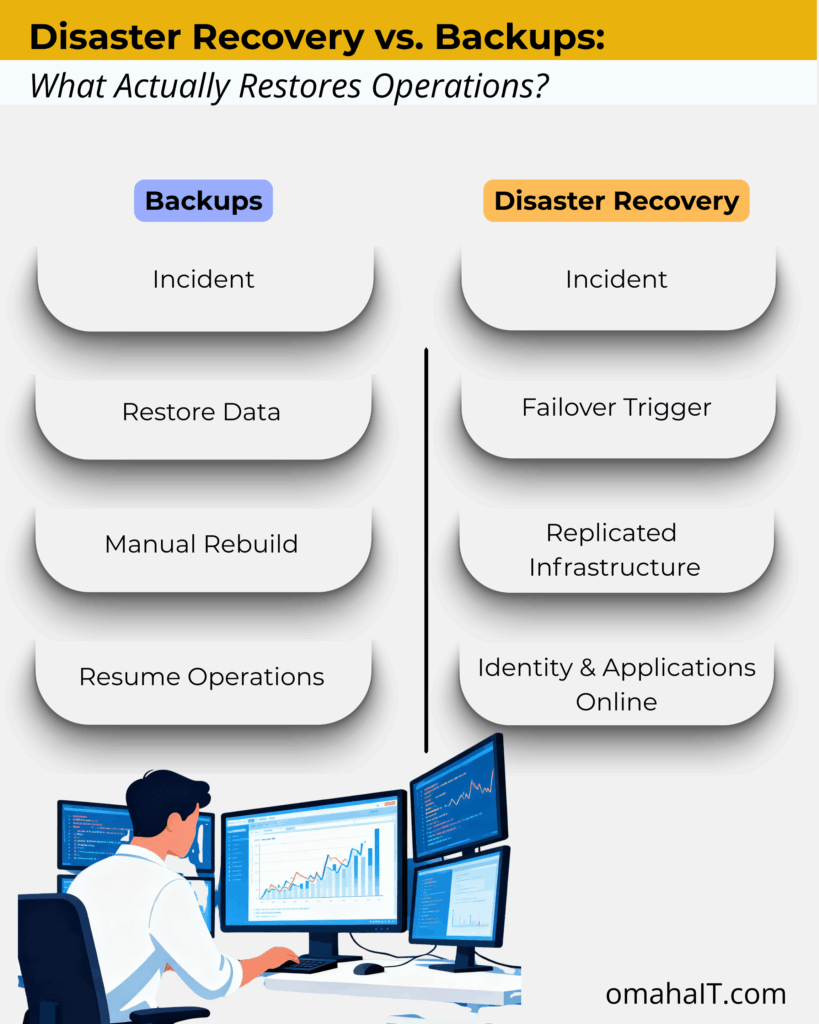
This is where the conversation around Disaster Recovery vs. Backups becomes more than technical terminology.
A backup is a copy of data stored separately from production systems. Its purpose is preservation.
Backups protect against:
Accidental deletion
File corruption
Limited hardware failure
They do not automatically restore:
Authentication systems
Network configuration
Server infrastructure
Application dependencies
Email platforms
Workflow integrations
Disaster recovery is different.
A disaster recovery plan defines how the business resumes operations when infrastructure is compromised.
It answers questions like:
How fast must we recover? (RTO)
How much data loss is acceptable? (RPO)
Where do systems fail over?
Who executes recovery procedures?
Has this process been tested?
Backups answer, “Can we restore the file?”
Disaster recovery answers, “Can we function?”
The Real Lesson from MGM Isn’t About Enterprise Scale
It would be easy to assume that MGM’s situation was unique because of its size.
But the operational lesson scales down.
Modern businesses — regardless of size — rely on:
Identity systems
Cloud authentication
Email infrastructure
Line-of-business software
Vendor integrations
Secure network trust
If those systems fail, file restoration alone does not restore operations.
Large enterprises have dedicated security teams, infrastructure engineers, and global vendor contracts.
Most small and mid-sized businesses do not.
Which means the difference between disaster recovery and backups can have even more significant operational impact in SMB environments.
Not because infrastructure is larger.
But because margin for downtime is smaller.
Why Backups Alone Create a Risk Blind Spot
1. Backup Success Does Not Equal Recovery Speed
Industry research consistently shows gaps between backup completion and operational recovery.
Organizations report:
Long recovery timelines
Backup failures under stress
Lack of disaster recovery testing
The issue is rarely whether backups exist.
It is whether recovery assumptions have been validated.
If a system has never been rebuilt under real-world conditions, recovery timelines are theoretical.
2. Downtime Is Financially Material
Recent industry data shows:
100% of surveyed organizations report revenue loss due to outages.
Mid-sized businesses report downtime costs exceeding $300,000 per hour.
Over one-third of ransomware recoveries extend beyond one month.
Downtime is not an IT inconvenience.
It is an operational event.
And the longer recovery takes, the more consequences compound — financially, reputationally, and legally.
3. Ransomware Now Targets Recovery Infrastructure
Modern ransomware attacks routinely encrypt:
Local backups
Attached storage
Cloud-synced drives
Unless backups are:
Off-site
Immutable
Isolated from production environments
They can be compromised alongside primary systems.
A backup that can be altered is not resilience.
It is exposure deferred.
Disaster Recovery vs. Backups: The Core Differences
Backups are components of a resilience strategy.
Disaster recovery is the strategy.
What “Good” Disaster Recovery Looks Like
A mature disaster recovery posture includes:
1. Off-Site, Immutable, Versioned Backups
Backups must be isolated and protected from alteration.
2. Secondary Infrastructure or Cloud Failover
Warm or hot standby environments reduce downtime dramatically.
3. Defined RTO and RPO
Leadership must determine acceptable downtime and acceptable data loss — explicitly.
4. Documented Runbooks
Recovery procedures must be clear and executable under stress.
5. Regular Testing
Testing remains one of the most common gaps identified in recovery research.
If it hasn’t been tested, it hasn’t been validated.
6. Clean Recovery Environments
Cyber incidents require verified rebuild processes before systems are reintroduced.
Disaster recovery is not a product.
It is structured preparedness.
What This Means for Businesses in Omaha
If you rely on a managed IT provider in Omaha, disaster recovery planning should extend beyond backup verification.
Leadership should understand:
How fast operations must resume (RTO)
How much data loss is tolerable (RPO)
Whether infrastructure can fail over
Whether recovery has been tested under stress
Backups are expected. Continuity planning is differentiating.
What This Means for SMB Leaders
If a global enterprise with infrastructure depth required weeks to fully rebuild after a cyber incident — despite having backups — the relevant leadership question becomes:
Have we defined how our organization would resume operations if core systems became unavailable?
Not whether data exists.
But whether authentication, applications, and workflows can be restored within acceptable timelines.
If RTO and RPO targets are undefined, the organization is backup-protected — but not recovery-ready.
That distinction is strategic, not technical.
The Decision That Matters
Backups are necessary.
However, they are not sufficient.
Disaster recovery defines how your business responds under stress.
One preserves information.
The other preserves continuity.
If your organization relies on backups without a tested disaster recovery plan, the exposure is not visible — until it becomes operational.
The lesson from MGM isn’t alarmist. It’s clarifying.
Resilience requires both preservation and restoration.
Frequently Asked Questions
1. What is the difference between disaster recovery and backups?
Backups create copies of data for restoration. Disaster recovery restores full operational systems, infrastructure, and applications after disruption.
2. Why didn’t backups prevent downtime in the MGM cyberattack?
Because backups protect data, not operations.
In MGM’s 2023 cyberattack, data was largely recoverable—but critical systems were unsafe to bring back online. Attackers compromised identity and access platforms, meaning systems couldn’t be restored until authentication, permissions, and trust relationships were rebuilt.
3. What are RTO and RPO?
RTO (Recovery Time Objective) defines how quickly operations must resume. RPO (Recovery Point Objective) defines how much data loss is acceptable.
4. Are cloud backups enough for ransomware protection?
Not necessarily. If backups are not immutable or isolated, ransomware can encrypt them alongside production systems.
5. Do small businesses need disaster recovery plans?
Yes. SMBs often have fewer internal resources to recover quickly, making structured disaster recovery planning even more important.
6. How often should disaster recovery plans be tested?
At minimum annually — ideally more frequently — to ensure recovery timelines are realistic and executable.
If you’re evaluating your disaster recovery posture with a managed IT provider in Omaha, the first step is defining what recovery actually means for your organization.
Not just whether data exists.
But whether operations can continue.
Because the difference between disaster recovery vs. backups is not technical.
For skilled trade businesses, most job sites feel like controlled chaos that somehow works. Crews are moving, phones are buzzing, photos are getting sent, and jobs keep progressing. From the outside, nothing looks “broken.” Technology is doing its job—right.
Until one day, it doesn’t.
A missing photo delays billing. A lost device raises questions. A login issue stalls a crew mid‑task. These moments don’t usually come from dramatic failures or cyberattacks. More often, they come from everyday job‑site technology issues—that’s where IT risks for contractors quietly build over time, until they interrupt the work itself.
Where Job-Site Technology Risks Actually Show Up
The biggest risks aren’t hidden in systems — they’re visible in everyday workflows.
Industry research shows construction teams can lose up to 35% of their time to avoidable inefficiencies when systems and information aren’t aligned. In practice, that lost time doesn’t just affect productivity — it creates gaps in visibility, accountability, and consistency.
At the same time, studies show field service technicians can spend 1–2 hours per day navigating inefficiencies caused by fragmented mobile tools. When critical work happens across disconnected apps and devices, it becomes harder to track who did what, when, and using which information.
When technology isn’t designed around real‑world workflows, those inefficiencies quietly become risk — and they show up first in the tools crews use every day.
1. Phones and Tablets in the Field
Phones and tablets are essential on job sites. But they also create one of the most overlooked risks.
Devices get:
Lost, replaced, or upgraded
Shared between team members
Used for both work and personal tasks
Photos, emails, job notes, and apps all live in the same place—with no clear separation.
There’s rarely a clean line between “work data” and “everything else.”
Over time, that creates uncertainty around where critical information actually lives.
2. Shared Access and Informal Workarounds
When work needs to get done, crews find a way.
That often looks like:
Shared logins
Apps left signed in
Passwords reused across tools
Not because it’s ideal—but because stopping work isn’t an option.
These workarounds solve immediate problems. But they also remove visibility and accountability.
No one is fully sure:
Who accessed what
When something changed
Or how to trace issues when they arise
3. Data Moving Faster Than Visibility
Job-site data moves constantly:
Photos from the field
Notes from trucks
Emails to the office
Files between systems
But visibility doesn’t always keep up.
There’s often no single place to answer:
Where is this data stored?
Who has access to it?
Is it complete or missing pieces?
This is where job-site technology risks become operational—not technical.
What “Intentional” Job-Site Technology Actually Looks Like
The goal isn’t to slow crews down.
It’s to make the right way of working the easiest way.
That usually comes down to three things:
1. Clear Ownership of Devices and Access
Every device, account, and workflow has defined ownership—supported by Mobile Device Management (MDM) to ensure devices are known, secured, and appropriately governed, without adding friction for the field.
2. Guardrails That Work Automatically
Instead of relying on people to remember processes, systems handle consistency in the background.
3. Visibility That Matches Real Workflows
Leaders can see what’s happening across job sites—without needing crews to change how they work.
Good systems adapt to the job site.
Crews shouldn’t have to adapt to IT.
If you’re like most contractors, the question isn’t whether technology is in place—it’s whether it’s actually supporting how work gets done day to day.
That answer usually reveals where IT risks for contractors quietly build over time—and why managed IT services in Omaha are increasingly focused on aligning systems to real‑world field workflows, not just maintaining tools.
If it’s unclear, that’s a good place to start.
Frequently Asked Questions
1. What are the most common IT risks for contractors?
For most contractors, the biggest IT risks aren’t cyberattacks — they’re everyday issues that quietly disrupt operations. That includes lost or replaced devices, shared logins, unclear ownership of job‑site data, and inconsistent workflows across crews. Over time, these gaps affect billing, scheduling, and accountability.
2. Why are job‑site technology risks so easy to miss?
Because day‑to‑day work still gets done. Photos are sent, jobs move forward, and crews adapt. The risk only becomes visible when something slows down or goes missing — a delayed invoice, a dispute over documentation, or a stalled crew waiting on access. By then, the issue has usually been building for a while.
3. How do phones and tablets used by crews create risk?
Phones and tablets are essential on job sites, but they often serve multiple roles at once. Devices are shared, upgraded, or replaced. Work and personal use overlap. Critical photos, emails, and job notes live on individual devices instead of in systems with clear visibility. That makes it harder to track information, verify work, or respond quickly when questions arise.
4. Are field service IT issues different from office IT issues?
Yes. Office IT is typically built around fixed locations and predictable access. Field service environments are mobile, time‑sensitive, and shared. Crews need fast access without friction, which means traditional office‑style controls don’t always translate well. The risk comes from forcing field teams to work around systems that don’t match how the job actually runs.
5. What does better job‑site technology management look like?
It starts with clarity — knowing where job‑site data lives, who owns it, and how it flows between the field and the office. Strong setups support how crews already work, instead of slowing them down. The goal isn’t adding more tools; it’s creating visibility, consistency, and accountability across jobs.