Leadership Insights

3-2-1 Backup Rule explained for businesses using managed IT, featuring layered local and cloud data protection strategy

3-2-1 Backup Rule Explained for Businesses with Managed IT

Let’s start with something simple.

Your server goes down at 10:14 AM on a Tuesday.

Not dramatically. Not with sparks. Just… down.

Your team can’t access shared files. Accounting can’t pull invoices. Someone tries to open a folder and gets an error message that feels far too calm for what’s happening.

You call IT. They say, “We’ll restore from backup.”

And that’s the moment that matters.

Because what happens next depends entirely on whether your environment follows the 3-2-1 backup rule — or whether someone assumed one copy was enough.

What the 3-2-1 Backup Rule Actually Means

The 3-2-1 backup rule requires:

  • 3 copies of your data (production + two backups)
  • 2 different types of storage media
  • 1 copy stored offsite (cloud or physically separate location)

This structure is consistently defined by backup vendors like Acronis and reinforced by guidance from the Cybersecurity & Infrastructure Security Agency (CISA), which recommends the 3-2-1 model as a baseline for resilience against ransomware and system failure.

Why the consistency?
Because this framework solves multiple types of failure at once.

And most businesses underestimate how many failure types actually exist.

Why the 3-2-1 Backup Rule Is Critical for Ransomware Protection

Modern ransomware doesn’t just encrypt production data.

It looks for backups.

Attackers increasingly attempt to:

  • Encrypt local NAS backups
  • Delete connected backup repositories
  • Compromise backup credentials
  • Target cloud backup consoles

Security researchers and enterprise infrastructure providers have documented this shift, which is why newer models like 3-2-1-1 are emerging — adding:

  • 1 immutable or offline copy (cannot be altered or deleted)
immutable or offline copy

Immutability means once the backup is written, it cannot be modified — even by administrators — for a defined retention period.

For managed IT clients in 2026, ransomware backup protection isn’t optional.
It’s architectural.

If your backups can be deleted, they can be weaponized against you.

Business Continuity Isn’t About Backups. It’s About Time.

Here’s a more important question:

How long can your business operate without systems?

The 3-2-1 backup rule supports two types of recovery:

1. Local Restore (Speed)

Illustration of the 3-2-1 Backup Rule showing a computer and on-premise server with bidirectional arrows, representing one of the local backup copies used for fast data recovery.

A local backup — such as a NAS or backup appliance — allows fast recovery from:

  • Accidental deletions
  • File corruption
  • Routine hardware failures

This protects operational continuity.

2. Offsite Restore (Survival)

An offsite copy — cloud or geographically separate — protects against:

  • Fire
  • Flood
  • Theft
  • Building outages
  • Regional disasters

On-prem-only backups fail during physical disasters.

The 3-2-1 structure ensures you can survive large-scale events, not just everyday mistakes.

This is foundational to effective business continuity planning — something many organizations only evaluate after disruption occurs.

Illustration of the 3-2-1 Backup Rule showing a cloud connected to a backup folder with a refresh symbol, representing offsite cloud storage for secure and redundant data recovery.

What “Good” Looks Like for Managed IT Clients in 2026

Not all backup systems are equal — even if they use the term “3-2-1.”

Here’s what maturity looks like.

Baseline: True 3-2-1 Structure

A strong managed IT backup strategy typically includes:

  • Production data on servers/workstations
  • Local backup on a NAS or dedicated appliance
  • Encrypted offsite backup in the cloud

Enterprise vendors like Acronis and federal guidance from CISA both emphasize this structure as foundational.

Healthy environments also include regular restore testing — because a backup that hasn’t been tested is a theory, not a recovery plan.

Better: Enhanced 3-2-1 with Modern Protections

Top-performing MSPs now add:

  • Immutable storage (cannot be altered or deleted)
  • Air-gapped or logically isolated copies
  • Automated backup integrity checks

You may see this described as 3-2-1-1-0:

  • 3 copies
  • 2 media
  • 1 offsite
  • 1 immutable
  • 0 errors (verified backups)

This evolution exists for one reason: attackers now target backup systems directly.

Your backup strategy must assume that.

Best: Fully Managed Backup Lifecycle

The strongest environments include more than infrastructure.

They include process.

  • Continuous monitoring and alerting
  • Automated verification
  • Scheduled test restores
  • Documented recovery plans
  • Multi-tiered retention (daily, weekly, monthly)
  • Coverage for remote worker devices and SaaS platforms
  • Cloud geo-redundancy

At this level, backup is no longer a product.
It’s part of operational maturity.

And that’s where managed IT shifts from reactive support to leadership-level partnership.

Frequently Asked Questions

1. What is the 3-2-1 backup rule in simple terms?

The 3-2-1 backup rule means keeping three total copies of your data, stored on two different types of media, with one copy stored offsite. It is widely recommended by cybersecurity authorities like CISA as a baseline for resilience.

2. Is cloud storage the same as backup?

No. Cloud file sync services replicate changes — including deletions and ransomware encryption. A true backup maintains separate, restorable copies that are not instantly overwritten.

3. How does the 3-2-1 backup rule protect against ransomware?

It ensures at least one copy is stored offsite and ideally isolated or immutable, so attackers cannot encrypt or delete every recovery point.

4. Do small businesses really need this level of backup structure?

Yes. Single points of failure disproportionately impact SMBs because downtime affects revenue, operations, and reputation immediately. The 3-2-1 model is specifically designed to prevent total data loss.

5. What is 3-2-1-1-0?

An evolution of the 3-2-1 backup rule that adds one immutable/offline copy and zero unverified backups (meaning restore testing is performed regularly).

Final Thought

Backups are easy to assume.

Recovery is harder to design.

The 3-2-1 backup rule isn’t about technical best practice — it’s about removing uncertainty from moments that would otherwise disrupt your business.

If you’d like clarity from a trusted managed IT provider on whether your current environment truly meets that standard — or just sounds like it does — that’s a conversation worth having.

Professional man seated and using a tablet with office background, featuring InfiNet logo and contact message.

3-2-1 Backup Rule Explained for Businesses with Managed IT Read More »

Illustration showing hardware resources flowing toward AI demand, where servers, laptops, and circuit boards become increasingly concentrated, representing how AI growth narrows availability in a constrained hardware market while a decision-maker reviews system data.

The Hidden Risk of Waiting in a Constrained Hardware Market

Most organizations delay replacing hardware until it’s necessary—a workstation slows down, a server shows errors, or an imaging system seems adequate for another year.

In a stable market, that approach often works.
In a constrained hardware market, it quietly increases risk.

A major driver behind today’s constraints is the rapid expansion of AI infrastructure. Large-scale AI systems require significantly more memory and storage than traditional workloads.

To meet that demand, major manufacturers have shifted production capacity toward data-center components — tightening availability and raising prices for the same memory and storage used in everyday workstations, servers, and imaging systems.

This isn’t a short-term disruption. It’s a structural shift in how core hardware components are allocated. And it changes what “waiting” actually costs.

Why Waiting Carries More Risk Than It Used To

When hardware supply was predictable, waiting until systems reached end-of-life was usually manageable. In today’s market, AI-driven demand has reduced slack across the supply chain — leaving far less room for reactive decisions.

The impact shows up in a few consistent ways.

Reactive Replacements Become More Likely

When a workstation, server, or imaging system fails unexpectedly, limited component availability can force organizations into reactive replacements.

Instead of selecting systems that align with:

  • performance requirements
  • regulatory or compliance needs
  • long-term support lifecycles

Teams are often left choosing from what’s immediately available — not what’s best suited for the environment.

AI-driven memory and storage demand means those “last-minute” options are increasingly constrained.

Fewer Configuration Options

To manage limited supply, manufacturers have tightened quoting practices and reduced configuration flexibility. In some cases, contract pricing has been paused, and certain memory lines have seen temporary quoting freezes.

As a result:

  • approved configurations are narrowing
  • standardization becomes harder
  • long-term planning gives way to short-term compromise

When configuration choice shrinks, organizations lose control — not just over price, but over system longevity and fit.

Operational and Financial Impact Compounds

Unplanned downtime is costly on its own. In a constrained market, it often coincides with elevated pricing and longer lead times.

Analysts continue to project sustained pricing pressure into 2028 and beyond, driven in large part by ongoing AI infrastructure expansion. When failures collide with supply constraints, organizations absorb both operational disruption and financial strain at the same time.

What Intentional Planning Looks Like Right Now

The organizations navigating this market best aren’t buying more hardware.
They’re planning better.

Intentional hardware planning shifts the model from “wait until it breaks” to “prepare before the market dictates your options.”

A modern planning approach includes:

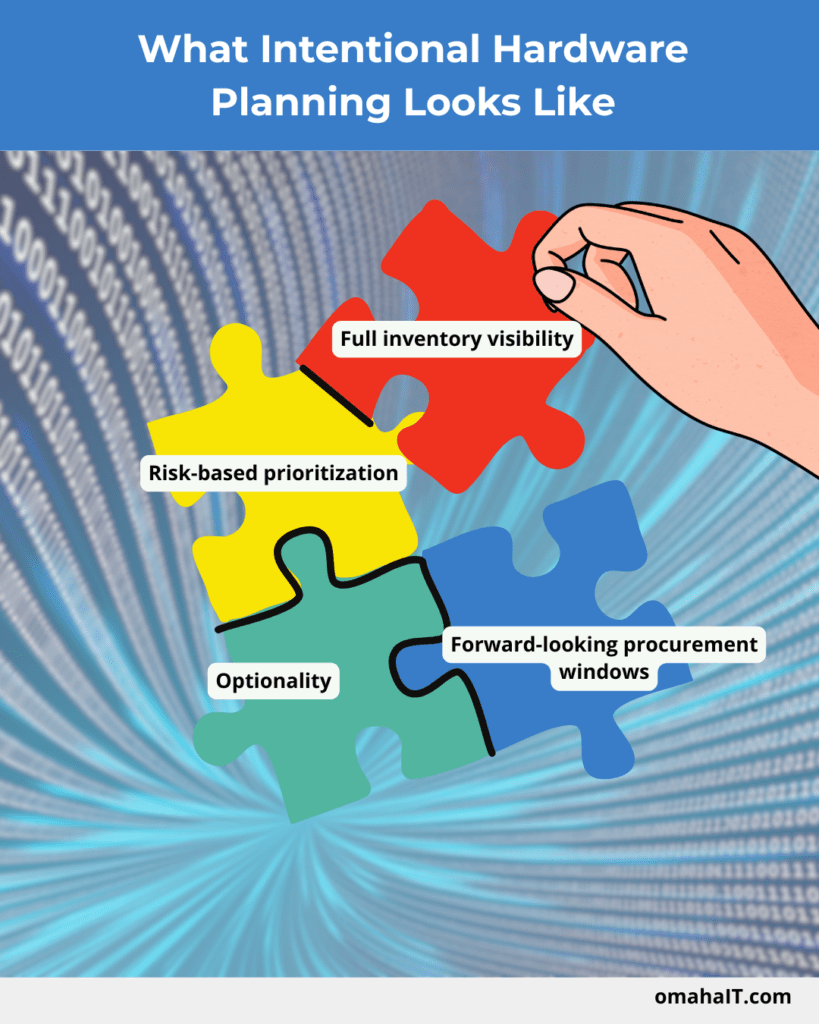
  • Full inventory visibility: Clear insight into all workstations, servers, imaging units, and network components — including age, role, and performance.
  • Risk-based prioritization: Identifying aging or at-risk systems based on business impact, manufacturer lifecycle stages, and operational dependency.
  • Optionality: Pre-identifying multiple viable configurations or supply paths instead of relying on a single model or vendor.
  • Forward-looking procurement windows: Understanding realistic lead times and planning windows — without committing to immediate purchases.
Illustration showing puzzle pieces coming together to represent intentional hardware planning in a constrained hardware market, highlighting full inventory visibility, risk-based prioritization, optionality, and forward-looking procurement windows.

This kind of visibility preserves choice in a market where choice is increasingly limited.

How Leaders Can Reduce Surprise (Without Making Reactive Purchases)

The most effective step leaders can take right now doesn’t involve buying anything.

It involves clarity.

Reducing surprise in a constrained hardware market typically starts with:

  • early forecasting conversations with trusted technology partners
  • mapping multi-year refresh expectations instead of single-event replacements
  • understanding upcoming manufacturer milestones, such as end-of-support or model retirements
  • pre-evaluating compatible system alternatives to avoid last-minute decisions

None of this requires action today. The goal is to remove uncertainty in a market where uncertainty has become common.

Industry-Specific Considerations

Healthcare & Dental

Clinical environments rely heavily on imaging performance, which is closely tied to GPU and SSD availability — both of which are under pressure from AI-driven data center demand.

Planning ahead helps ensure clinical workflows aren’t slowed by outdated or underpowered systems.

Relevant environments include:
Dental imaging rooms, CBCT systems, intraoral cameras, ultrasound, and radiography workstations.

Veterinary Practices

Many veterinary clinics operate with mixed-age hardware across front desk, diagnostic, and clinical systems.

In a constrained market, reactive replacements often disrupt workflows and strain budgets. Proactive lifecycle planning helps stabilize costs and reduce operational interruptions.

Frequent multitasking and heavy software usage place consistent demands on workstation memory and storage.

DRAM constraints and pricing volatility directly affect the everyday productivity machines these organizations rely on — making forward planning critical to maintaining performance and predictability.

Final Thought

Waiting isn’t neutral anymore. In a constrained hardware market, it quietly limits options, increases exposure to downtime, and shifts control from leadership to circumstance. Planning restores that control.

Flat-style digital illustration of an IT professional using a tablet in a calm, modern office. In the background, multiple workstations display structured system dashboards. Text reads: “Get in touch with our team.” InfiNet logo shown.

The Hidden Risk of Waiting in a Constrained Hardware Market Read More »

Flat vector illustration showing a business owner reviewing IT systems as costs decline, with warning indicators on screens and reduced resources, illustrating how problems emerge when an IT budget is too low and critical systems begin to feel pressure.

How to Know If Your IT Budget Is Too Low

Let’s face it: when spending conversations come up, most leaders do not feel their IT budget is too low.

On the surface, things appear to be working. Systems run. Tickets get closed. Nothing is breaking badly enough to force uncomfortable discussions. Technology seems under control.

But underneath that, small issues often begin to stack up in familiar ways.

Teams stay stuck in reactive mode instead of making improvements. Security alerts linger longer than they should. Projects slow down or stall altogether because there is no time, capacity, or margin to move them forward.

When that pattern appears, it’s rarely about effort or competence. It’s usually a sign the IT budget no longer matches the level of risk, complexity, and expectations the organization is carrying.

The challenge is that IT underfunding doesn’t announce itself clearly. It doesn’t show up as one broken system or an obviously wrong line item. It shows up operationally first – long before leadership even calls it a budgeting issue.

The First Places an IT Budget Falls Short

When an IT budget is too low, it doesn’t fail everywhere at once.

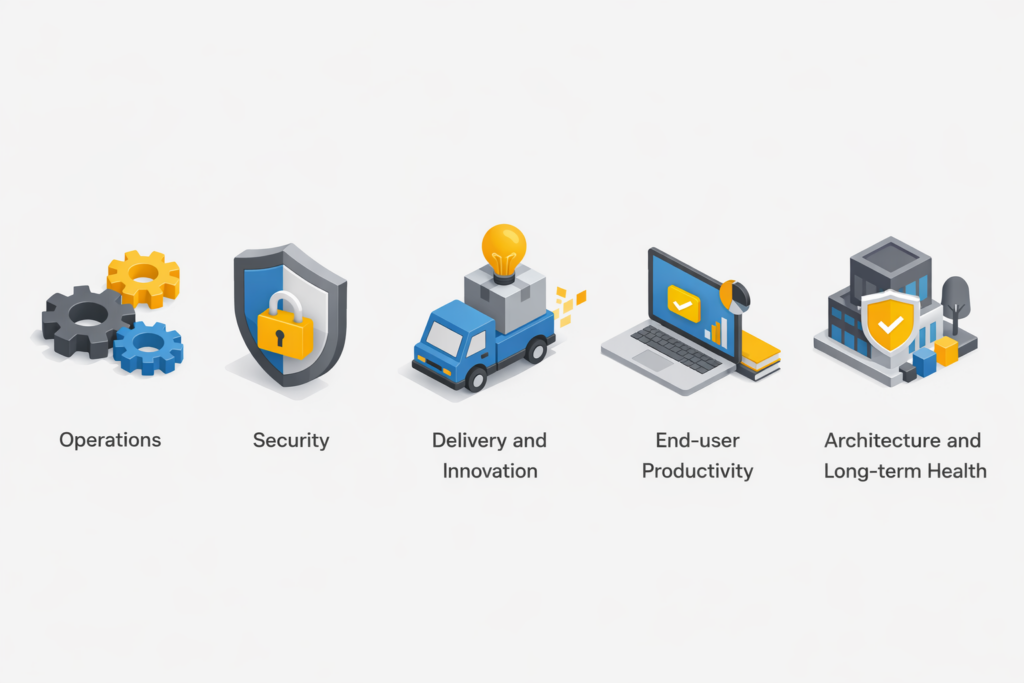
It fails where capacity and visibility matter most — the areas that quietly hold the entire operation together. These tend to fall into five categories:

  1. Operations
  2. Security
  3. Delivery and innovation
  4. End-user productivity
  5. Architecture and long-term health

The early symptoms are easy to normalize. Leaders adapt. Teams work around issues. Temporary fixes become permanent habits.

That’s why having a clear diagnostic lens matters.

Visual illustrating how an IT budget is too low impacts key business areas, showing operations, security, delivery and innovation, end-user productivity, and long-term IT architecture as the first areas where gaps in capacity and visibility begin to affect overall performance.

Quick Diagnostic Checklist: Early Warning Signs

If several of these sound familiar, it’s a strong indicator that underfunding is already affecting operations.

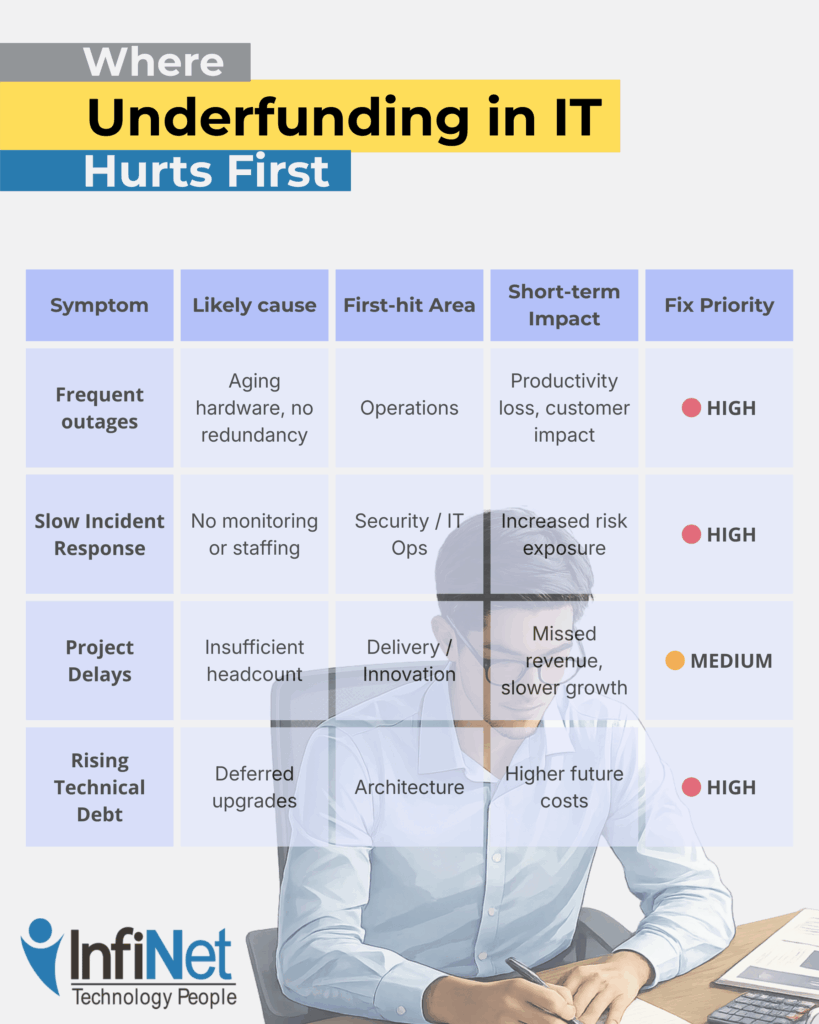
Frequent outages or long time to repair

When systems fail more often — or take longer to recover — it usually signals underinvestment in infrastructure, monitoring, redundancy, or vendor support. The cost isn’t just downtime. It’s lost confidence and accumulated disruption.

Rising number of unresolved security alerts

Alerts that stay open, patches that slip, and security tasks that get deprioritized are classic signs of an underfunded security operation. This isn’t about negligence. It’s about insufficient tooling, staffing, or time.

Growing project backlog

When new initiatives keep getting pushed “to next quarter,” it often points to a capacity gap. Teams are fully consumed keeping things running, leaving no room for improvement, automation, or innovation.

Rising technical debt

Deferred upgrades and postponed maintenance feel harmless in the moment. Over time, they increase complexity, raise future costs, and make every change harder than it should be.

Individually, these issues seem manageable. Together, they paint a clear picture of an IT budget that’s stretched too thin.

“Infographic showing where underfunding in IT hurts first, explaining common symptoms like outages, slow incident response, project delays, and rising technical debt, helping business leaders understand when an IT budget is too low and which areas are impacted first.”

Underfunding tends to hit the same areas first because they absorb risk on behalf of the rest of the business.

As you can see, patterns are important here.

Security and availability are usually affected first — not because they’re unimportant, but because they require continuous investment to remain invisible. When funding slips, these areas quietly absorb the damage until something breaks.

By the time leadership feels urgency, the organization is often already operating in a riskier, more fragile state than it realizes.

Leadership Decision Guide: What to Fix First

When underfunding becomes visible, the instinct is often to spread money thinly across everything. That usually makes the problem worse.

A more effective approach is triage.

1. Stabilize security and availability

Gaps here create the largest short-term risk. Address monitoring, patching, alert ownership, and system resilience first.

2. Restore visibility

Without clear insight into what’s happening, teams operate reactively. Investing in observability and ownership often delivers outsized returns.

3. Add intentional capacity

This doesn’t always mean hiring. It can mean automation, better tooling, or clearly defined external ownership that creates breathing room.

4. Delay non-essential initiatives

Not every project deserves immediate funding. Stabilizing foundations should come before expansion.

The goal isn’t to spend more everywhere — it’s to spend intentionally where risk and friction are already accumulating.

Frequently Asked Questions

1. How much should a company spend on IT?

There’s no universal number. The right spend depends on risk tolerance, regulatory exposure, system complexity, and growth goals — not just company size.

2. Is outsourcing cheaper than hiring internal IT staff?

Sometimes. Outsourcing can provide access to expertise and scale without full-time costs, but it still requires appropriate funding to be effective.

3. What’s the biggest risk of delaying IT investment?

Accumulated technical debt and reduced resilience. Problems become harder and more expensive to fix the longer they’re deferred.

4. How often should IT budgets be reviewed?

At least annually, with quarterly check-ins tied to operational and security metrics — not just spend tracking.

5. How do I justify IT spend to non-technical leadership?

Frame it around risk reduction, operational stability, and capacity — not tools or features.

A Clear Next Step

If you’re unsure whether your current IT budget is truly supporting the business — or quietly holding it back — clarity usually comes from examining how well operations, security, and delivery are actually holding up, often with the perspective of a trusted managed IT service.

Understanding where friction lives today is often more valuable than debating numbers in isolation.

Professional man using a tablet in an office setting with “Get in touch with our team” and InfiNet branding.

How to Know If Your IT Budget Is Too Low Read More »

Talk to our Team