Blog

Is Alexa Going To Take Over The World?

Amazon’s virtual assistant is designed to support home and office automation, maximize efficiency and save user time and money. Can Alexa’s automation of professional processes translate into profit – and conquer the business world?

Take over the world

It’s no surprise to most consumers that Amazon loves integration and automation. After a successful “dabble” in a shipping membership, its Amazon Prime service now estimates 80 million users and generates $6.4 billion in annual revenue. After test markets proved successful with both Amazon Prime Now, expediting delivery on specific Amazon Prime products to within a two-hour window, and Amazon Fresh, a home delivery grocery service, Amazon’s acquisition of Whole Foods seemed a logical next step to offer consumers a one-stop shop for most purchases.

Simultaneously, the expanding Amazon Echo product line-up aims to help consumers with artificial intelligence-based home automation solutions.

“Alexa, order more laundry detergent…”

“Alexa, set a timer for 15 minutes…”

“Alexa, what is the weather supposed to be like today…”

Alexa is happy to call another Echo product by looking through your contacts to find who has an Alexa-enabled device, or to command your Roomba to start a clean cycle. A whole-house Sonos audio system will set you back a few thousand dollars, but a couple of Amazon Echo devices will cost you a few hundred dollars by comparison and can be linked together to play the same music with comparable sound quality. Amazon Echo products and the voice-activated Alexa smart assistant are becoming more commonplace in homes but isn’t seen as a valuable option for a virtual assistant in the workplace – yet. Consumers tend to feel a bit overwhelmed by the vast options for how users can take full advantage of Alexa’s capabilities. Amazon does send a weekly email with the latest tips on how to make the most off Alexa, but we’re betting you didn’t know you can enable the Chat Bot skill to have Alexa assist in posting to your Slack account in a specific channel.

  • Enable the “Alexa Things to Try” skill and Alexa will deliver a quick tip-filled brief every day on how she can help you.

Yes, Alexa can help you post to a Slack channel. Let that sink in. Did you know Alexa can also integrate with Salesforce tools? Through Amazon Web Services (AWS), developers can design innovative voice-enabled technologies to build an Alexa skill, much like the Chat Bot skill mentioned above. Alexa can fetch various reports, like expense reports and professional status reports, with a simple voice command. Voice-activated automation of simple and repetitive tasks increase both efficiency and productivity and are far more cost-efficient.

Those are the buzzwords of the day: efficiency and productivity. What can you do to increase each, and improve overall cost-efficiency for your company? Think about what tasks your business can automate. That is the initial goal.

  • Did you know Amazon allows developers to create skills through the Alexa Skills Set on the Alexa developer site? Whether only for your company’s use or if you choose to publish the skill to be used by others, this is a fantastic resource with all the tools for experienced developers.

What skills would help your business run more efficiently? Here are a few existing Alexa skills that you can already implement:

  • Quick Events
    • Alexa can help you keep organized and on time with this skill that can add items to your Google calendar and check for conflicting events on your schedule.
  • Complete Tasks
    • This skill requires users to also have the accompanying Complete mobile app on their smartphone or tablet and allows users to add tasks by voice command.
  • Kayak Explore
    • For users with a Kayak account, Kayak Explore will check flight status, track prices, allow you to set up travel plans and more with the ever-expanding skill.
  • Translated
    • Given the global nature of agreements and transactions in modern business arrangements, the Translate skill helps users by translating short sentences into 36 languages. The best part of this particular skill is since the nature of Alexa is voice-activated, this skill includes pronunciation!
  • Chineasy
    • Going one step further than Translated, Alexa users with the Chineasy skill can learn Mandarin Chinese in an easy-to-remember process with one sentence a day. The unique features of this skill also share interesting stories of Chinese history and culture with users.
  • Notion
    • Alexa will read your emails to you and also delete them, but what makes this skill a must-have is that Notion will prioritize your emails based on importance.
  • AstroBot
    • Like Notion, AstroBot is your new intelligent email assistant for your Gmail or Office 365 email from an Alexa-enabled device.
  • UPS
    • This skill works much like the UPS.com website or the UPS app. You can find a location, track packages, or get a shipping quote with this Alexa skill, once it’s linked to your UPS My Choice account.

Did you know that with Skill Finder, Alexa will also tell you a “Skill of the Day” to showcase one featured skill? This is aside from the “Alexa Things to Try” skill, which means Alexa really wants to help you learn what it has to offer!

In the last decade, every major organization needed to develop a website to stay competitive, but in the last few years, the requirement has become the mobile app. Organizations that wasted time, money and resources on a mobile app that didn’t add value for users found themselves removed from smartphone screen real estate and declining metrics via their mobile app dashboard. Consumers feel the same way about Alexa skills that are published to the Alexa Skill storefront. More importantly, allocate resources to developing an Alexa skill that just doesn’t offer much improvement in productivity for your organization will be even more frustrating.

How can you run your day-to-day operations more efficiently? What processes can you automate? Sure, you already automate many tasks using software programs, but Alexa is different. You can tell Alexa what you need it to do while you’re performing another function.

Between Notion and Quick Events, the next day your human assistant takes the day off, try an Alexa skill to see how Alexa can help you run your business and dominate your industry by saving you time and making you money!

Is Alexa Going To Take Over The World? Read More »

Want To Be At The Top of Your Game?

Do What Professional Sports Teams Do—Use Analytics.

To win in any sport, coaches used to rely solely on their knowledge, experience and “gut.”  Today, they have another source to rely on–analytics. And those who don’t take advantage of it will fall behind their competition.

Professional Sports Analytics

Analytics are used in many industries, but today it’s helping team managers and coaches “score points.”  It’s being used to influence coaching decisions, boost performance, help with contract negotiations, prevent injuries and even gain insight into fan preferences.

Fans and sports enthusiasts can now visit websites where they can see breakdowns of their favorite player’s performance. According to John Forese, senior vice president and general manager of LiveAnalytics, a LiveNation data, analytics, and research company:

“It’s about knowing when a fan is interested in an opposing team coming to town or whether a 4 p.m. game is not too late for them. It’s about hitting them with that communication when they are in the decision mindset and giving season ticket holders more incentive to keep coming and retain their tickets.”

Analytics has been used in businesses for years. Only recently has it been applied to professional sports. And why not? It’s a source of information to help us make better decisions.  If you don’t use it in your business, you’re leaving a lot of information on the table that could help you succeed. And, those who don’t will be at a competitive disadvantage.

This is the premise of what MIT lecturer Ben Shields tells businesses—That managers and coaches can learn so much about analytical decision-making from the progress that sports teams have made in recent years. This is no different than what many businesses do today. They rely on software solutions like Microsoft Power BI (Business Intelligence) to transform data and create interactive reports to help them analyze data to reach their goals.

Teams now benefit from the use of wearable technologies that provide real-time data to track players’ movements. Every major professional sports team today has a department or team of data analytics experts.  They use data-driven decision-making to ensure their teams and players are at the “top of their game.”

As you know, professional sports teams have scouts. These scouts visit prospective players and take copious notes.  They send these notes to data developers. Then, the data is forwarded to skilled mathematicians who crunch the numbers to help a team’s general manager create overall profiles of players. They use these profiles to decide if a particular player should be signed on as a free agent or is worth drafting or acquiring in a trade for another player.

This sounds easy, right? It’s not.

It can be difficult to decide what data is valuable and what isn’t. Unless the team decides in advance what criteria an evaluation should be based on, all this work is for not.  It’s the same in any business.  You must first prioritize what your goals are before analyzing data. Otherwise the volume of data you accumulate can be overwhelming.

When asked how to integrate analytics into the decision-making process, Shields replied:

“We start with encouraging executives to clearly articulate their organizational goals and prioritize which goals may benefit from an analytics approach. Some organizations start with the data and the technology. We say start with the goals.”

Ever since Billy Beane, (the most progressive and talented baseball executive) first started utilizing statistical predictors over ten years ago, every MLB team has adopted analytics, as have teams in the NFL and NBA.  Vivek Ranadive, the Sacramento Kings’ owner believes that data analysis has changed the game of basketball forever. For example, Pitchf/x technology from Sportvision has been installed in all 30 Major League Baseball Stadiums. It tracks all the pitches that occur during games. Sportvision also provides data-capturing technologies for football and car-racing sports.

Basketball is one of the best examples of how analytics has changed the way sports are played and player performance is measured. They use “Player Tracking” to analyze the efficiency of a team of players by tracking their movement on the court.  SportVU put six cameras in all the NBA arenas to capture the movements of players and basketballs. It does this at a rate of 25x per second. Another company called Zebra Technologies makes RFID tags, which attach to equipment, balls, and players to track movement, distance, and speed. The RFID tags blink at a rate of 25 times per second and deliver data in 120 milliseconds.

This technology provides a team’s analysts a multitude of data such as player speed and ball possession. It shows them how fast a team player moves and how far he’s traveled throughout the game, as well as how many times he touched the ball, how many rebounds attempts he made, and more.

As mentioned above it can be difficult to determine how to use all this data and apply it to attain a competitive advantage. Coaches and team executives must know how to prioritize the volumes of data, how to prioritize it, decide what factors to apply in decision making and how to track the decisions they made. Just like departments in your business such as purchasing and sales, sports teams have both offense and defense coaches. They must consider the objectives for both before developing a mechanism for analyzing data. Then they must track the decisions they’ve made to ensure the team’s goals are met.  There’s no one formula for this.  Each team will do this differently.

According to Shields, even the players see value in data analytics:

“End users have become advocates, and by end users, I mean athletes. A growing number are starting to understand the value of analytics insights as they relate to their performance. This doesn’t mean the athletes are running their own models in Python; it means the information about how his or her performance can improve is being communicated in the right way and with the right emphasis on how that athlete can benefit. And, as a result, the athlete becomes more of a believer and more of an advocate for this type of information.”

Analytics in both business and sports organizations is a “game changer.” It’s an evolving field, and as it improves, more will depend on it for decision making.

Want To Be At The Top of Your Game? Read More »

Tired Of Juggling The Many Apps Your Team Uses?

Integrate and Collaborate Seamlessly Microsoft Teams

Microsoft Teams has become the go-to chat-based workspace in Office 365. It’s more than just a hub for teamwork. It’s even customizable for each type of team.

Microsoft Teams is perfect for one-on-one conversations, open group discussions or even public meetings. It has many modern features that make meetings more fun and productive. For instance, there are cool GIFs, stickers, and emojis available so team members can show a little personality. The program integrates well with Outlook email and it’s easy to switch between teams. Add to that the ability to use video calling on Android that includes mobile voice and you’ve got an excellent business resource.

The Microsoft Teams app provides users with all the tools necessary to facilitate meetings for corporate America as well as freelancers and even educational institutions. With so many people now taking online classes, the Teams app can give a tutor and student the perfect place to discuss Algebra or learn a new language. The app is fairly intuitive and most users pick up all the fine points of how to use it very quickly.

How Microsoft Teams Sets Itself Apart

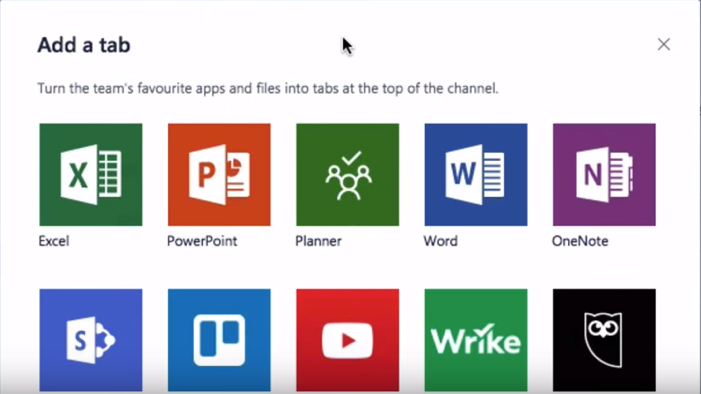
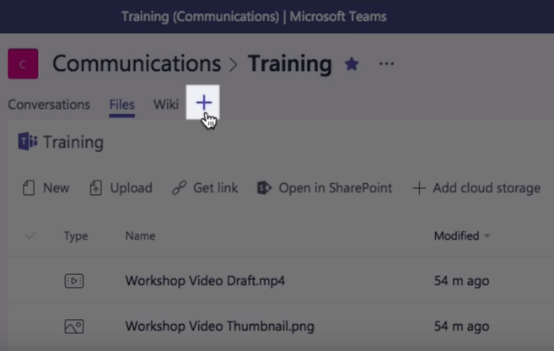
With so many meeting apps available now, organizations want to know why Microsoft Teams is better. That’s a good question and it does have a good answer: because this app is included in Office 365, it seamlessly integrates with all the programs that today’s business professionals are already using. Within the Teams app, users can access all files and any Office programs such as PowerPoint, Excel, Word and OneNote. In addition, the app features integration with Power Bl, SharePoint and Planner Intelligence using Microsoft Graph.

Though you can open these files using other meeting apps, they are seamlessly integrated into the Microsoft Teams app, limiting the additional steps that users must perform. Many of the exciting features are available with just a single tap. Regardless of what type of business you’re in, the Microsoft Team’s app can be customized to work the way you need it to. That’s one of the big reasons why people in so many different industries choose Team. The app works just as well for a few people or a dozen. It works nicely for business pros, teachers and students. The app is easy to set up and takes very little instruction to get started. With custom memes and tailored channels, most people quickly become expert Teams users.

Beyond the Basics

After using Microsoft Teams for a while, most people start looking around at some of the more advanced features, of which there are many. Do you need to integrate some common cloud services into your meeting? It’s a simple process.

Partner integration is available for Trello and SAP but Microsoft will be adding new partners in the future. The individual channels contain Bots that can be working in the background on important tasks. In addition to those great features, the Teams App is served from the Microsoft global hyperscale cloud. That makes it available from anywhere in the world, so if you need to meet with people Japan, in Taiwan, someone in Quebec and a group in India, it’s a simple matter to do so. Team players can share their documents, show a PowerPoint, go over an Excel spreadsheet and work on many other tasks like these. There are virtually a limitless number of tasks that can be done and without the help of an IT specialist.

Ideal for the Medical Field

Since the Teams app is compliant with HIPAA, ISO27001, and others, it’s perfect for use in a medical facility of any type or size. However, the app could also work well in telemedicine. Though live face-to-face meeting software is included in most programs for the telemedicine industry, Teams could be used in numerous instances. Say you were on the go and needed to use the app from your mobile phone. It’s not only quick and easy but remember that it is compliant with most HIPAA guidelines. Talk to a colleague or patient. Sometimes you just need a quick face-to-face with someone and that’s it.

Excellent Built-In Security

The Teams app is big on security as well. With so many thousands of cyber-theft events taking place each year around the world, you just can’t be too careful. Sometimes a team might be talking about their favorite flavor of ice cream and sometimes they might be discussing a new hyperdrive for America’s next rocket ship. Multi-factor authentication and built-in data protection are just two ways Microsoft ensures that your meeting will remain confidential.

Use Teams to Enhance Customer Service

Though this is being done in some organizations, in the future there may be a great number of businesses that contact their customers using apps like Teams, to let customers know about some problem with an order. Perhaps you just sold hardwood flooring to a residential customer for their whole house but now you’ve learned that the flooring is back-ordered for six months. Wouldn’t it be better to speak to this customer face-to-face when you break the news to them? Customers may be less upset when they realize that the store cared enough to have a manager call them and speak to them in person about the problem. That’s just the tip of the iceberg when it comes to retail sales.

In the sales world, it’s very common to have angry customers whose brand-new refrigerator/stove/television/computer just stopped working. Mitigating customer problems is a great way to use Microsoft Teams.

Microsoft Teams

Working Together

Microsoft Teams encourages people to work together. You can bring up the new budget from Excel and let everyone go over it, make comments, and suggest changes. You can open the new marketing plan in Word so that a whole room full of execs hear about the latest marketing campaign. They need to become familiar enough with it to pass on the information to employees in their department. Since most people have Office 365 already on their computer, there’s nothing new to install.

How to Set Up a Team

Simply go to the Office interface and click on the Teams App. At the bottom left corner of the screen, select “Create Team”, then type a name and short description. Next, add people to your new team. Using Microsoft Outlook, you can add an entire group. Now click “Done” and create a general channel. Other channels may be added later as needed. Name and describe this channel, click “Add” and it’s all set up. Within just a few minutes you can have a specific meeting place set up where you can meet each week with co-workers, students, your doctor, unhappy customers and much more.

Miscellaneous Features

Adding and removing team members is simple and only takes a few moments. A tutor who is working with five different students throughout the day could easily change the student’s name quickly in between each lesson. You might start with a private chat, just between the teacher and student. However, what if you wanted to add a second teacher or several more students? It’s easy to do that. Just list the name(s) of the people you want to attend, then compose a new message in Outlook to invite them to attend. While in a chat, you can make a video or audio call by selecting the icon for it. Chats can be renamed, which is good for those that get transferred to a different department. You can continue using the same chat room; just add or remove people as needed.

Microsoft Team has so many more features that make life and work much simpler. It is quickly becoming the favorite virtual chat room for business people in every industry. If you’re still feeling you need some help with setting up a chat room, Microsoft offers a great range of informative YouTube videos with step-by-step instructions for how to do just about anything.

Tired Of Juggling The Many Apps Your Team Uses? Read More »

Tired of Your Local Shock Jockeys?

Give Free Global Radio A Try Instead

Listening to free, global radio stations is a great way to broaden your horizons and liven up your listen to habits. It’s also a lot easier than you may think.

Local Internet Radio

Why Listen to Global Radio?

Many people are saying that radio is dead, but that’s not true at all. It has morphed into something much greater than it once was. Today, many of us have friends and family living in other countries, which is why someone might want to listen to a radio station in Hong Kong. There is a wide range of other reasons as well. Maybe you grew up in the Philippines and just want to keep up with what’s going on in your hometown. Tuning into one of their local radio stations is a great way to do this.

Say you just moved from Seattle to New York, but maybe you’d like to continue getting daily news from Seattle. Or maybe you might be thinking of moving to New Zealand. What better way to find out what life is really like there than by listening to local radio stations?

Get Local News & Weather

You can get local news, weather and other fun, interesting or weird information by tuning into radio stations in other parts of the world. The best part about this is that there are now several services that offer you the ability to listen to dozens of different radio stations from Ireland to Australia. Many of these services allow you to browse by station or by country. Let’s say you want to listen to a radio station in Latvia.

Latvia is a small country on the western border of Russia. Estonia lies to the north, while Belarus lies to the south. In spite of this being a small remote nation, one global radio service offers 19 different radio stations in Latvia. Some of these stations are broadcast in Russian while some are broadcast in Latvian or other Baltic languages. If you’re trying to learn to speak Russian, listening to a Russian radio station would enhance your efforts.

Whether you were born in France and yearn to hear the language spoken by French people or you are trying to learn about a new culture, listening to a French radio station would make your efforts more enjoyable. As mentioned above, access to global radio stations is free on many websites. Most of these sites give you choices as to what you’d like to listen to. You can listen to talk radio shows, local news, and weather for any city, sports news for any country or city, or just music from the city or country of your choosing.

How to Get Started

Search for internet radio stations or services that provide multiple choices. Good search phrases for this include:

  • Listen to radio stations worldwide
  • Global radio stations
  • Internet radio

Multiple choices will come up depending on exactly what you typed in the browser. Some of these will be paid services like Amazon Music Unlimited. Though they do offer 30 days of free music, at some point you’ll have to start paying to listen. Of course, a paid service will offer other perks like being able to listen using your Echo device. These are Alexa voice-controlled devices that make it easy to hear your favorite tunes from Spain, India or anyplace in the world.

If you’re not ready to sign up for a paid service, you’ll also find many free services like Pandora, Screamer, TuneIn, and Jango. Most of these allow you to search for your favorite artist, search by genre, or search by specific song/artist titles. You might be looking for the latest Hip Hop music or some good music for your workout routine. Simply click on something that peaks your interests and listens. If you don’t like what you hear, use the back button to return to the original page.

At Pandora, you create your own personal “station” by choosing favorite artists or genres of music such as country music. You can add favorite tunes or artists as you desire. Pandora offers ad-free listening for around $5 per month. This type of “radio station” does not include local news and weather; it’s just music.

Tips for Success

With so much cultural, musical, and lifestyle information available through radio stations, there’s no reason not to become an avid listener. You can broaden your musical tastes or just find out what’s going on today in Rome simply by tuning into an Internet radio station. However, there are many other reasons to listen – become better informed about what’s going on in the world, or track new emerging technology in Southeast Asia.

Since there are so many choices now available, select a station or service based on what you’d like to accomplish. If you simply want to listen to music, then Pandora or Jango are both good choices. If you want to listen to an actual radio station, then Screamer and TuneIn are good ideas. Most stations and services offer ad-free content for an additional charge. You may have to pay extra for specific content, such as comedy programming.

The interface for many worldwide radio stations will allow you to manage volume control, play, stop or resume listening. They may also have an information box that will tell you what song/artist is currently playing. You can tag a song or a station as a “favorite” so that it’s easy to return there.

Improving your Sound Quality

With music, sound quality is usually important. That’s where many computers and laptops fall short. You may have to spend over $1,000 to get a computer with a decent sound card. If you are unable to afford this, there are workarounds. Amazon and other online sellers, offer devices that allow you to hook your computer up to external speakers.

External Speakers

To find out more about this, simply search online for “how to hook up my computer to external speakers” and other similar phrases. Usually, it’s just a matter of wiring your computer to a device like a Lepai LP2020 amplifier and then wiring that device to your external speakers. You can also purchase external speakers made specifically for this purpose. These speakers will have a 3.5mm jack or USB plug that can be plugged directly into the laptop or computer.

Of course, all computers have a headphone jack. For about $100 you can buy headphones with amazing sound quality. This will make your listening experience more personal and intimate. This is a good idea when you have others in the family or home who may not want to listen to, say, Latvian Folk Music.

Tired of Your Local Shock Jockeys? Read More »

Is Organizing Your Staff A Little Like Herding Cats?

Stop Struggling – Try Microsoft’s Team Planner

Microsoft’s latest and greatest app is called Team Planner. It’s an amazing tool that lets people organize any task. Of course, it was developed with corporate America in mind, but this type of app would be great for planning anything from a birthday party to a wedding. The app has been well-received and is now being used around the world in every type of business or enterprise.

Designed for Projects of Any Size

For those who work with teams every day, it’s clear why this type of app has been so successful. Any company or department that has worked on a big project understands the frustrations. There’s just no easy way to manage a big project with lots of players involved. How do you assign people to specific tasks? How do you upload documents so everyone has access? How can you find out each person’s current status?

In the past, programs developed to streamline project management have been large, unwieldy conglomerations that most team members could hardly understand. Each task was so cumbersome it was often easier to just work without project management software. This is where Microsoft really excels, because their developers have been down this road before. They know the pitfalls and drawbacks. With each generation of software, they’ve gradually eliminated time-consuming obstacles. They’ve fine-tuned the app, sanding off its rough edges and now what’s left is a really intuitive solution that works well for both corporate America and individuals.

Screen Clipping

How to Begin

Begin by Opening MS Office 365. There you’ll see all the apps available. Planner should be shown as one of the tiles on the page. Click on the interface and Team Planner will open to the Dashboard. You can also launch the app from the “app launcher” icon in the upper left-hand corner. At the dashboard page, you can view all ongoing projects. This is also where you create a new project.

Screen Clipping Let’s say you want to create a project for your company’s new marketing video. Just click on the “Plus” sign. Next, you’ll fill in project details including a name and description of the project. As you create tasks, go ahead and assign each one to a member of your team. You can include as much or as little information as you need to. The app also has a chat feature that allows team members to connect. Workers find it helpful to have a built-in chat feature. As they discuss the project, both parties can see the plan’s progress and find out what each member is working on.

Planner uses a handy tool called “Buckets” and you can give descriptive names to your buckets. Place all related tasks in one bucket. This prevents you from having to search around for specific things. Click on My Tasks for a comprehensive list of your own projects. It’s easy to see where you are and what you need to do next.

Email Notifications

As the project leader assigns new tasks to team members, an email notification is sent to each one. This ensures that everyone knows what they’ve been assigned to do. From now on, there’s no confusion about who should be working on what. These types of snags can prevent a project from moving forward the way the boss expects it to – those days are over with Team Planner.

Transparency in Every Task and Project

Ever worked on a big project and not known its status or who was working on what? That’s happened to all of us at some time. With the Team Planner Dashboard, you can quickly see who has been assigned to what task. You can also view any attachments, images, videos or other task-related information.

As each person completes a task, they mark it done. That makes it easy for the team leader and others to check the project’s progress. No more playing phone tag with the PM and team members for progress updates.

Organize Your Work Visually

For those people who work better when tasks are more visual, Team Planner is a good solution. Each project has a board that allows you to easily organize tasks, placing them in buckets. It’s easy to view the project’s current stage. If someone has to drop out of the project, just drag and drop to assign it to someone else. Teams work together in unison. Anyone can update or change the status of an assignment. With Team Planner, project collaboration is a breeze.

Best Features

Built for Office 365, Team Planner lets you attach files to tasks, work together on those files, and even have conversations around tasks without switching between apps. With this app, all discussions and deliverables stay with the plan. That way, nothing can fall through the cracks. Want to know what you should be working on next? Click on My Tasks for a comprehensive list of your own projects. It’s easy to see where you are and what you need to do next.

Microsoft Flow

Microsoft Flow is a SaaS cloud service that makes it easy to get all your favorite apps to communicate with each other. It works with Microsoft programs like Outlook and OneNote, but also includes over 100 other programs that people use daily and find handy. Automate time-consuming tasks, such as emails. Set up a flow that notifies you with a text message when you receive an important email from a client. Emailing your customer using Outlook with project updates. Manage approvals all in one place. With just the tap of a button, you can set up and accomplish many tasks that once took days to complete.

Conclusion

No matter what type of work you do, great teamwork is the key to success. That’s one of the reasons why Microsoft developed its new app, “Team Planner.” With this program, it’s so much easier for teams to create plans, assign tasks, share files and get organized. That’s the key to any project succeeding. All team members must be working together toward a final goal. When everyone has a clear idea of what the project is all about and what should be completed next, your project will get completed on-time and on budget.

Is Organizing Your Staff A Little Like Herding Cats? Read More »

Talk to our Team