Infinet

Internet Safety for Businesses: Staying Secure Online

Let’s be real: Internet Safety for Businesses often gets attention during awareness moments like National Internet Safety Month in June—but the risks it highlights don’t come and go.

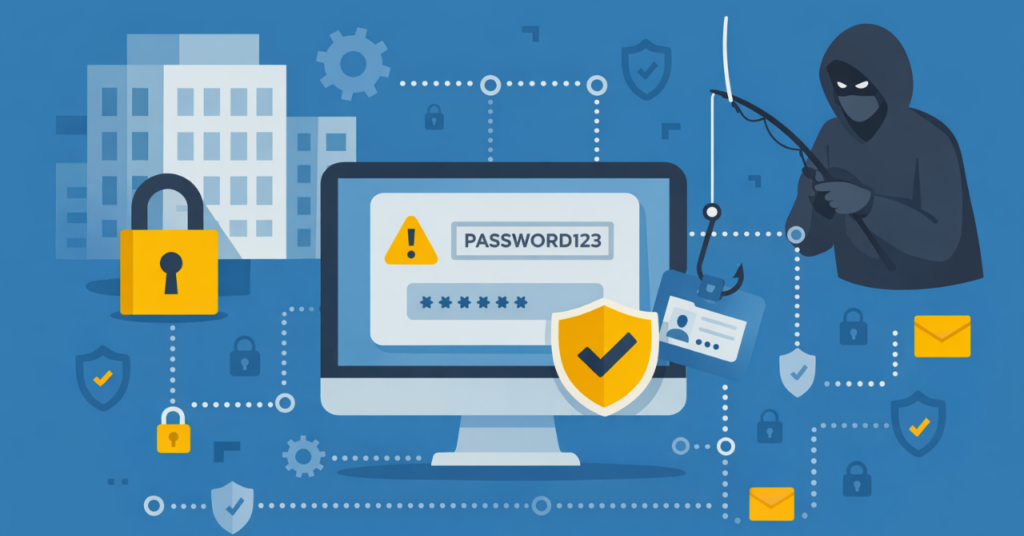
Hackers aren’t sitting in basements wearing hoodies. They’re organized. Funded. Ruthless. And frankly, they love it when your team uses “Password123.”

If you’re a small or mid-sized business, you might think you’re flying under the radar. You’re not. You’re just under protected.

Illustration of a professional being lured by a phishing hook with login credentials, highlighting human risk factors in internet safety for businesses.
Illustration of a team working securely at a laptop with protection icons, representing internet safety for businesses and how small gaps can create access risks over time.
Phishing attack illustration showing a hacker accessing a laptop through a deceptive email, highlighting email-based threats and decision risks in internet safety for businesses.
Security training awareness request banner
Click the banner to request a schedule.

💣 So… What Are the Big Threats?

Phishing email illustration showing login credential theft, highlighting common threats addressed in internet safety for businesses.

Phishing Emails That Look Legit

Karen thinks the CEO really did send her that PDF.
(Spoiler: He didn’t. And now you’re locked out of your systems.)

Weak Password Hygiene

We’ve seen it all—“companyname2023!”, birthdays, pet names.
If your passwords are guessable, your data is vulnerable.

Unsecured Networks

Your Wi-Fi isn’t just slow—it’s a digital revolving door for intruders if it’s not locked down correctly.

People Problems

Even with the best tech, your team can still click, download, or share the wrong thing.

Warning symbol over a Wi-Fi network illustrating unsecured connections and the importance of internet safety for businesses in protecting access points.

What You Can Do (Without Becoming a Cybersecurity Expert)

Team collaborating around security systems and password management, representing employee training and authentication in internet safety for businesses.

1. Enforce MFA (Multi-Factor Authentication)

Yes, it’s one extra step. But it’s one that keeps the bad guys out—even if they’ve stolen your password.

2. Use a Password Manager

Ditch the sticky notes and shared spreadsheets.
Use a secure vault that generates strong, unique passwords for every login.

3. Train Your People (Regularly)

Quarterly cybersecurity training isn’t overkill—it’s survival. We offer tailored training that makes sense to non-tech staff. No jargon or headscratchers here. We’ll keep everything simple and easy to act on.

4. Patch. Update. Repeat.

Outdated software is like leaving your front door open. Run updates and patches like your data depends on it—because it does.

5. Monitor Everything

From endpoint protection to email filtering, you need visibility. If you’re not tracking suspicious activity, you’re basically blindfolded on the freeway.

Illustration of system updates and monitoring tools emphasizing proactive maintenance as a core part of internet safety for businesses.
Visual metaphor showing limited protection, highlighting how internet safety for businesses requires more than basic antivirus solutions.

“But I Already Have an Antivirus…”

Here’s the thing: Antivirus alone is like putting a Band-Aid on a shark bite.

Real protection means:

  • Proactive threat detection
  • Real-time monitoring
  • Managed response
  • Human support (hi, that’s us!)
Illustration of layered security measures representing internet safety for businesses, including monitoring, threat detection, and managed response systems.

You Don’t Need to Be Paranoid. You Need to Be Prepared.

Internet safety for businesses isn’t about reacting to headlines or one-time initiatives. The risks are consistent—and so is the opportunity to manage them more intentionally.

The good news: this doesn’t require more tools or more complexity. It starts with understanding where exposure actually exists and aligning your environment to support how your team works day to day.

That’s where a more structured, proactive approach—often supported through managed IT services—makes the difference.

Professional woman using a tablet in a modern office with InfiNet branding and “Get in touch with our team” text.

Internet Safety for Businesses: Staying Secure Online Read More »

Spring Storms in Omaha: How to Keep Your Business Online When the Weather Hits

Here in Omaha, we know that spring doesn’t just bring flowers—it brings thunderstorms, tornado warnings, hail, and unexpected power outages. For local businesses, that kind of disruption can mean lost revenue, frustrated clients, and stalled operations.

At InfiNet Solutions, we’ve been helping Omaha-area businesses stay protected and connected since 1998. When storm season hits, we make sure IT isn’t what takes your business down.

Here’s how we help you keep things running—rain, wind, or shine:

Disaster Recovery Plans That Are Actually Ready

We build Omaha-tough continuity plans tailored to your business. Whether it’s a temporary outage or a major event, your team will have a clear game plan—tested and ready.

Work-from-Anywhere Options

If storms knock out power or flood access roads, your team can still work securely from home or another location. We’ll set you up with the tools to stay productive no matter where you are.

Real-Time Monitoring, Local Support

We’re not some out-of-state vendor. We’re right here in Omaha—monitoring your systems and stepping in fast if anything goes sideways. You’ll never be left wondering who to call.

Don’t Wait for the Tornado Siren

Storms are part of life in Nebraska—but downtime doesn’t have to be. Let’s make sure your tech is Omaha-strong and ready for whatever the skies throw our way.

Spring Storms in Omaha: How to Keep Your Business Online When the Weather Hits Read More »

Open Houses, Not Open Wi-Fi: Why Network Security Should Be a Top Priority in Real Estate

Agents are always on the go—sending contracts from a laptop, uploading listing photos from a phone, giving live or virtual tours, and using smart tech to stage the perfect open house. But in the race to close deals fast, there’s one crucial detail often left wide open: the network.

Whether you’re at the office or working remotely, unsecured Wi-Fi can quietly compromise sensitive data and systems. In this post, we’ll explore why strong network security matters in the real estate world—and how simple steps like separating guest traffic and avoiding public networks can dramatically reduce your risk.

Open Wi-Fi = Open Invitation

Open or poorly secured Wi-Fi may be convenient, but it comes with serious risks. In a real estate office, if everyone—from staff to clients to vendors—is on the same network, that opens the door to potential security breaches. A guest could unknowingly bring malware into the environment, or worse, a bad actor could intercept sensitive client data.

The danger doesn’t end outside the office. Agents frequently connect to public Wi-Fi at coffee shops, airports, or client locations—often without realizing how vulnerable these networks are. Without the right protections, data sent over these connections can be intercepted, and devices can be exposed to unauthorized access.

The Case for a Dedicated Guest Network at the Office

At your office, separating internal devices from guest or agent-owned devices is essential. A dedicated guest Wi-Fi network provides basic internet access to visitors without exposing business-critical systems.

This protects everything from:

  • Client documents
  • Office workstations
  • VoIP phones
  • Cloud file storage
  • Smart devices and printers

Use a VPN (Virtual Private Network)

A VPN encrypts your internet traffic—even over public Wi-Fi—making it nearly impossible for cybercriminals to intercept what you’re sending or receiving. That means your client contracts, login credentials, and email conversations stay private, even on open networks.

Use a Mobile Hotspot or Tethering Instead

Tethering your laptop to your phone’s data connection (or using a mobile hotspot) gives you a private, encrypted connection that’s far more secure than public Wi-Fi. Many cellular providers include hotspot capabilities, and it’s a simple way to protect your clients’ data on the go.

Avoid Logging into Critical Systems on Open Wi-Fi

Accessing cloud-based systems like your CRM, document storage, or email while on public Wi-Fi puts sensitive information at risk. Without encryption, attackers can capture session data, login credentials, or even hijack your connection. If you must log in, make sure you’re using a VPN first.

Quick Checklist: Network Security Best Practices for Real Estate Teams

How InfiNet Helps Real Estate Teams Stay Secure

At InfiNet, we work with real estate offices and independent agents to create secure, scalable IT environments that move as fast as you do.

From properly segmented guest networks to VPN access, endpoint protection, and proactive monitoring, we make sure your data stays safe whether you’re in the office or on the road.

The Bottom Line

Your listings might be open, but your Wi-Fi shouldn’t be. Whether you’re welcoming clients to your office or grabbing a quick coffee between showings, keeping your network locked down protects your clients, your reputation, and your business.

Let’s Talk IT Security for Real Estate Want help tightening up your network? Contact InfiNet Solutions to schedule a quick real estate-friendly security assessment!

Open Houses, Not Open Wi-Fi: Why Network Security Should Be a Top Priority in Real Estate Read More »

Slam Dunk Tech: How InfiNet Solutions Powers Real Estate Success

Defense Wins Championships: Stronger Security for Real Estate Transactions

Just like in basketball, the best offense is a great defense! Real estate firms need airtight security to defend against cyber threats. Real estate businesses handle highly sensitive financial and client data, making them prime targets for phishing, wire fraud, and cyberattacks. We’ve got you covered with: ✅ Phishing prevention and training to keep teams alert. ✅ Multi-factor authentication (MFA) to lock down logins. ✅ Encrypted file storage for safe document handling. ✅ Secure email solutions to prevent fraud before it happens.

Cloud-Based Collaboration & Document Management

From contracts to client communications, real estate pros need easy, secure access to documents—from anywhere. We help firms harness Microsoft 365 and secure cloud storage solutions to keep deals moving, teams collaborating, and data protected from loss or cyber threats.

Fast Break Communication: VoIP & Unified Messaging

Real estate moves fast—just like a fast break play! Your communication tools need to keep up with the action. We provide VoIP and unified communications solutions that keep agents, brokers, and property managers connected, whether they’re in the office, at a showing, or on the go. Plus, we can integrate VoIP with CRM platforms to streamline follow-ups and close deals faster.

Full-Court Press: Network & Wi-Fi Management for Real Estate Offices

A slow or unreliable network? That’s like missing a game-winning shot—unacceptable! We provide managed networking solutions that ensure secure, high-speed Wi-Fi across real estate offices. From firewall security to network monitoring, we make sure your team stays online, productive, and protected.

Cyber Insurance Readiness & Risk Management

Cyber threats are on the rise in real estate, and cyber insurance is becoming a must-have. We help businesses meet cyber insurance requirements by conducting security assessments, implementing compliance measures, and training teams on cybersecurity best practices—so you get the best coverage at the best rates.

Why Choose InfiNet Solutions for Your Championship Run?

Technology should work for you, not against you. Real estate firms trust InfiNet Solutions to: ✅ Protect sensitive data with top-tier cybersecurity solutions. ✅ Keep deals moving with cloud-based collaboration tools. ✅ Boost communication with VoIP & unified messaging. ✅ Provide expert IT support during business hours, plus 24/7 monitoring for peace of mind. ✅ Ensure business continuity with disaster recovery & backup solutions. ✅ Manage office networks for fast, secure connections.

Slam Dunk Tech: How InfiNet Solutions Powers Real Estate Success Read More »

Spring Clean Your IT: Sweep Away Inefficiencies & Grow

It’s time for an IT spring refresh—and InfiNet Solutions is here to help! We’ll streamline your technology, secure your business, and optimize your systems so you can focus on what you do best.

🚀 The IT Spring Cleaning Checklist
🗑️ Declutter Your Tech Stack

✅ Remove redundant software & unused tools
✅ Consolidate overlapping systems to save time & money
✅ Make sure everything is up-to-date for security & efficiency

How InfiNet Helps: Our Tech Stack Audit identifies bloat and helps you consolidate tools—so you spend less and get more done.

🔒 Strengthen Your Cybersecurity

✅ Review access permissions (should Bob from Accounting still have admin rights?)
✅ Enable multi-factor authentication (MFA) & update passwords
✅ Ensure your backups are working before you need them!

How InfiNet Helps: Our Security Review finds weak spots before cyber threats do, and we implement stronger security measures to keep your business safe.

📂 Optimize Cloud & Storage

✅ Remove outdated files and unused cloud storage
✅ Ensure backups are running correctly (and recoverable!)
✅ Optimize cloud costs—stop overpaying for storage you don’t need

How InfiNet Helps: We help organize your cloud environment, reduce costs, and improve backup reliability so you never lose critical data.

⚡ Speed Up Your Systems & Network

✅ Identify slow computers & upgrade outdated hardware

✅ Optimize network configurations for better speed & security

✅ Remove unused devices that could be slowing down performance

How InfiNet Helps: Our Network Performance Assessment spots bottlenecks and keeps your IT running at top speed.

📋 Refresh IT Policies & Training

✅ Update IT policies to match today’s security risks
✅ Train employees on best practices (like spotting phishing scams!)
✅ Document workflows to prevent knowledge loss when employees leave

How InfiNet Helps: We modernize your IT policies, improve team security awareness, and streamline workflows for better efficiency.

Give your IT a fresh start this spring! InfiNet Solutions is here to handle the tech so you can focus on what matters most—growing your business.

IT Health Check – Identify inefficiencies before they slow you down
Tailored Optimization Plan – Custom solutions built for your business needs
Seamless Implementation – We take care of the heavy lifting so you don’t have to!

🌸 Refresh, optimize, and secure your IT for success!

Spring Clean Your IT: Sweep Away Inefficiencies & Grow Read More »

Talk to our Team