Most nonprofits don’t struggle because they ignore cybersecurity.
They struggle because every dollar has a job already assigned—programs, staff, services, fundraising—and technology rarely feels urgent until it interrupts the mission.
The problem is that attackers understand this reality very well.
From a managed IT partner’s perspective, nonprofits aren’t targeted because they’re careless. They’re targeted because they’re resource-constrained, data-rich, and built on trust. And that combination creates risk that leadership often isn’t given a clear way to evaluate.
This article breaks down what affordable cybersecurity for nonprofits really mean—and how to focus on what actually reduces risk, without overbuying or overcomplicating.
Table of Contents
Why Nonprofits Attract Attention (Even When They’re Small)
Nonprofits tend to hold more sensitive information than they realize:
Donor and payment data
Personal details about clients or beneficiaries
Internal financial and grant information
Access to partner systems and community networks
At the same time, most operate with:
Small or part-time IT support
Limited internal security expertise
Older systems held together by good intentions
That gap—not size—is what attackers exploit.
Government agencies like CISA have been clear about this: nonprofits don’t need enterprise security programs, but they do need basic protections applied consistently.
The first step isn’t buying tools. It’s deciding what level of risk leadership is willing to accept—and what’s simply too disruptive to ignore.
What “Affordable Cybersecurity” Actually Means for Nonprofits
Affordable cybersecurity is often misunderstood as “the cheapest tools available.”
In reality, it means:
Spending time before money
Prioritizing actions that reduce the most risk
Avoiding complexity that staff can’t realistically maintain
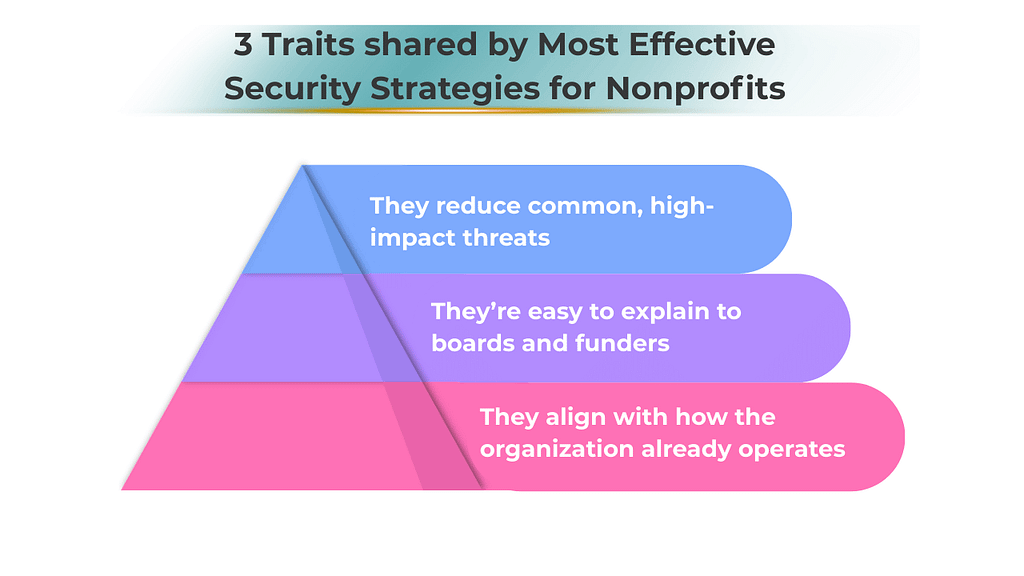
For nonprofits, the most effective security strategies tend to share three traits:
That’s why many MSPs anchor nonprofit guidance to recognized frameworks—not because leaders need to read them, but because they provide a defensible structure behind the scenes.
A Simple Way to Think About Security
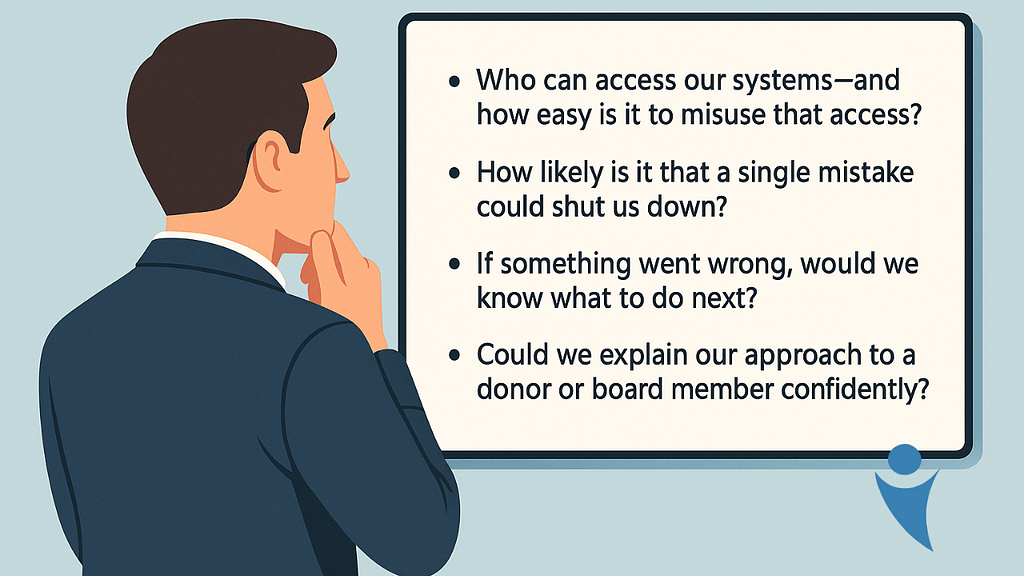
Instead of starting with tools, it helps to ask four practical questions:
Good security programs—especially on tight budgets—are designed to answer those questions clearly.
The Highest-Value Actions Nonprofits Can Take First
When budgets are limited, some steps consistently deliver more protection than others.
1. Strengthen sign-ins (with minimal disruption)
Adding a second step to logins dramatically reduces account takeovers—often without adding licensing costs. For leadership, the real benefit isn’t technical; it’s operational stability.
2. Make email impersonation harder
Many nonprofit breaches start with convincing emails that look legitimate. Simple configuration changes can reduce how often staff are exposed to those messages in the first place.
3. Ensure data can be recovered, not just stored
Backups are often assumed to exist—until they’re needed. What matters most is not where data is stored, but whether it can be restored quickly.
4. Keep devices from becoming single points of failure
Lost or compromised laptops shouldn’t put the organization at risk. Basic device safeguards protect data even when hardware walks out the door.
How Much Is “Enough” at Different Budget Levels?
Rather than chasing perfection, nonprofits benefit from defining what reasonable looks like.
Very Small Budgets
The goal is basic protection and clarity:
Strong sign-in practices
Safer email handling
Reliable backups
Free or nonprofit-priced platforms
This alone eliminates many common attacks.
Modest Budgets
The focus shifts to visibility and consistency:
Better protection on staff devices
Simple training to reduce risky mistakes
Clear expectations around access and data
At this stage, leaders can confidently say security is being managed—not ignored.
Larger or Growing Organizations
Here, the conversation becomes about resilience:
Faster detection of issues
Clear response plans
Stronger protection for sensitive data
The goal isn’t fear—it’s continuity.
How We Frame This Conversation as an MSP
When advising nonprofits, we don’t lead with tools or threats. We focus on decisions leadership already cares about:
Continuity: What would disrupt programs the most?
Trust: What would damage donor confidence?
Accountability: Could leadership explain their approach if asked?
Affordable cybersecurity for nonprofits works best when they support those outcomes—not when they compete with them.
Most SMB leaders don’t ignore cybersecurity — they delegate it.
And that delegation often turns security into a collection of tools, tasks, and reminders rather than a system with clear priorities and ownership. The result isn’t negligence, but misalignment: effort without structure, protection without consistency.
That disconnect is why many cybersecurity failures feel surprising in hindsight, even though the warning signs were there all along.
For small and mid-sized businesses, cybersecurity risk usually builds through everyday decisions that seem reasonable at the time — especially with limited staff, tight budgets, and competing priorities.
Meanwhile, attackers have become faster and more automated. According to the Verizon Data Breach Investigations Report, credential theft, phishing, and exploited vulnerabilities now dominate how breaches begin — and SMBs are frequently targeted because defenses are inconsistent, not nonexistent.
Below are the 10 most common cybersecurity mistakes SMBs make, why they happen, and what fixing them the right way looks like from a business-first perspective.
Table of Contents
1. Treating Cybersecurity as an IT Task Instead of a Business Risk
Many businesses leave cybersecurity entirely to IT, which often means leadership isn’t actively involved in risk decisions. Without clear ownership, priorities shift, decisions slow down, and security efforts become inconsistent.
The National Institute of Standards and Technology (NIST) emphasizes that cybersecurity is an enterprise risk — similar to financial or operational risk — and should be reviewed regularly by leadership. When leaders set expectations and direction, security decisions become clearer and more aligned with business goals.
2. Underestimating Identity Risk and Delaying Multi-Factor Protection
Stolen login credentials remain one of the most common ways attackers gain access, yet many SMBs still rely on passwords alone. This puts email, remote access, and cloud tools at unnecessary risk.
The Cybersecurity and Infrastructure Security Agency (CISA) lists multi-factor authentication as one of the most effective and accessible protections for small businesses. Adding a second verification step dramatically reduces unauthorized access without major disruption.
3. Letting Software and Systems Go Unpatched
Outdated software continues to be a leading cause of cyber incidents because attackers quickly exploit known weaknesses. Many businesses delay updates due to fear of downtime or unclear responsibility.
It’s crucial to prioritize updates for the most exposed systems and maintain a predictable update schedule. Staying reasonably current matters far more than being perfect.
4. Treating Security Awareness as a Once-a-Year Activity
Annual training sessions don’t prepare employees for the constant stream of phishing emails and scam messages they face. The Federal Trade Commission (FTC)stresses that ongoing awareness and simple reporting habits are far more effective than one-time instruction.
When employees know what to watch for and how to report concerns quickly, incidents are caught sooner and cause less damage.
5. Assuming Backups Are Reliable Without Testing Them
Many businesses believe they’re protected because backups exist — but they’ve never tested whether those backups can actually be restored. In ransomware incidents, backups that are connected to live systems are often targeted first.
Isolating backups and routinely testing recovery are highly encouraged, so downtime is predictable instead of chaotic. A backup that hasn’t been tested is a risk, not a safeguard.
6. Lacking a Clear Incident Response Plan
When a cyber incident occurs, confusion costs time and money. Without a documented plan, teams struggle to decide who should act, what steps to take, and how to communicate.
Even small businesses have to maintain a simple, practiced response plan so actions are coordinated instead of reactive. Preparation turns high-stress moments into manageable situations.
7. Losing Visibility Over Apps and Tools in Use
Employees often adopt new software to stay productive, but unmanaged tools can create blind spots for data access and security. Over time, information spreads across systems no one fully tracks.
Businesses should maintain visibility into approved tools and control access through centralized accounts. Knowing what’s in use is the foundation of protecting it.
8. Assuming Security Tools Work Without Oversight
Installing security software is important, but tools alone don’t stop threats. Alerts need to be monitored, investigated, and acted on in real time. CISA highlights the importance of pairing technology with clear responsibility, so warnings lead to action, not silence. Security improves when there’s consistent attention, not just installed software.
9. Overlooking Risks Introduced by Vendors and Partners
Many SMBs share data or system access with vendors yet rarely verify how those partners protect information. If a third party is compromised, your business may still suffer the consequences. Hence, identifying which vendors are critical and setting minimum security expectations are essential. Trust matters — but visibility and accountability matter more.
10. Ignoring Legal and Reporting Responsibilities
Cyber incidents often come with legal and reporting obligations, especially when customer or employee data is involved. Many businesses only consider these requirements after an incident occurs. The FTC outlines clear expectations for protecting data and responding appropriately to breaches. Preparing in advance helps businesses act responsibly and avoid unnecessary penalties or reputational damage.
What This Means for SMB Leaders
Most cybersecurity mistakes SMBs make aren’t caused by neglect.
They’re caused by lack of structure.
Cybersecurity works best when it’s treated as an ongoing business system — one with ownership, priorities, testing, and visibility. The strongest security programs don’t rely on fear or complexity. They rely on clarity, consistency, and intentional decisions that reflect how the business actually operates.
A good next step isn’t buying another tool. It’s understanding where risk truly lives in your environment — and whether your current approach matches that reality.
Frequently Asked Questions
1. What is the biggest cybersecurity risk for SMBs today? Credential theft combined with weak identity controls remains the most common entry point.
2. How often should SMBs test backups? At least quarterly for critical systems, with documented RTO/RPO.
3. Is MFA really necessary for small businesses? Yes — especially for email, remote access, and admin accounts. It’s now baseline, not advanced.
4. Do SMBs need a formal incident response plan? Yes. Even a one-page plan dramatically improves response speed and outcomes.
5. How does managed IT help with cybersecurity? By providing structure: governance, monitoring, prioritization, and accountability — not just tools.
Let’s be honest. Production schedules rarely collapse from major disasters; instead, they break down when a single system lags, a network stutters, or a software update doesn’t work as expected—and just like that, everything comes to a halt.
For Omaha manufacturers, downtime isn’t just an IT inconvenience. It’s an operational threat that ripples through labor, production targets, shipping commitments, and customer trust.
The true operational cost of downtime isn’t just measured in lost revenue. It shows up in idle crews, rushed recovery decisions, strained supplier relationships, and long-term reputational damage — often from issues leadership never expected to halt production in the first place.
Table of Contents
Why Downtime Hits Manufacturing Harder Than Most Industries
When IT systems slow down or go offline, production lines don’t “catch up later.” Labor stays clocked in. Equipment sits idle. Materials pile up. Schedules compress.
Even short IT disruptions — including slow systems, delayed file syncing, and intermittent network instability — can rapidly become costly for small and midsize businesses (SMBs). Independent research shows that even brief outages can cost SMBs between $137 and $427 per minute, which equates to $7,620 to over $25,000 per hour, once lost productivity, revenue impact, and recovery efforts are included.
For manufacturers operating with tight margins and continuous workflows, downtime multiplies fast.
The Real Financial Cost of Manufacturing Downtime
Across manufacturing sectors, downtime consistently ranks as one of the most expensive operational risks.
Recent industry data shows:
$260,000 per hour is the average cost of unplanned manufacturing downtime across sectors
Small manufacturers lose $137–$427 per minute during outages
Manufacturers average 30 hours of lost production per month — more than 360 hours annually
60% of manufacturers report downtime costs exceeding $250,000 per year
Even localized Omaha manufacturers feel this pressure, especially those tied into agricultural, transportation, engineering, or industrial supply chains. One delayed shipment can jeopardize an entire vendor relationship.
The Hidden Costs Leaders Often Don’t See
Most downtime calculations stop at “lost revenue.” That’s only part of the picture.
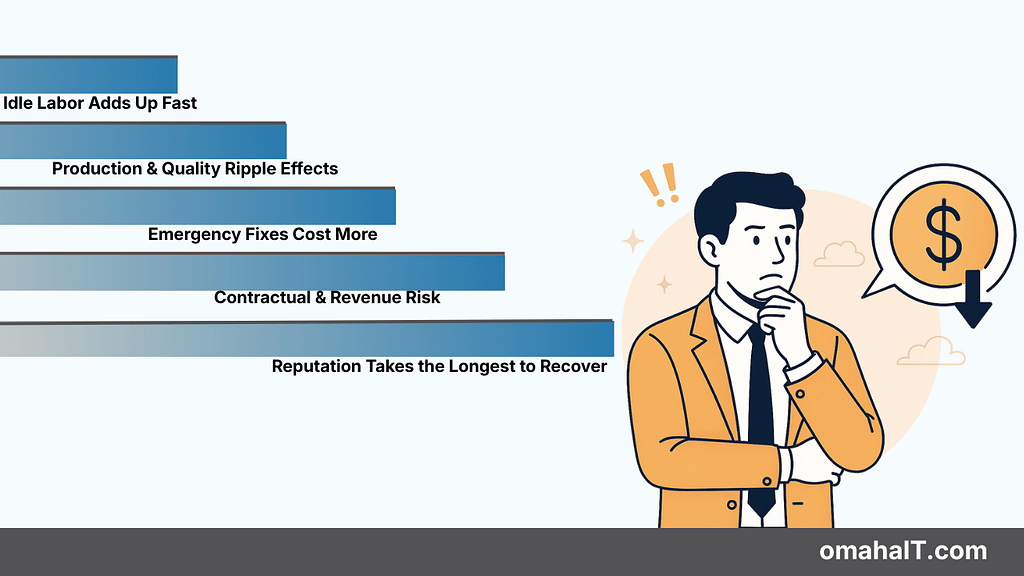
1. Idle Labor Adds Up Fast
If 25 employees sit idle for four hours, that’s 100 labor hours lost — before recovery even begins. Across manufacturing, productivity losses are often 2–3× higher than the actual repair cost.
2. Production & Quality Ripple Effects
More than half of manufacturing leaders report that downtime leads to missed shipping targets and quality issues. When reporting systems lag or troubleshooting drags on, bottlenecks cascade through the operation.
3. Emergency Fixes Cost More
Emergency repairs often cost 3–4× more than planned maintenance. Overnight shipping, rush labor, and temporary workarounds inflate what should have been manageable fixes.
4. Contractual & Revenue Risk
Missed deadlines can trigger penalties, withheld payments, or lost future contracts. In some cases, preventable outages can even complicate cyber insurance claims.
5. Reputation Takes the Longest to Recover
Nearly half of organizations report long-term reputational damage from downtime. For manufacturers working with enterprise or government buyers, regaining trust is slow — and expensive.
What Actually Causes Downtime in SMB Manufacturing
Downtime isn’t just about broken machines.
The data points to systemic issues:
67% of manufacturers rely on reactive maintenance
74% experience delays in reporting issues
72% rely on undocumented workarounds that mask real downtime
For small and mid-sized manufacturers specifically, the most common causes include:
Hardware failures and misconfigured systems
Software bugs and failed updates
Network outages
Cyber incidents, including ransomware
Human error — responsible for 66–80% of incidents
These aren’t rare edge cases. They’re everyday operational risks.
Downtime as a Business Continuity Threat
SMBs often operate without redundancy.
One failed router, one server issue, or one misstep during an update can halt the entire plant. Unlike larger enterprises, there’s often no secondary system waiting in the background.
For Omaha manufacturers running lean teams and just-in-time processes, downtime threatens:
Production commitments
Workforce efficiency
Contract obligations
Customer relationships
Long-term growth
At this point, downtime stops being an inconvenience — it becomes a continuity risk.
Why Proactive IT Has Become a Competitive Advantage
Across manufacturing studies, one pattern is clear: prevention costs less than recovery.
Predictive and proactive maintenance reduces downtime by 30–50%
Real-time monitoring cuts unplanned downtime by up to 25%
Every 1% reduction in downtime can save specialized plants millions annually
Backup testing, system monitoring, and failover planning don’t eliminate incidents — they turn unknown disruptions into manageable events.
This is where IT shifts from “support” to operational protection.
What “Prepared” Actually Looks Like
Prepared manufacturers tend to share a few characteristics:
Visibility into system health before failures occur
Documented recovery plans that don’t rely on heroics
Tested backups and known recovery timelines
Clear escalation paths when issues surface
IT aligned to production priorities — not just uptime metrics
The goal isn’t perfection. It’s predictability.
The Bottom Line for Manufacturing Leaders
One IT issue — a network outage, failed update, misconfigured system, or malware incident — can:
Stop your production line
Idle your workforce
Delay shipments
Trigger penalties
Damage trust
Cost hundreds of thousands per year
The operational cost of downtime is the most expensive unbudgeted expense manufacturers face — and one of the most controllable.
Not through more tools. But through clearer visibility, intentional planning, and fewer surprises.
From Unplanned Disruptions to Operational Visibility
If downtime feels unpredictable in your environment, the first step isn’t a purchase — it’s clarity.
Understanding where risk actually lives inside your operation often reveals that many “unexpected” outages are anything but.
Frequently Asked Questions
1. How much does downtime cost manufacturers per hour?
Manufacturing downtime can cost anywhere from $8,000 per hour for SMBs to hundreds of thousands per hour depending on scale, labor, and production impact.
2. What causes the most downtime in manufacturing?
Common causes include hardware failures, network outages, software issues, cyber incidents, and human error — often compounded by delayed reporting.
3. Why is downtime more expensive for SMB manufacturers?
SMBs typically lack redundancy. One failure can halt the entire operation, with fewer backup systems to absorb the impact.
4. Can proactive IT really reduce downtime?
Yes. Studies consistently show 30–50% reductions in unplanned downtime with proactive monitoring, maintenance, and planning.
5. Is downtime mostly an IT problem?
No. Downtime is an operational issue with financial, workforce, and customer impacts — IT is just one part of the system.
Knowing how to choose a managed IT provider isn’t usually a rushed decision.
It happens after enough small frustrations stack up:
Issues that “aren’t urgent” but keep repeating
Security answers that sound confident but feel vague
Contracts that lock you in without real clarity
These frustrations reflect well‑documented industry patterns. Independent research shows that recurring unresolved issues persist because many IT service models emphasize ticket closure over analyzing root‑cause patterns.
By the time most Omaha businesses start comparing managed IT providers, they’re not looking for features — they’re looking for confidence.
This guide is built to guide you on how to choose a managed IT provider intentionally. Each question below starts with a clear, practical answer, followed by why it matters and what to ask for before signing anything.
Table of Contents
1. What should a managed IT provider actually be responsible for?
A managed IT provider should clearly define responsibility for support, security, monitoring, and escalation — in writing.
When responsibility is unclear, gaps form. Those gaps often show up during incidents, audits, or outages, when everyone assumes someone else owned the risk.
What to ask for:
Written responsibility matrix
Security ownership vs. shared responsibility
Incident response roles
Proof:
Clearly documenting IT responsibilities—such as support, security, and monitoring—aids audits and incident response. If roles are unclear, audits may uncover more issues, and problems can take longer to resolve. In summary, recorded IT duties help organizations prevent and address issues efficiently.
ACTION: Request a responsibility overview before committing.
2. How fast should response times really be?
You should expect defined response and resolution targets backed by a Service Level Agreement (SLA) — not “best effort” support.
Without SLAs, urgent issues compete with routine requests, which leads to downtime that quietly impacts productivity and revenue.
What to ask for:
Written SLA with response tiers
Escalation process
After-hours and on-site support expeActiontions (local coverage matters)
Proof: Clear SLAs are associated with lower average downtime and faster issue resolution.
ACTION: Request a sample SLA.
3. What does “proactive IT” actually mean?
Proactive IT means preventing issues through monitoring, maintenance, and planning — not just fixing things faster.
Many providers use the term, but without clear deliverables, it often defaults to reactive support with better branding.
What to ask for:
Examples of issues prevented, not just resolved
Preventive maintenance schedule
Monitoring scope
Proof: Proactively managed environments experience fewer critical incidents year over year.
ACTION: Ask for a sample monthly IT report.
4. Who owns cybersecurity — us or the IT provider?
Cybersecurity should be a shared responsibility with clearly defined ownership on both sides.
When no one owns specific controls — backups, MFA, endpoint protection — security becomes assumed rather than managed.
What to ask for:
Security responsibility breakdown
Incident response ownership
Documentation and testing standards
Proof: Firms with defined security ownership close vulnerabilities faster and recover more efficiently.
ACTION: Book a short security responsibility review.
5. How are backups handled — and how often are they tested?
Backups should be monitored, verified, and regularly tested — not just “set and forgotten.”
Untested backups often fail when they’re needed most, turning a recoverable incident into a major disruption.
What to ask for:
Backup frequency and retention
Testing cadence
Recovery time expeActiontions
Proof: Regularly tested backups dramatically reduce recovery time during incidents.
ACTION: Request backup testing documentation.
6. How does the provider handle employee onboarding and offboarding?
A managed IT provider should have a documented, repeatable process for onboarding and offboarding employees.
Proof: Organizations that review IT performance regularly make fewer reactive decisions.
ACTION: Request a sample leadership IT report.
8. How are vendors and third-party tools managed?
Your IT provider should actively manage vendors and tools — not leave coordination to your team.
When no one owns vendor oversight, costs creep up, tools overlap, and accountability disappears during outages or renewals.
What to ask for:
Vendor ownership and escalation process
Renewal and lifecycle management
Guidance on consolidating overlapping tools
Proof: Vendor consolidation often reduces IT spend while improving reliability.
ACTION: Ask how vendor management is handled end-to-end.
9. What happens when something goes wrong after-hours?
After-hours issues should follow a defined escalation path — not an inbox no one’s watching.
Downtime rarely respects business hours. Without clear coverage, small issues can turn into long disruptions overnight or over weekends.
What to ask for:
After-hours support availability
Escalation criteria
On-call response expectations
Proof: Defined after-hours support reduces the duration of critical outages.
ACTION: Request after-hours support details.
10. How does the provider support compliance requirements?
A managed IT provider should support compliance through documentation, controls, and ongoing oversight — not just tools.
Compliance failures often come from missing processes, not missing technology.
What to ask for:
Experience supporting relevant regulations
Documentation and audit support
Ongoing compliance check-ins
Proof: Organizations with structured compliance support resolve audit issues faster.
Typical compliance needs for many businesses involve protecting sensitive data, controlling access to systems, and ensuring information can be recovered when disruptions occur.
While requirements vary by industry, this often includes supporting HIPAA-aligned environments for healthcare and professional services, meeting cybersecurity insurance requirements, and maintaining documented data protection and recovery practices.
ACTION: Ask how compliance responsibilities are shared.
11. Are security tools standardized or customized per client?
Security tools should be standardized where possible and adapted where necessary.
Too much customization increases complexity. Too much standardization ignores business realities.
What to ask for:
Core security stack components
Areas of flexibility
How exceptions are documented and reviewed
Proof: Standardized security environments are easier to manage and secure.
ACTION: Request an overview of the standard security stack.
12. What documentation do we actually receive?
You should receive clear, usable documentation — not just have it stored somewhere unseen.
Documentation is critical during audits, incidents, leadership transitions, and vendor changes.
What to ask for:
Network and system documentation
Security and recovery procedures
How documentation is kept current
Proof: Documented environments recover faster from disruptions.
ACTION: Ask to see sample documentation.
13. How does pricing scale as we grow?
Pricing should scale predictably with headcount and complexity — without surprise fees.
Unclear pricing models make budgeting difficult and strain long-term partnerships.
What to ask for:
Pricing structure explanation
What triggers cost increases
Examples of growth scenarios
Proof: Transparent pricing leads to fewer contract disputes.
ACTION: Request a pricing scalability overview.
14. What’s excluded from the contract?
Every managed IT agreement has exclusions — they should be explicit and easy to understand.
Hidden exclusions often surface during urgent situations, when expectations are highest.
ACTION: Ask for a plain-language contract summary.
15. How does the provider support on-site issues in Omaha?
Local on-site support should be clearly defined — not assumed.
For Omaha businesses, remote-only support doesn’t always cut it when hardware or network issues arise.
What to ask for:
On-site availability and response expectations
Local technician coverage
Scenarios that trigger on-site visits
Proof: Defined on-site support reduces prolonged downtime for physical issues.
ACTION: Ask how on-site support works locally.
16. How are recurring issues identified and addressed?
Recurring issues should be tracked, analyzed, and resolved at the root — not repeatedly patched.
If the same problems keep happening, something upstream isn’t working.
What to ask for:
Trend tracking methodology
Root-cause analysis process
Examples of permanent fixes
Proof: Root-cause resolution reduces ticket volume over time.
ACTION: Ask how recurring issues are handled.
17. What does strategic planning look like beyond support?
A mature IT provider helps plan ahead — not just respond to today’s problems.
Without proper planning, IT decisions often become short-sighted, focusing only on immediate technical issues rather than supporting the organization’s broader objectives.
This reactive approach can lead to fragmented solutions, inefficient use of resources, and missed opportunities for innovation. As a result, IT investments may not align with business priorities, causing technology to become a barrier rather than an enabler for growth.
Proactive strategic planning, on the other hand, ensures that IT initiatives are purposefully designed to drive business value, anticipate future needs, and support the long-term vision of the company.
What to ask for:
Strategic review cadence
Budgeting and roadmap support
Alignment with growth plans
Proof: Organizations with regular IT planning experience fewer surprise expenses.
ACTION: Ask what long-term planning support looks like.
18. How is risk communicated to leadership?
Risk should be explained in business terms — not buried in technical language.
Leaders can’t make informed decisions if risk isn’t visible or understandable.
What to ask for:
Risk reporting format
How severity is defined
How tradeoffs are explained
Proof: Clear risk communication leads to better prioritization.
ACTION: Ask how risk is reported to leadership.
19. What happens if the relationship isn’t working?
A professional IT provider should make it easy to exit cleanly if needed.
Vendor lock-in creates leverage — and not in your favor.
What to ask for:
Termination terms
Transition support
Documentation ownership
Proof: Clean exits reduce disruption during provider changes.
ACTION: Review exit and transition terms upfront.
20. How will we know this partnership is successful?
Success should be defined by outcomes, not activity.
Without shared success criteria, it’s hard to know whether the partnership is delivering real value.
What to ask for:
Success metrics
Review cadence
How adjustments are made over time
Proof: Defined success metrics improve long-term satisfaction.
ACTION: Ask how success is measured and reviewed.
Choosing a managed IT provider shouldn’t feel uncertain. If you’re comparing options or questioning your current setup, starting with clarity around responsibility, response, and risk often makes the next step obvious.
The efficiency, time management, and risk levels of Architecture & Engineering firms largely depend on how they handle project work.
Deadlines are tight. Files move constantly. Teams expand and contract by project. External partners need access yesterday. And somehow, everything still has to stay organized, secure, and billable.
From the outside, it looks like controlled chaos.
From the inside, it often is — especially when project workflows outgrow the systems meant to support them.
What many firms don’t realize is that the biggest security risks in project-based work don’t come from hackers breaking in. They come from everyday project management gaps: how files are shared, how access is granted, how tools are stitched together, and how much “temporary” access quietly becomes permanent.
Research shows that routine collaboration habits—not external attacks—create the majority of exposure points inside organizations. For instance, a 2025 analysis revealed that file‑sharing risks often arise from broad permissions, inconsistent storage, and link‑based sharing that never expires, making internal oversharing far more common than external hacking attempts.
Over time, those gaps don’t just create security exposure. They undermine productivity, accountability, and trust across the business.
Table of Contents
Why Project Management Is a Security Issue (Whether You Call It One or Not)
In Architecture and Engineering firms, projects are the business. Every drawing, revision, RFI, model, and approval lives inside a project workflow.
Which means security isn’t a standalone concern — it’s embedded in how work gets done.
When project management lacks structure, security issues tend to follow predictable patterns:
Files are stored wherever it’s convenient
Access is granted quickly but rarely reviewed
Teams rely on email, shared links, and personal storage to keep things moving
No one is quite sure who still needs access after a project ends
None of this feels reckless in the moment. It feels practical.
But practicality without structure is where risk compounds.
{{Security isn’t a standalone concern — it’s embedded in how work gets done.}}
The Hidden File Sharing Risks Inside “Normal” Project Collaboration
Most firms assume their biggest file sharing risks come from external threats.
In reality, the more common exposure lives inside routine collaboration.
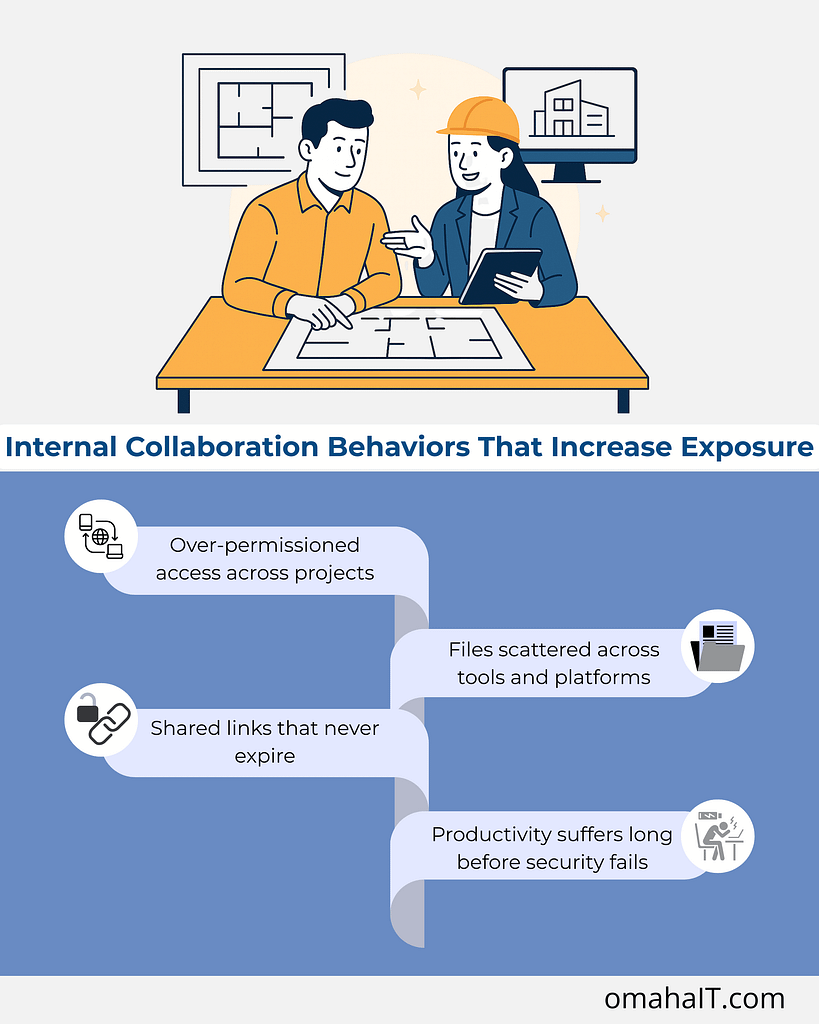
1. Over-permissioned access across projects
Project teams change constantly — interns, consultants, contractors, joint venture partners. Access is added to keep work moving but rarely removed with the same urgency.
Over time, this creates:
Former team members who can still access live project files
Vendors with visibility into unrelated work
Shared folders that have outlived the project they were created for
This is one of the most overlooked project collaboration security risks — not because it’s complex, but because no one owns the cleanup.
2. Files scattered across tools and platforms
When project tools don’t integrate cleanly, teams compensate.
Drawings might live in one system, approvals in another, and “working copies” in email threads or personal cloud storage. The result isn’t just inefficiency — it’s loss of visibility.
Leadership can’t confidently answer:
Where is the most current version?
Who has access to what?
What happens if a device is lost or an account is compromised?
Security relies on knowing where information lives. Fragmented workflows make that nearly impossible.
3. Shared links that never expire
Shared file links are convenient — and often forgotten.
A link created to move a project forward can remain active indefinitely, long after the original need is gone. Multiply that by dozens of projects per year, and you end up with persistent exposure that no one is actively monitoring.
This is how file sharing risks quietly scale without triggering alarms.
4. Productivity suffers long before security fails
What’s interesting is that security issues rarely show up first as breaches. They show up as friction.
Time wasted searching for the right version
Rework caused by outdated drawings
Confusion around approvals and accountability
Hesitation to collaborate because “it’s easier to do it myself”
When project systems lack consistency, teams spend more energy managing work than doing it.
Security and productivity aren’t competing priorities here — they’re tightly linked. The same structure that protects information also enables momentum.
What “Good” Project Security Actually Looks Like in Practice
Strong security in project-based work doesn’t feel heavy or restrictive. In mature environments, it’s almost invisible.
Here’s what tends to be true:
1. Clear ownership of project systems
There’s a defined standard for:
Where project files live
How access is granted and reviewed
How long information is retained after project close
This removes ambiguity — and ambiguity is where risk thrives.
2. Role-based access tied to projects, not people
Access is aligned to what someone is doing right now, not who they are or who they used to be.
When a project ends, access ends with it — automatically or through a defined process.
3. Integrated tools that support how teams actually work
Instead of patching together disconnected platforms, systems are designed to support:
Collaboration
Version control
Visibility across active projects
This reduces the need for workarounds — which are often the root of security gaps.
4. Ongoing visibility for leadership
Leadership doesn’t need to manage the tools day-to-day. But they do have confidence that:
Project data is protected
Access aligns with responsibility
Risks are visible before they become problems
That confidence comes from structure, not guesswork.
Where Managed IT Services Fit into Project-Based Firms
This is where managed IT services are often misunderstood.
It’s not about fixing things when they break. It’s about designing systems that support how the business runs — especially when projects are the engine.
For Architecture and Engineering firms, managed IT can provide:
Intentional project system design
Secure, standardized file sharing frameworks
Access controls that adapt as projects change
Ongoing oversight so small issues don’t become systemic risks
When IT is aligned with project management, technology stops being a constraint and starts reinforcing discipline, clarity, and accountability.
The Leadership Question Worth Asking
The real question isn’t whether your firm has security tools.
It’s this: Do your project workflows make it easy to do the right thing — or easy to work around the system?
If the answer is the latter, security risks are likely already present. They’re just disguised as “the way we’ve always done it.”
Frequently Asked Questions
1. Why is project-based work riskier from a security standpoint?
Project-based work involves constant changes in teams, access, and data flow. Without structured systems, access and file sharing risks accumulate quickly.
2. What are the most common security risks in project-based work?
Over-permissioned access, scattered file storage, unmanaged shared links, and lack of visibility into who can access project data.
3. How does project management affect security?
Strong project management creates consistency. Consistency enables secure access control, version management, and accountability.
4. Are file sharing tools inherently risky?
No — but unmanaged or inconsistently used tools introduce risk. The issue is usually governance, not the technology itself.
5. Can managed IT services improve productivity as well as security?
Yes. When systems are designed intentionally, teams spend less time managing work and more time delivering it — securely.
A Better Starting Point
If project work is central to your firm’s success, then project security deserves the same level of intention as project delivery.
Sometimes the most valuable first step isn’t adding another tool — it’s gaining clarity around where risk actually lives and how your systems support (or undermine) the way your teams work.
If you’re looking to better understand how your project workflows, collaboration tools, and access controls align, that conversation often starts with visibility — not assumptions.