
New Year IT Reset for Businesses: Setting the Year Up Right
January has a way of exposing things you managed to live with all year.
Budgets reset. Projects resurface. Leadership asks new questions. And suddenly, the technology decisions you made incrementally—one tool here, one fix there—are sitting under a brighter light.
For many organizations, this is when an IT reset for businesses turns into a checklist exercise: patch systems, review backups, renew licenses, move on.
But the businesses that start the year strongest don’t treat January as a technical cleanup.
They treat it as a strategic IT reset.
A reset shouldn’t just involve asking, “Is everything working?”—but instead, “Is our technology truly aligned with the business’s goals for this year?”
That distinction matters—because misaligned IT doesn’t usually fail loudly. It quietly creates risk, waste, and friction that compounds long before anyone notices.
Table of Contents
Why an IT Reset Matters for Businesses in January
January is one of the few moments when IT strategy for business can be made proactively, not reactively.
You have:
- A clear view of last year’s breakdowns and near-misses
- Fresh financial context
- Leadership attention before the year accelerates
Handled correctly, an IT reset for businesses lets you:
- Reduce meaningful risk early in Q1
- Reclaim wasted spend before it compounds
- Align systems to real business outcomes—not assumptions
Handled poorly, January becomes a rushed audit that checks boxes without changing trajectory.
The difference isn’t effort.
It’s how you frame the work.
January is one of the few moments where technology decisions can be made proactively, not reactively.
From Checklists to Strategy: The Framing Questions That Matter
Before reviewing tools or systems, effective January IT planning starts with framing questions leadership can actually act on:
What business outcomes must IT enable this year?
Growth? M&A readiness? Cost control? Compliance pressure? Operational stability?
If IT isn’t explicitly aligned to these outcomes, decisions default to habit instead of intent.
Which risks would hurt the most if they surfaced in Q1?
Data loss, ransomware, prolonged outages, vendor failure—most businesses know what’s possible. Fewer agree on what’s unacceptable.
January is the moment to decide.
Who owns each outcome—and do they have authority?
Risk without ownership turns into delay. Delay turns into exposure.
Effective IT planning assigns:
- Clear owners
- Decision authority
- Accountability timelines
These questions shift the conversation from tactical fixes to IT strategy for business, where tradeoffs are made intentionally.
A Quick Comparison: Three Ways Businesses Approach January IT Reviews
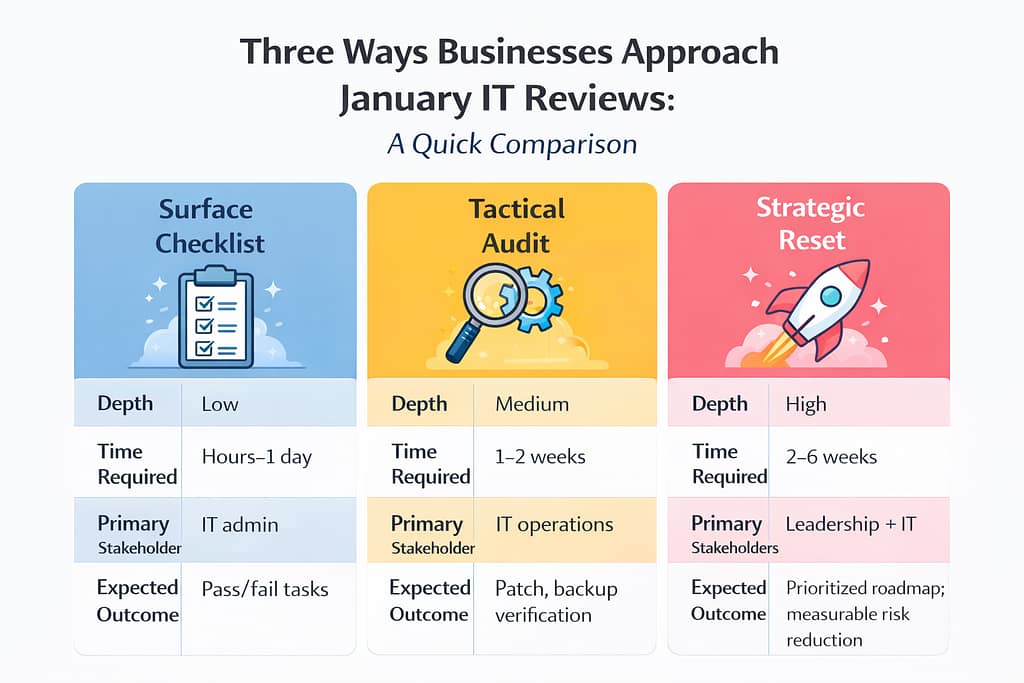
Most businesses operate in the middle by default.
The organizations that mature fastest intentionally move up the stack—not by doing more, but by deciding better.
A Practical January IT Reset: What to Review (and How to Go Deeper)
Below isn’t a list of tools.
It’s a set of decision areas that determine whether IT supports or silently undermines the business.
Align Technology to the Business Plan
Start by identifying your top three business priorities for the year.
Then map:
- Which systems support each priority
- Required performance expectations (SLAs, uptime, response)
- What failure would cost the business
If a system doesn’t map to a priority, it raises a hard but necessary question:
Why are we funding this?
This is where many organizations uncover shadow spend and legacy tools that survived without justification.
Treat Backups as Recoverability Projects
Backups often give leaders a false sense of security.
Most businesses assume that if data is being backed up, it can be restored quickly when something goes wrong. In reality, many organizations don’t discover gaps until they’re already under pressure—during a ransomware event, a system failure, or an accidental deletion that disrupts operations.
The real question isn’t whether backups exist.
It’s whether your business can actually recover fast enough to avoid downtime, lost revenue, or operational chaos.
That’s why January is the right time to treat backups as a recoverability exercise, not a checkbox.

The question isn’t “Do we have backups?”
It’s “Can we recover fast enough to avoid real damage?”
Move from Vulnerability Lists to Attack-Path Reduction
Scanning tools generate noise. Attackers exploit pathways.
A stronger January reset focuses on:
- Identity and privileged access
- Exposed services
- Lateral movement opportunities
Breaking attacker chains reduces risk more effectively than chasing every CVE.
This shift requires context, prioritization, and leadership buy-in—not just alerts.
Rationalize SaaS and Licensing Spend
Most organizations underestimate how much budget disappears into unused or overlapping subscriptions.
A January reset should include:
- Full inventory of SaaS tools
- Usage vs. cost analysis
- Consolidation where it reduces complexity
- Intentional reinvestment of savings

This is often where businesses fund higher-impact security or automation—without increasing total spend.
Rebuild Observability and Runbooks
Alerts without action create fatigue.
Effective systems ensure:
- Every alert maps to a documented response
- Clear ownership and escalation paths
- Tabletop exercises for the top two incident types
When something breaks, the goal isn’t speed alone—it’s clarity under pressure.
Review Vendor and Contract Health
January is the safest time to examine:
- SLA performance
- Renewal timelines
- Exit clauses
- Vendor risk concentration
Consolidation only makes sense when it reduces risk and friction—not when it’s driven by convenience.
Address People and Skills Gaps
Technology maturity stalls without the right human support.
Rather than trying to fix everything, identify:
- One critical skills gap
- One short-term training or advisory investment
- One clear owner for cross-team coordination
Progress beats perfection—especially early in the year.
Why Many Businesses Struggle to Execute This Alone
None of this is conceptually complex.
What’s hard is:
- Maintaining objectivity
- Prioritizing across departments
- Translating technical findings into business decisions
- Keeping momentum once Q1 accelerates
This is where many organizations stall—not because they lack tools, but because no one owns the strategic layer.
Where MSP and vCIO Support Changes the Outcome
At its best, MSP support keeps systems stable.

At its best, vCIO guidance helps leadership:
- See risk clearly
- Understand tradeoffs
- Make intentional technology decisions
- Align IT spend to business reality
The role isn’t to add complexity—it’s to reduce uncertainty.
A well-run January IT reset creates a 90-day roadmap that:
- Prioritizes actions by business impact
- Assigns ownership
- Reduces exposure early in the year
- Builds confidence instead of noise
That’s the difference between reacting to issues and running technology with intent.
What “Good” Looks Like Coming Out of January
By the end of a true IT reset, leadership should be able to answer:
- Where does our biggest risk actually live?
- Which systems matter most—and why?
- What are we intentionally not fixing yet?
- Who owns the next 90 days?
If those answers are clear, the year starts on stable footing.
If they’re vague, the organization is already behind.
Frequently Asked Questions
1. What is an IT reset?
An IT reset is a structured review of systems, risk, and spend that aligns technology decisions to business goals—rather than a simple technical checklist.
2. Why is January the best time to review IT?
January offers fresh budgets, leadership focus, and the opportunity to reduce Q1 risk before issues compound later in the year.
3. How is an IT reset different from an IT audit?
Audits confirm compliance and configuration. An IT reset prioritizes outcomes, tradeoffs, and forward-looking decisions.
4. Do small businesses need a strategic IT reset?
Yes—often more than larger organizations. Smaller teams feel the impact of outages, waste, and misalignment faster and more directly.
5. What role does a vCIO play in an IT reset?
A vCIO provides leadership-level guidance, translating technical findings into business decisions and building a prioritized roadmap.
6. How long should a proper IT reset take?
Typically 2–6 weeks, depending on complexity. The value comes from clarity and prioritization—not speed alone.
A Thoughtful Next Step
If January already feels busy, that’s exactly why clarity matters.
A short, focused conversation can help you understand:
- Where risk is underestimated
- Where spend is misaligned
- What a realistic 90-day plan looks like
That’s how strong years begin. Here’s to a clear, intentional start.

New Year IT Reset for Businesses: Setting the Year Up Right Read More »