
Security Risks in Project-Based Work Most Architecture & Engineering Firms Miss
The efficiency, time management, and risk levels of Architecture & Engineering firms largely depend on how they handle project work.
Deadlines are tight. Files move constantly. Teams expand and contract by project. External partners need access yesterday. And somehow, everything still has to stay organized, secure, and billable.
From the outside, it looks like controlled chaos.
From the inside, it often is — especially when project workflows outgrow the systems meant to support them.
What many firms don’t realize is that the biggest security risks in project-based work don’t come from hackers breaking in. They come from everyday project management gaps: how files are shared, how access is granted, how tools are stitched together, and how much “temporary” access quietly becomes permanent.
Research shows that routine collaboration habits—not external attacks—create the majority of exposure points inside organizations. For instance, a 2025 analysis revealed that file‑sharing risks often arise from broad permissions, inconsistent storage, and link‑based sharing that never expires, making internal oversharing far more common than external hacking attempts.
Over time, those gaps don’t just create security exposure. They undermine productivity, accountability, and trust across the business.
Table of Contents
Why Project Management Is a Security Issue (Whether You Call It One or Not)
In Architecture and Engineering firms, projects are the business. Every drawing, revision, RFI, model, and approval lives inside a project workflow.
Which means security isn’t a standalone concern — it’s embedded in how work gets done.
When project management lacks structure, security issues tend to follow predictable patterns:
- Files are stored wherever it’s convenient
- Access is granted quickly but rarely reviewed
- Teams rely on email, shared links, and personal storage to keep things moving
- No one is quite sure who still needs access after a project ends
None of this feels reckless in the moment. It feels practical.
But practicality without structure is where risk compounds.
{{Security isn’t a standalone concern — it’s embedded in how work gets done.}}
The Hidden File Sharing Risks Inside “Normal” Project Collaboration
Most firms assume their biggest file sharing risks come from external threats.
In reality, the more common exposure lives inside routine collaboration.
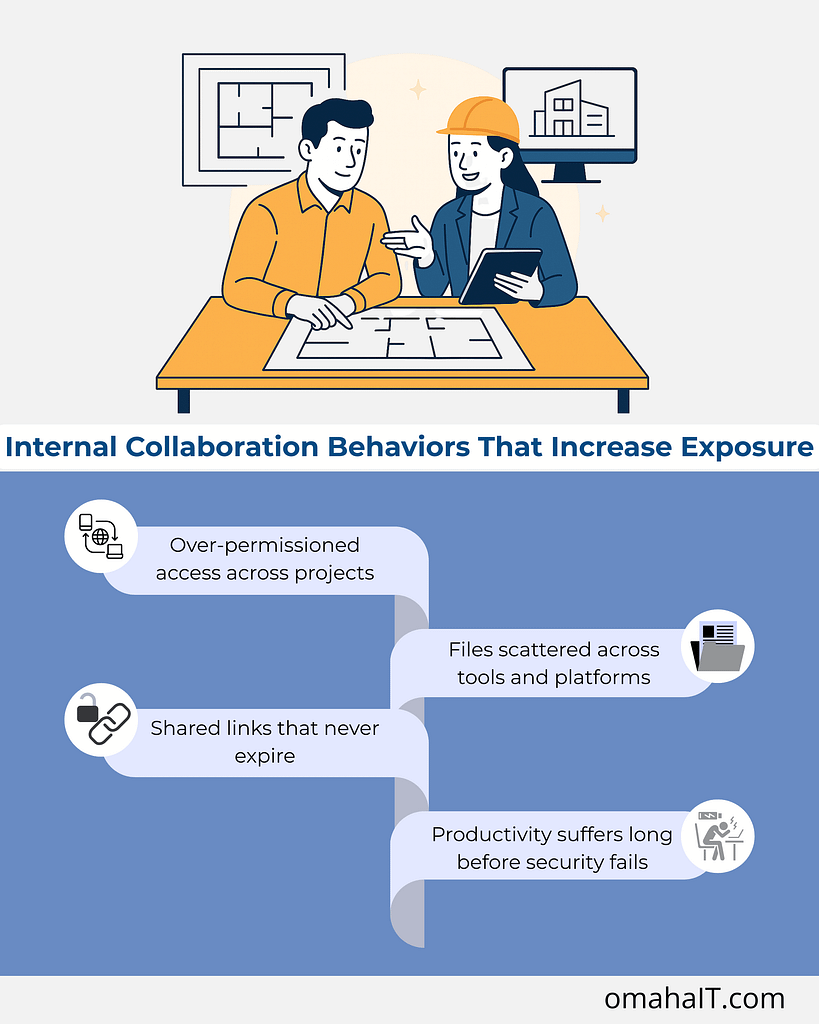
1. Over-permissioned access across projects
Project teams change constantly — interns, consultants, contractors, joint venture partners. Access is added to keep work moving but rarely removed with the same urgency.
Over time, this creates:
- Former team members who can still access live project files
- Vendors with visibility into unrelated work
- Shared folders that have outlived the project they were created for
This is one of the most overlooked project collaboration security risks — not because it’s complex, but because no one owns the cleanup.
2. Files scattered across tools and platforms
When project tools don’t integrate cleanly, teams compensate.
Drawings might live in one system, approvals in another, and “working copies” in email threads or personal cloud storage. The result isn’t just inefficiency — it’s loss of visibility.
Leadership can’t confidently answer:
- Where is the most current version?
- Who has access to what?
- What happens if a device is lost or an account is compromised?
Security relies on knowing where information lives. Fragmented workflows make that nearly impossible.
3. Shared links that never expire
Shared file links are convenient — and often forgotten.
A link created to move a project forward can remain active indefinitely, long after the original need is gone. Multiply that by dozens of projects per year, and you end up with persistent exposure that no one is actively monitoring.
This is how file sharing risks quietly scale without triggering alarms.
4. Productivity suffers long before security fails
What’s interesting is that security issues rarely show up first as breaches. They show up as friction.
- Time wasted searching for the right version
- Rework caused by outdated drawings
- Confusion around approvals and accountability
- Hesitation to collaborate because “it’s easier to do it myself”
When project systems lack consistency, teams spend more energy managing work than doing it.
Security and productivity aren’t competing priorities here — they’re tightly linked. The same structure that protects information also enables momentum.
What “Good” Project Security Actually Looks Like in Practice
Strong security in project-based work doesn’t feel heavy or restrictive. In mature environments, it’s almost invisible.
Here’s what tends to be true:
1. Clear ownership of project systems
There’s a defined standard for:
- Where project files live
- How access is granted and reviewed
- How long information is retained after project close
This removes ambiguity — and ambiguity is where risk thrives.
2. Role-based access tied to projects, not people
Access is aligned to what someone is doing right now, not who they are or who they used to be.
When a project ends, access ends with it — automatically or through a defined process.
3. Integrated tools that support how teams actually work
Instead of patching together disconnected platforms, systems are designed to support:
- Collaboration
- Version control
- Visibility across active projects
This reduces the need for workarounds — which are often the root of security gaps.
4. Ongoing visibility for leadership
Leadership doesn’t need to manage the tools day-to-day. But they do have confidence that:
- Project data is protected
- Access aligns with responsibility
- Risks are visible before they become problems
That confidence comes from structure, not guesswork.
Where Managed IT Services Fit into Project-Based Firms
This is where managed IT services are often misunderstood.
It’s not about fixing things when they break. It’s about designing systems that support how the business runs — especially when projects are the engine.
For Architecture and Engineering firms, managed IT can provide:
- Intentional project system design
- Secure, standardized file sharing frameworks
- Access controls that adapt as projects change
- Ongoing oversight so small issues don’t become systemic risks
When IT is aligned with project management, technology stops being a constraint and starts reinforcing discipline, clarity, and accountability.
The Leadership Question Worth Asking
The real question isn’t whether your firm has security tools.
It’s this: Do your project workflows make it easy to do the right thing — or easy to work around the system?
If the answer is the latter, security risks are likely already present. They’re just disguised as “the way we’ve always done it.”
Frequently Asked Questions
1. Why is project-based work riskier from a security standpoint?
Project-based work involves constant changes in teams, access, and data flow. Without structured systems, access and file sharing risks accumulate quickly.
2. What are the most common security risks in project-based work?
Over-permissioned access, scattered file storage, unmanaged shared links, and lack of visibility into who can access project data.
3. How does project management affect security?
Strong project management creates consistency. Consistency enables secure access control, version management, and accountability.
4. Are file sharing tools inherently risky?
No — but unmanaged or inconsistently used tools introduce risk. The issue is usually governance, not the technology itself.
5. Can managed IT services improve productivity as well as security?
Yes. When systems are designed intentionally, teams spend less time managing work and more time delivering it — securely.
A Better Starting Point
If project work is central to your firm’s success, then project security deserves the same level of intention as project delivery.
Sometimes the most valuable first step isn’t adding another tool — it’s gaining clarity around where risk actually lives and how your systems support (or undermine) the way your teams work.
If you’re looking to better understand how your project workflows, collaboration tools, and access controls align, that conversation often starts with visibility — not assumptions.

Security Risks in Project-Based Work Most Architecture & Engineering Firms Miss Read More »