
Infinet

5 Reasons Why You Need to Make the Switch to Microsoft Office 365

If you run a business, chances are that you’ve thought about moving to an online productivity suite. The two most popular in recent years is Google’s G Suite and Microsoft’s Office 365. Touted as “innovative” and “the next big thing,” Microsoft’s productivity suite is a revolutionary concept when it comes to operating systems and computing. But why should you choose Microsoft over the other guys?

Because:

Microsoft Office 365

  • It’s cloud-based. Doing all your computing in the cloud means that you always have access to your files as long as you’re connected to the Internet. All of Office 365’s tools will work on any PC/Mac, tablet, or smartphone. With O365, you can use the online versions of the productivity suite, or install them to your device.
  •  It’s secure. Whether you’re using the version of O365 installed on your machine, or the cloud version, you’ll get the best level of security and encryption. The same set of Rights Management Services applies to both. None of your files can be accessed without the proper user credentials that are set up and monitored by Microsoft Azure. This provides the best security and control over your Office 365 data.
  • Data is backed up. Microsoft’s Office 365 offers its own form of checks and balances, 24/7 support that’s always on-call, and OneDrive to store all your files. But it’s always a good idea to have an extra layer of protection by using a Managed Services Provider (MSP) who can monitor your backups and add an extra layer of security if your data is compromised or lost.

Office 365 offers major advantages over others. As with anything worth doing, there are pros and cons when moving your operations to the cloud. However, there are some major advantages when using the Microsoft Cloud:

  • You can work anywhere. If you have an internet connection, you can use your data from anywhere and on any device. You can check emails, access files, and work on a project all from the same place – even if that place happens to be the other side of the world.
  • Easy collaboration between coworkers. How many times have you had multiple people working together on the same project only to have one version go missing. With Office 365 you can avoid this. Collaborators can work on the same file and get changes in real time. You can also share files as links right from OneDrive, rather than as attachments.
  • Access to the latest versions of programs. Imagine having access to the most current versions of Word, Excel, and Outlook without having to pay extra or reinstall programs. All the most recent versions of everything in the Microsoft Office Suite are available with an Office 365 subscription.
  • Great security features. How secure the Cloud is for you depends on what security measures you have in place. With Office 365, there are quite a few built-in security features to keep your data safe. These include:
  • Encrypted email. Only the intended recipient can read an email.
  • Data loss prevention. O365 checks and ensures that sensitive data (like your social security number) doesn’t get sent out via email.
  • Mobile device management. You can control Office 365 on your employees’ phones, and protect company information.
  • Advanced threat analytics. O365 learns and protects company data, and alerts you of suspicious activity on the network.

Alongside all the advantages of using Office 365, there are also a few cons:

  • Subscription-based model. You must pay a monthly or annual subscription for your Office 365.
  • If the Internet is down, your data is down. Because Office 365 is cloud-based, if the Internet goes out, you could be without access to your data. Plus, if you have a slow connection, working with a cloud-based system isn’t ideal.
  • Most people don’t use all of its features. Most users don’t use everything that Office 365 has to offer. They only use email, file storage, and access to Office programs. This isn’t a terrible thing, but it means you’re paying for features that you aren’t using.
  • Microsoft throws in some great extras. Office 365 comes with 1TB of storage space in Microsoft’s OneDrive cloud storage service, free web hosting and the tools to use it, and a full 60 minutes of Skype each month for making landline calls.

Microsoft Office 365 is a very good example of not only what a cloud service can be, but what more businesses are turning to for their cloud needs. Cloud computing is becoming a big part of more companies’ tech strategy, and Office 365 is an excellent way to jump into the cloud.

Our IT experts can walk you through your Office 365 set up. Give {company} a call at {phone}, or email us at {email}, and we’ll make sure you get the full benefit of this great service.   

5 Reasons Why You Need to Make the Switch to Microsoft Office 365 Read More »

Why Do I Need Antivirus Software?

Antivirus softwareYou may be thinking to yourself, “I don’t need antivirus software. I don’t go to any sketchy websites or click on shady pop-ups.” While that does help cut down your risk of getting a virus that doesn’t mean you are 100% safe. Many viruses now are found on legitimate websites that have been corrupted, and you could unknowingly be putting yourself and your computer at risk. The adage “it’s better to be safe than sorry” holds true in this case.  Think about all the valuable data on your computer that you use every day; wouldn’t it be a huge inconvenience if you lost access to it all because of an entirely preventable virus?

Types of Attacks

There are several types of viruses and attacks that your computer may be vulnerable to. The first of course is the typical computer virus. You could end up with this by clicking on the content of unknown or questionable origin. Computer worms are another type of attack that usually attacks the network as a whole, but may still deposit malware onto your device to spread it throughout the network. Trojan horses are when the user thinks that a download is legitimate, but is a virus in disguise. Some viruses appear to be updates or downloads from reputable websites so it can be difficult at times to know what is fake and what is real. Antivirus software can warn a user when a virus is within the download, but can’t stop the user from downloading the file if they so desire. Spyware is a virus that doesn’t actively change anything on your computer, but instead steals data and information for use by a cybercriminal. Messaging applications are common carriers of viruses, so it is essential to have an antivirus software that will warm you when your emails or IMs are carrying fake links or attachments. Bots are also a standard way for cybercriminals to drop viruses and malware onto your computer, by remotely hacking into your computer. Antivirus software will warn you when someone is trying to hack into your computer. And finally, beware of rootkits that are buried deep in your computer hiding other viruses and malware from your immediate view.

Safe Surfing

Using common sense on the internet and browsing carefully will get you far, but it can’t protect you forever. Not every type of virus or malware attack is easy to spot and therefore having antivirus software is necessary for the times when you couldn’t tell if something was corrupted or that someone was hacking into your device. Often, companies will set up your computer with an antivirus before it reaches you and when you first start it up, it will get you to sign up for the antivirus already pre-installed. This is how some companies make extra money. However, you don’t need to use the antivirus software that is preloaded. You can choose another service if you want. There are many good antivirus software on the market to fit any budget.

Some of the Best Antivirus Softwares

All Windows 10 PCs come with Windows Defender. This is an excellent all-around software that fights off the most run of the mill viruses and threats. The benefit of using Windows Defender is that it already comes on your computer and offers a proficient level of protection. It is comparable to other software available from third parties. It also has a user-friendly dashboard where you can check on things like the overall health of your device, parental controls, antivirus settings, and scan results.

Norton Security is an antivirus software that has been around for a very long time. It is a trusted name with an excellent reputation for antivirus protection. The basic package starts at $49.99 per year, and the premium package is $109.99 per year. All their packages are a great value, and the one best for you depends on things like how many devices need protection and if there are children that will be using said devices.

McAfee is another popular option. They have a basic package that starts at $59.99, and they go up to $99.99. This software offers excellent protection while managing to stay more affordable than some of the more dominant antivirus software.

Avast has a good basic free option that consumers often take advantage of. Their 1-year subscription is $59.99 and includes a two-way firewall so that viruses already on your PC can’t get back out onto the internet and spread to another network or device. It also comes with parental controls and several other features.

Conclusion

Antivirus software is an essential tool when using the internet. There are people out there wanting to steal your information, wreck your computer, or just cause general chaos. Don’t give them the opportunity to do so; protect your computer.

Why Do I Need Antivirus Software? Read More »

Microsoft Word Shortcuts

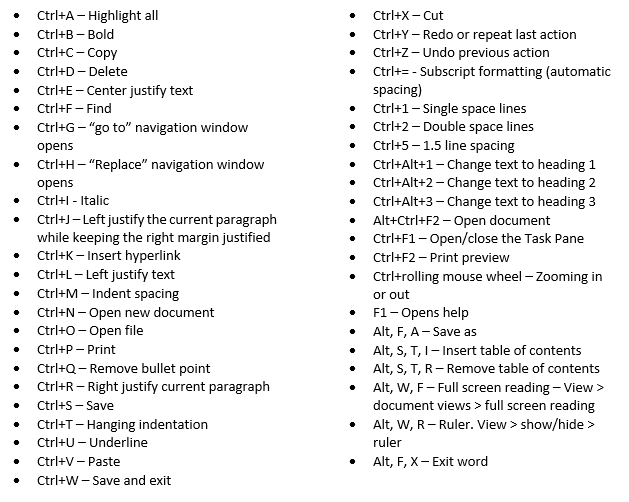
Microsoft Word is a valuable software that most people use daily. However, even if you are a word pro, there may be some things you don’t know about shortcuts. Shortcuts are simple keystroke actions that make doing certain tasks much easier and quicker than doing them with the mouse. Utilizing shortcuts can help content creators and writers speed up their process and reach deadlines faster. Any moment spent switching between keyboard and mouse is a moment wasted. Here are some of the easiest shortcuts that are easy to learn, and you can implement in your creative process immediately.

Word Shortcuts

Many people who use these shortcuts are self-taught and simply pick up on everything themselves. However, you can also take a typing 101 course to learn how to implement the most common shortcuts seamlessly into your routine. There are online typing classes that will help you learn how to use not only shortcuts but also proper typing form and technique. Also, many public libraries and community colleges offer typing classes for no or low cost to the public. In some cases taking a typing class is required or offered at new jobs or in school. Take advantage of these courses when available, especially if they fill a requirement on a transcript. They are also advantageous to have on your resume or CV.

Those who don’t use shortcuts may not for a variety of reasons. Maybe they aren’t aware of them or don’t know how to use them properly. Or perhaps they are aware of them but haven’t taken the time to practice implementing them when typing. Learning these shortcuts does take some time at first, but the payoff, in the end, makes it worth it. In a professional setting you would be ahead of deadlines, have time to create more content, typing emails and memos would take seconds instead of half an hour.

In a personal setting, using shortcuts would improve the quality of your typing and again save time that you could spend doing other errands and tasks. Sending important emails, making flyers, and creating to-do lists becomes much simpler and quicker when using shortcuts.

Shortcuts were invented to make the user experience of writing within Microsoft Word quicker, more streamlined, and a more effective use of the user’s time in both a professional and personal setting. They fulfill that goal when users make a conscious effort to implement shortcuts. They can be tricky to get the hang of at first. Muscle memory dictates that when you want to highlight, copy, and paste you reach for the mouse. It can take quite a while to retrain your brain so it’s immediate response is not to reach for the mouse. However, once using these shortcuts becomes a habit, you will notice your type speed increase and any typing tasks take up less time in your day. To become a more productive individual it is important to take advantage of these kinds of shortcuts. By spending less time typing you can focus more on the meaning behind the words, and the message of the writing as a whole.

Microsoft Word Shortcuts Read More »

Strategize Your Way To A Stellar 2018

With the right guidance and advice, strategic IT planning can set your business on a path to greater success in 2018 and beyond.

2017 isn’t quite behind us yet, but already many businesses are turning their attention to the year ahead. Planning out your objectives and goals for the coming months is a great way to make sure your business is prepared to meet those challenges, and that starts with taking a look at how you faired in the previous months. Now is the time to make sure your plan for 2018 is ready to go and covers all aspects of your business. This means focusing not just on your operations, but the many moving parts that keep your operations running.

Did your business meet all its goals and objectives for 2017? Hopefully, you were able to cross most, if not all, of your goals off of your list. But those areas where your business might have come up short, or the objectives you didn’t quite get around to tackling are a great starting point for your plans for 2018. And while it’s important to keep the big picture in perspective when making decisions that will have an impact on your future success, it’s just as important to focus your attention where it’s needed.

I’m talking, of course, about your business technology. Have you thought about technology and the role Information Technology can play in making sure your business continues to be successful? Information Technology plays an important role in every company’s success, regardless of how big or small your operations are, or what your company specializes in. Technology is the driving force behind just about everything a modern business does, from accounting and administration to shipping and manufacturing, and all things in between.

Having the right technology in place to improve, enhance, or completely change the way your staff works can make all difference, both short-term and long-term. And having the right IT strategy can help to make sure your business is in a position to accelerate growth, increase operational efficiencies, and ensure maximum productivity for all departments and employees. Strengthening your internal operations through innovative technology investments can be a game changer for your business.

Of course, it’s not just the things that happen behind the scenes that need to be a part of your planning. The right strategic IT plan can ensure your team is able to market your business to your ideal audience and help your sales teams to win new sales opportunities by staying a step ahead of your competitors. The agility and speed offered by today’s technology, when implemented correctly and used to your full advantage, allow your staff to do more for your clients and prospective clients and exceed expectations.

It’s just a matter of knowing where and how you want your business to grow in the coming year, what changes need to be made to make that growth happen, and how to get the most out of the technology at your disposal.

If your business doesn’t have a strategic IT plan ready to roll out just yet, now is the time to talk to trusted technology professionals about your goals and learn what your options are. Your business can and should use technology as a foundation to build up a framework for success in the coming year. Whether it’s something as small as upgrading your accounting software to help streamline payroll and billings, or something as huge as finally migrating your systems and servers to a cloud-based platform, planning is everything.

Don’t let that fact that the focus of this planning is on your goals for 2018 keep you from starting this conversation in 2017. Procrastination will only hold you back, and keep your business from benefitting fully from everything new technology can bring to the table. You don’t have to run out tomorrow and start making purchases, but the sooner you start planning, the sooner you can start putting that plan into motion.

You might have a very clear idea of the kinds of changes you want to see and the milestones you intend to strive for, and that’s great. That certainly will help guide your business. But if all you have is a vague idea of where you’d like to see your business end up when 2018 comes to an end, that’s where advice from an IT professional can make a big difference. Just knowing what services and solutions are available for your business to choose from can help guide you onto the right path. It’s just a matter of knowing which questions to ask.

Or better still, working with an IT support provider who knows which questions need to be asked to help your business leverage technology into massive growth and success in 2018 and beyond.

Ready to start on a strategic IT plan for 2018? Contact {company} at {email} or {phone} today to book a consultation with a strategic IT advisor. We’re the technology experts businesses in {city} trust.

Strategic IT Plan

Strategize Your Way To A Stellar 2018 Read More »

Talk to our Team