In September 2023, MGM Resorts International was hit by a large‑scale ransomware attack that disrupted operations across its Las Vegas and U.S. properties.
The company had backups.
Customer data was not permanently lost.
But critical systems—including hotel check‑in, digital room keys, slot machines, payment systems, and reservations—were taken offline for days.
MGM ultimately recovered.
But not quickly.
Restoration required rebuilding domain controllers, reinstalling systems, and reconstructing network trust relationships across global offices.
This is where the conversation around Disaster Recovery vs. Backups becomes more than technical terminology.
Backups protect data.
Disaster recovery protects operations.
And when the distinction isn’t clearly defined, businesses often discover—at the worst possible moment—that they were protected… but not prepared.
Backups Preserve Data. Disaster Recovery Restores Operations.
A backup is a copy of data stored separately from production systems. Its purpose is preservation.
Backups protect against:
- Accidental deletion
- File corruption
- Limited hardware failure
They do not automatically restore:
- Authentication systems
- Network configuration
- Server infrastructure
- Application dependencies
- Email platforms
- Workflow integrations
Disaster recovery is different.
A disaster recovery plan defines how the business resumes operations when infrastructure is compromised.
It answers questions like:
- How fast must we recover? (RTO)
- How much data loss is acceptable? (RPO)
- Where do systems fail over?
- Who executes recovery procedures?
- Has this process been tested?
Backups answer, “Can we restore the file?”
Disaster recovery answers, “Can we function?”
The Real Lesson from MGM Isn’t About Enterprise Scale
It would be easy to assume that MGM’s situation was unique because of its size.
But the operational lesson scales down.
Modern businesses — regardless of size — rely on:
- Identity systems
- Cloud authentication
- Email infrastructure
- Line-of-business software
- Vendor integrations
- Secure network trust
If those systems fail, file restoration alone does not restore operations.
Large enterprises have dedicated security teams, infrastructure engineers, and global vendor contracts.
Most small and mid-sized businesses do not.
Which means the difference between disaster recovery and backups can have even more significant operational impact in SMB environments.
Not because infrastructure is larger.
But because margin for downtime is smaller.
Why Backups Alone Create a Risk Blind Spot
1. Backup Success Does Not Equal Recovery Speed
Industry research consistently shows gaps between backup completion and operational recovery.
Organizations report:
- Long recovery timelines
- Backup failures under stress
- Lack of disaster recovery testing
The issue is rarely whether backups exist.
It is whether recovery assumptions have been validated.
If a system has never been rebuilt under real-world conditions, recovery timelines are theoretical.
2. Downtime Is Financially Material
Recent industry data shows:
- 100% of surveyed organizations report revenue loss due to outages.
- Mid-sized businesses report downtime costs exceeding $300,000 per hour.
- Over one-third of ransomware recoveries extend beyond one month.
Downtime is not an IT inconvenience.
It is an operational event.
And the longer recovery takes, the more consequences compound — financially, reputationally, and legally.
3. Ransomware Now Targets Recovery Infrastructure
Modern ransomware attacks routinely encrypt:
- Local backups
- Attached storage
- Cloud-synced drives
Unless backups are:
- Off-site
- Immutable
- Isolated from production environments
They can be compromised alongside primary systems.
A backup that can be altered is not resilience.
It is exposure deferred.
Disaster Recovery vs. Backups: The Core Differences
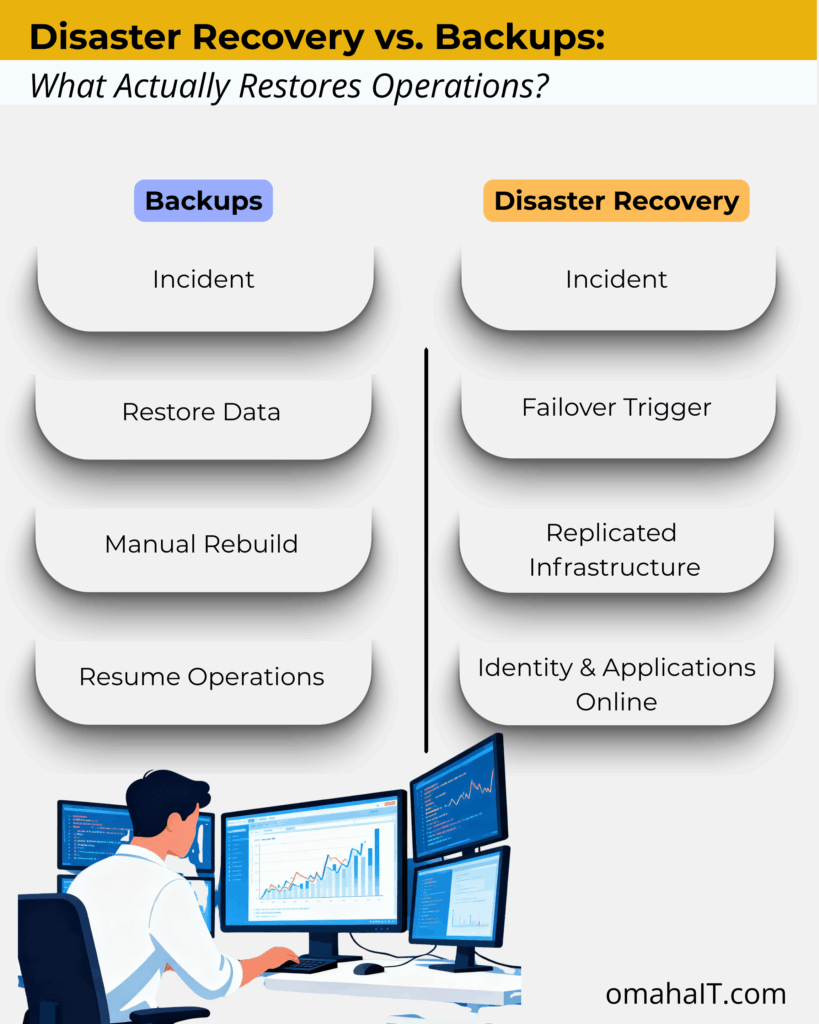
Backups are components of a resilience strategy.
Disaster recovery is the strategy.
What “Good” Disaster Recovery Looks Like
A mature disaster recovery posture includes:
1. Off-Site, Immutable, Versioned Backups
Backups must be isolated and protected from alteration.
2. Secondary Infrastructure or Cloud Failover
Warm or hot standby environments reduce downtime dramatically.
3. Defined RTO and RPO
Leadership must determine acceptable downtime and acceptable data loss — explicitly.
4. Documented Runbooks
Recovery procedures must be clear and executable under stress.
5. Regular Testing
Testing remains one of the most common gaps identified in recovery research.
If it hasn’t been tested, it hasn’t been validated.
6. Clean Recovery Environments
Cyber incidents require verified rebuild processes before systems are reintroduced.
Disaster recovery is not a product.
It is structured preparedness.
What This Means for Businesses in Omaha
If you rely on a managed IT provider in Omaha, disaster recovery planning should extend beyond backup verification.
Leadership should understand:
- How fast operations must resume (RTO)
- How much data loss is tolerable (RPO)
- Whether infrastructure can fail over
- Whether recovery has been tested under stress
Backups are expected.
Continuity planning is differentiating.
What This Means for SMB Leaders
If a global enterprise with infrastructure depth required weeks to fully rebuild after a cyber incident — despite having backups — the relevant leadership question becomes:
Have we defined how our organization would resume operations if core systems became unavailable?
Not whether data exists.
But whether authentication, applications, and workflows can be restored within acceptable timelines.
If RTO and RPO targets are undefined, the organization is backup-protected — but not recovery-ready.
That distinction is strategic, not technical.
The Decision That Matters
Backups are necessary.
However, they are not sufficient.
Disaster recovery defines how your business responds under stress.
One preserves information.
The other preserves continuity.
If your organization relies on backups without a tested disaster recovery plan, the exposure is not visible — until it becomes operational.
The lesson from MGM isn’t alarmist. It’s clarifying.
Resilience requires both preservation and restoration.
Frequently Asked Questions
1. What is the difference between disaster recovery and backups?
Backups create copies of data for restoration. Disaster recovery restores full operational systems, infrastructure, and applications after disruption.
2. Why didn’t backups prevent downtime in the MGM cyberattack?
Because backups protect data, not operations.
In MGM’s 2023 cyberattack, data was largely recoverable—but critical systems were unsafe to bring back online. Attackers compromised identity and access platforms, meaning systems couldn’t be restored until authentication, permissions, and trust relationships were rebuilt.
3. What are RTO and RPO?
RTO (Recovery Time Objective) defines how quickly operations must resume.
RPO (Recovery Point Objective) defines how much data loss is acceptable.
4. Are cloud backups enough for ransomware protection?
Not necessarily. If backups are not immutable or isolated, ransomware can encrypt them alongside production systems.
5. Do small businesses need disaster recovery plans?
Yes. SMBs often have fewer internal resources to recover quickly, making structured disaster recovery planning even more important.
6. How often should disaster recovery plans be tested?
At minimum annually — ideally more frequently — to ensure recovery timelines are realistic and executable.
If you’re evaluating your disaster recovery posture with a managed IT provider in Omaha, the first step is defining what recovery actually means for your organization.
Not just whether data exists.
But whether operations can continue.
Because the difference between disaster recovery vs. backups is not technical.
It’s operational.